
Our Community is getting an upgrade! To get everything ready for the relaunch, we’ll be placing the site in read-only mode starting September 21st.
We really appreciate your understanding while we get things set up behind the scenes. Catch up on all the exciting details about the move here.
Need help or have questions? Drop us a line at [email protected]

Archives of Support Questions (Read Only)
- Cloudera Community
- Board Archive
- Archives of Support Questions (Read Only)
- Re: SmartSense Host Does Not Match
- Subscribe to RSS Feed
- Mark Question as New
- Mark Question as Read
- Float this Question for Current User
- Bookmark
- Subscribe
- Mute
- Printer Friendly Page
- Subscribe to RSS Feed
- Mark Question as New
- Mark Question as Read
- Float this Question for Current User
- Bookmark
- Subscribe
- Mute
- Printer Friendly Page
SmartSense Host Does Not Match
- Labels:
-
Hortonworks SmartSense


Created on 03-21-2017 03:23 PM - edited 08-18-2019 04:05 AM
- Mark as New
- Bookmark
- Subscribe
- Mute
- Subscribe to RSS Feed
- Permalink
- Report Inappropriate Content
Hi,
I just recently installed smartsense in our server. I would like to ask if how can I resolve this message in my View in Ambari. Every time I open Smartsense View shows this message. See below.
Error Message in SmartSense View
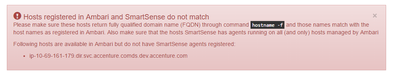
Hostname (hostname -f)

Services Status (Healthy)
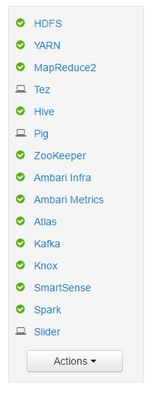
Not sure what is the effect of this as all components are healthy.
Appreciate all your help.
Thanks,
Bruce



Created 03-22-2017 12:35 AM
- Mark as New
- Bookmark
- Subscribe
- Mute
- Subscribe to RSS Feed
- Permalink
- Report Inappropriate Content
I thought you wanted to use ip-10-69-161-179.dir.svc.accenture.comds.dev.accenture.com as your hostname. But based on hosts file and network config , it looks like sandbox.hortonworks.com is the intended hostname. So , revert the change I had earlier recommended in /etc/hosts.
Main problem is multiple hostname configured for the same hosts. So , the incorrect host should probably be deleted. What do you see in when you click on Hosts on the top center of ambari view ? Do you see sandbox.hortonworks.com as your hostname ? If yes then, go ahead and use the delete command provided below. replace username, password and clustername.
Here is the command to delete using api :
curl -u [USERNAME]:[PASSWORD] -H "X-Requested-By: ambari" -X DELETE http://10.69.161.179:8080/api/v1/clusters/[CLUSTERNAME]/hosts/ip-10-69-161-179.dir.svc.accenture.comds.dev.accenture.com
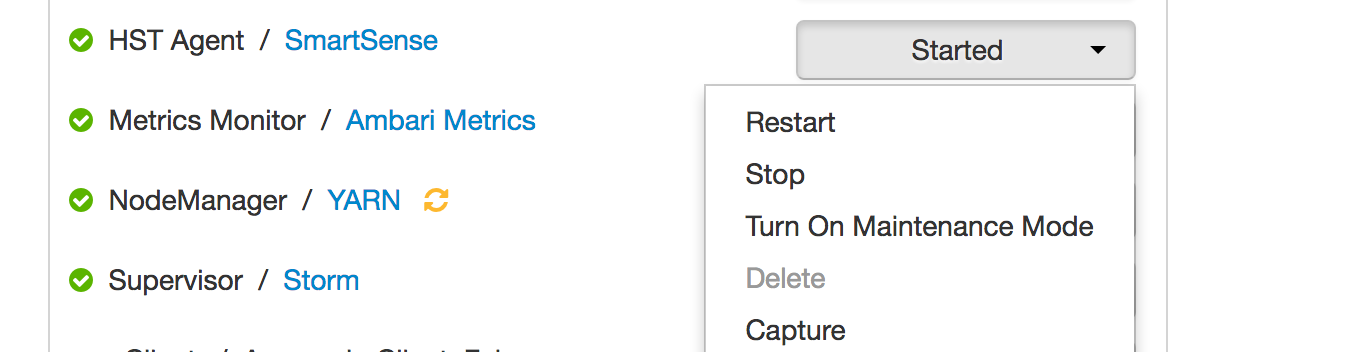
Then stop and restart HST Agent as provided in screenshot earlier.
Created 03-21-2017 04:52 PM
- Mark as New
- Bookmark
- Subscribe
- Mute
- Subscribe to RSS Feed
- Permalink
- Report Inappropriate Content
1. Can you please provide Ambari and SmartSense version ? Do you have any custom script to identify hostnames for Ambari ?
2. Pls execute this command and share the output : hst list-agents
we need "hostname -f" to be registered smartsense agent and it should also match with ambari-agent.
Created on 03-21-2017 07:18 PM - edited 08-18-2019 04:05 AM
- Mark as New
- Bookmark
- Subscribe
- Mute
- Subscribe to RSS Feed
- Permalink
- Report Inappropriate Content
Upon checking http://10.69.161.179:8080/api/v1/hosts/, I saw that there is 2 associated hosts.
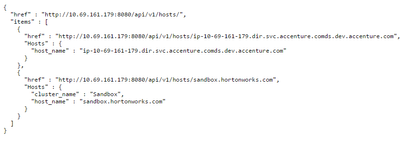
hst list-agent

Versions
Ambari Version - 2.4.0.1
SmartSense Version - 1.3.0.0-1

Created 03-21-2017 06:31 PM
- Mark as New
- Bookmark
- Subscribe
- Mute
- Subscribe to RSS Feed
- Permalink
- Report Inappropriate Content
It might be possible that the hostname is not setup properly in that sandbox. May be it might be missing the following line in /etc/hosts file
127.0.1.1 ip-10-69-161-179.dir.svc.accenture.comds.dev.accenture.com
Created 03-21-2017 07:22 PM
- Mark as New
- Bookmark
- Subscribe
- Mute
- Subscribe to RSS Feed
- Permalink
- Report Inappropriate Content
Do i need to include 127.0.1.1 ip-10-69-161-179.dir.svc.accenture.comds.dev.accenture.com in my /etc/hosts?
Created 03-21-2017 11:38 PM
- Mark as New
- Bookmark
- Subscribe
- Mute
- Subscribe to RSS Feed
- Permalink
- Report Inappropriate Content
The correct content to put in /etc/hosts is :
127.0.0.1 ip-10-69-161-179.dir.svc.accenture.comds.dev.accenture.com
After that verify with command hostname -f. It should show the rectified hostname. Then stop and restart HST Agent as follows:
Created on 03-22-2017 12:19 AM - edited 08-18-2019 04:05 AM
- Mark as New
- Bookmark
- Subscribe
- Mute
- Subscribe to RSS Feed
- Permalink
- Report Inappropriate Content
@apathak. I tried and same issue. Here's the result and my current config.
/etc/hosts

hostname -f

/etc/sysconfig/network

Let me know if there's incorrect config. 😞
Created 03-22-2017 12:35 AM
- Mark as New
- Bookmark
- Subscribe
- Mute
- Subscribe to RSS Feed
- Permalink
- Report Inappropriate Content
I thought you wanted to use ip-10-69-161-179.dir.svc.accenture.comds.dev.accenture.com as your hostname. But based on hosts file and network config , it looks like sandbox.hortonworks.com is the intended hostname. So , revert the change I had earlier recommended in /etc/hosts.
Main problem is multiple hostname configured for the same hosts. So , the incorrect host should probably be deleted. What do you see in when you click on Hosts on the top center of ambari view ? Do you see sandbox.hortonworks.com as your hostname ? If yes then, go ahead and use the delete command provided below. replace username, password and clustername.
Here is the command to delete using api :
curl -u [USERNAME]:[PASSWORD] -H "X-Requested-By: ambari" -X DELETE http://10.69.161.179:8080/api/v1/clusters/[CLUSTERNAME]/hosts/ip-10-69-161-179.dir.svc.accenture.comds.dev.accenture.com
Then stop and restart HST Agent as provided in screenshot earlier.
Created 03-22-2017 12:51 AM
- Mark as New
- Bookmark
- Subscribe
- Mute
- Subscribe to RSS Feed
- Permalink
- Report Inappropriate Content
@apathak: Thank you for your help. I was able to fix this issue. Cheers!!


