
Our Community is getting an upgrade! To get everything ready for the relaunch, we’ll be placing the site in read-only mode starting September 21st.
We really appreciate your understanding while we get things set up behind the scenes. Catch up on all the exciting details about the move here.
Need help or have questions? Drop us a line at [email protected]

Archives of Support Questions (Read Only)
- Cloudera Community
- Board Archive
- Archives of Support Questions (Read Only)
- Solr Tutorial Error With JAVA ENV PATH
- Subscribe to RSS Feed
- Mark Question as New
- Mark Question as Read
- Float this Question for Current User
- Bookmark
- Subscribe
- Mute
- Printer Friendly Page
- Subscribe to RSS Feed
- Mark Question as New
- Mark Question as Read
- Float this Question for Current User
- Bookmark
- Subscribe
- Mute
- Printer Friendly Page
Solr Tutorial Error With JAVA ENV PATH
- Labels:
-
Apache Solr


Created on 12-16-2015 04:27 PM - edited 08-19-2019 05:32 AM
- Mark as New
- Bookmark
- Subscribe
- Mute
- Subscribe to RSS Feed
- Permalink
- Report Inappropriate Content
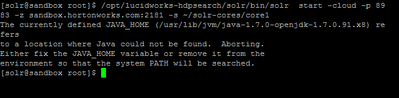
After getting to Step 3 of "Indexing and Searching Documents with Apache Solr", I recieved the following error from entering the syntax: /opt/lucidworks-hdpsearch/solr/bin/solr start -cloud -p 8983-z sandbox.hortonworks.com:2181-s ~/solr-cores/core1
Any ideas as to what my next course of action could be, besides removing the JAVA ENV?



Created 12-16-2015 09:34 PM
- Mark as New
- Bookmark
- Subscribe
- Mute
- Subscribe to RSS Feed
- Permalink
- Report Inappropriate Content
@Yue Chen you can set JAVA_HOME, then retry the solr start command you are running, and it should work. For example, on my sandbox, I was able to set it this way
export JAVA_HOME=/usr/lib/jvm/java-1.7.0-openjdk.x86_64
Created 12-16-2015 09:34 PM
- Mark as New
- Bookmark
- Subscribe
- Mute
- Subscribe to RSS Feed
- Permalink
- Report Inappropriate Content
@Yue Chen you can set JAVA_HOME, then retry the solr start command you are running, and it should work. For example, on my sandbox, I was able to set it this way
export JAVA_HOME=/usr/lib/jvm/java-1.7.0-openjdk.x86_64

Created 12-17-2015 06:04 AM
- Mark as New
- Bookmark
- Subscribe
- Mute
- Subscribe to RSS Feed
- Permalink
- Report Inappropriate Content
Make sure you have set JAVA_HOME in your environment or in /opt/lucidworks-hdpsearch/solr/bin/solr.in.sh
You can either add JAVA_HOME or SOLR_JAVA_HOME to the solr script.
Created 12-18-2015 03:24 AM
- Mark as New
- Bookmark
- Subscribe
- Mute
- Subscribe to RSS Feed
- Permalink
- Report Inappropriate Content
@Yue Chen were you able to resolve your issue using the below suggestions?


