Our Community is getting an upgrade! To get everything ready for the relaunch, we’ll be placing the site in read-only mode starting September 21st.
We really appreciate your understanding while we get things set up behind the scenes. Catch up on all the exciting details about the move here.
Need help or have questions? Drop us a line at [email protected]

Archives of Support Questions (Read Only)
- Cloudera Community
- Board Archive
- Archives of Support Questions (Read Only)
- Re: Sqoop Connector - HDP 2.5
- Subscribe to RSS Feed
- Mark Question as New
- Mark Question as Read
- Float this Question for Current User
- Bookmark
- Subscribe
- Mute
- Printer Friendly Page
- Subscribe to RSS Feed
- Mark Question as New
- Mark Question as Read
- Float this Question for Current User
- Bookmark
- Subscribe
- Mute
- Printer Friendly Page
Sqoop Connector - HDP 2.5
- Labels:
-
Apache Sqoop


Created 02-25-2017 10:58 AM
- Mark as New
- Bookmark
- Subscribe
- Mute
- Subscribe to RSS Feed
- Permalink
- Report Inappropriate Content
Hello guys, I'm having problems listing databases of SQL Server with the command:
sqoop list-databases --connect jdbc:sqlserver://ip:1433/ --username hadoop --password mypassword
I'm getting the error:
Error loading ManagerFactory information from file /usr/hdp/2.5.0.0-1245/sqoop/conf/managers.d/td_connector.txt: java.io.IOException: Could not load jar /usr/hdp/current/sqoop-client/lib/sqljdbc41.jar into JVMI also tried many other combinations of commands but none of them work.
I have 2 jars, the sqljdbc41.jar and sqljdbc42.jar in /usr/hdp/current/sqoop-client/lib/, and i haved modified the td_connector.txt to:
com.microsoft.sqoop.SqlServer.MSSQLServerManagerFactory = /usr/hdp/current/sqoop-client/lib/sqljdbc41.jar
What i'm doing wrong, or what am i missing? Thanks


Created 02-25-2017 12:50 PM
- Mark as New
- Bookmark
- Subscribe
- Mute
- Subscribe to RSS Feed
- Permalink
- Report Inappropriate Content
Can you include only one or the other jar in the lib. What java version is loaded on your cluster? If you are using Java 7 use jdbc41 if Java 8 then use jdbc42. using lower JRE will throw an error. https://duckduckgo.com/?q=microsoft+jdbc+jar
Created 02-25-2017 12:50 PM
- Mark as New
- Bookmark
- Subscribe
- Mute
- Subscribe to RSS Feed
- Permalink
- Report Inappropriate Content
Can you include only one or the other jar in the lib. What java version is loaded on your cluster? If you are using Java 7 use jdbc41 if Java 8 then use jdbc42. using lower JRE will throw an error. https://duckduckgo.com/?q=microsoft+jdbc+jar
Created 02-25-2017 02:20 PM
- Mark as New
- Bookmark
- Subscribe
- Mute
- Subscribe to RSS Feed
- Permalink
- Report Inappropriate Content
I have version 8 of Java, and i removed now the jdbc41 but i'm getting the same error... What shoud i have in td_connector.txt? Thanks
Created 02-25-2017 02:26 PM
- Mark as New
- Bookmark
- Subscribe
- Mute
- Subscribe to RSS Feed
- Permalink
- Report Inappropriate Content
Can you try without the file all together? Also want to make sure the jar in that file reference sqljdbc42 not 41 as your example.
Created 02-25-2017 03:15 PM
- Mark as New
- Bookmark
- Subscribe
- Mute
- Subscribe to RSS Feed
- Permalink
- Report Inappropriate Content
So, with file mentioning sqljdbc42 i got the same error. Without the file, i have less errors as described in the image. error.png
Created 02-25-2017 03:36 PM
- Mark as New
- Bookmark
- Subscribe
- Mute
- Subscribe to RSS Feed
- Permalink
- Report Inappropriate Content
Make sure your file is readable and complete, meaning you downloaded the jdbc jar correctly. Also try using --driver com.microsoft.sqlserver.jdbc.SQLServerDriver and --direct
That should improve performance
Created 02-25-2017 05:29 PM
- Mark as New
- Bookmark
- Subscribe
- Mute
- Subscribe to RSS Feed
- Permalink
- Report Inappropriate Content
Finally it worked!!
For some reason the file was corrupted... i checked it with ls -la nameof.jar and do not match with the real size of jar.
So, i downloaded again from microsoft, uploaded to dropbox to get the link (with wget), becauce i could't extract directly via microsoft. and decompressed with tar -xzvf nameof.tar.gz command. After that, just copy the jar that i need to /usr/hdp/current/sqoop-client/lib, with the command cp sqljdbc42.jar /usr/hdp/current/sqoop-client/lib Thanks for your help
Created 02-25-2017 06:20 PM
- Mark as New
- Bookmark
- Subscribe
- Mute
- Subscribe to RSS Feed
- Permalink
- Report Inappropriate Content
Excellent, please mark the answer as accepted to close the thread.


Created on 03-05-2018 12:48 PM - edited 08-19-2019 03:08 AM
- Mark as New
- Bookmark
- Subscribe
- Mute
- Subscribe to RSS Feed
- Permalink
- Report Inappropriate Content
@Artem Ervits and @Francisco Pires,
I am facing the same problem. I am using the ambari-sandbox on VmWare.
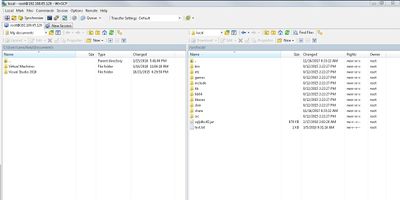
I have downloaded sqljdbc.jar on my windows and then copy it to /usr/local by using WinSCP.
then i try to copy this jar file to /usr/hdp/current/sqoop-client/lib so i got an error
Copy command:
[root@sandbox-hdp local]# cp /usr/local/sqljdbc42.jar /usr/hdp/current/sqoop-client/lib
Error:
cp: cannot stat `/usr/local/sqljdbc42.jar': No such file or directory
As you can see that sqljdbc42.jar is available in /usr/local folder...
Please help me out