
Our Community is getting an upgrade! To get everything ready for the relaunch, we’ll be placing the site in read-only mode starting September 21st.
We really appreciate your understanding while we get things set up behind the scenes. Catch up on all the exciting details about the move here.
Need help or have questions? Drop us a line at [email protected]

Archives of Support Questions (Read Only)
- Cloudera Community
- Board Archive
- Archives of Support Questions (Read Only)
- Re: Sqoop Query returns Backend I/O Exception
- Subscribe to RSS Feed
- Mark Question as New
- Mark Question as Read
- Float this Question for Current User
- Bookmark
- Subscribe
- Mute
- Printer Friendly Page
- Subscribe to RSS Feed
- Mark Question as New
- Mark Question as Read
- Float this Question for Current User
- Bookmark
- Subscribe
- Mute
- Printer Friendly Page
Sqoop Query returns Backend I/O Exception
- Labels:
-
Apache Hadoop
-
Apache Sqoop


Created on 07-05-2016 06:02 PM - edited 08-19-2019 04:05 AM
- Mark as New
- Bookmark
- Subscribe
- Mute
- Subscribe to RSS Feed
- Permalink
- Report Inappropriate Content
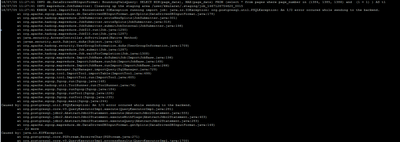
Hi, I have tried importing a table and import from query and both fail at this step where it gives an I/O error. Does anyone know why this is? Image attached.


Created on 07-08-2016 07:56 PM - edited 08-19-2019 04:05 AM
- Mark as New
- Bookmark
- Subscribe
- Mute
- Subscribe to RSS Feed
- Permalink
- Report Inappropriate Content
Hi @ghost k,
Step1:
#Can you edit pg_hba.conf file in /var/lib/pgsql/data
# Add the following line as the first line of pg_hba.conf. It allows access to all databases for all users with an encrypted password:
host all all 0.0.0.0/0 md5
On postgres end:
- su postgres
- psql
- \c ambari
- #list all tables
- \dt ambari.*
- select*from ambari.hosts;
Step2:
Download the jar and
curl -L 'http://jdbc.postgresql.org/download/postgresql-9.2-1002.jdbc4.jar'-o postgresql-9.2-1002.jdbc4.jar

Step3:
sqoop list-tables --connect jdbc:postgresql://127.0.0.1/ambari --username ambari --password bigdata

Step4: sqoop ambari hosts table into hdfs: password: bigdata
sqoop import --connect jdbc:postgresql://127.0.0.1/ambari --username ambari -P --table hosts --target-dir /user/guest/ambari_hosts_table
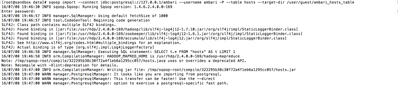
Hope this helps...
Thanks,
Sujitha


Created 07-05-2016 06:29 PM
- Mark as New
- Bookmark
- Subscribe
- Mute
- Subscribe to RSS Feed
- Permalink
- Report Inappropriate Content
Hi, Please check if the sqoop list tables option is working or not against the same connection details.
If this is not working, then there is a connectivity issue from the sqoop client machine to the database server.
The query that is failing here is not the query used by Sqoop to extract data , but the query used to collect metadata information from remote database. It then uses this information to create the hadoop writers. So this appears to be a connectivity issue, and this can be confirmed by running the list tables variant of sqoop first.
Created 07-05-2016 06:32 PM
- Mark as New
- Bookmark
- Subscribe
- Mute
- Subscribe to RSS Feed
- Permalink
- Report Inappropriate Content
I echo Bala, this error is occurring due to connectivity issue with remote database.
Thanks,
Sujitha
Created 07-05-2016 06:54 PM
- Mark as New
- Bookmark
- Subscribe
- Mute
- Subscribe to RSS Feed
- Permalink
- Report Inappropriate Content
Hi,
Thanks for the feedback. list-tables work but doesn't actually give any output. The following are the only logs I get for this. Should I be investigating connectivity?
Please set $ACCUMULO_HOME to the root of your Accumulo installation. 16/07/05 12:55:16 INFO sqoop.Sqoop: Running Sqoop version: 1.4.6.2.4.2.0-258 16/07/05 12:55:16 INFO manager.SqlManager: Using default fetchSize of 1000
Created 07-05-2016 07:03 PM
- Mark as New
- Bookmark
- Subscribe
- Mute
- Subscribe to RSS Feed
- Permalink
- Report Inappropriate Content
Hi @ghost k
Can you please share the queries you used for importing the tables,creating the tables and also can you share the complete logs from:
/var/log/sqoop
when you use sqoop list-tables if ran successfully it should show the list of tables in the database server in this case its postgre.
Thanks,
Sujitha
Created 07-07-2016 09:16 AM
- Mark as New
- Bookmark
- Subscribe
- Mute
- Subscribe to RSS Feed
- Permalink
- Report Inappropriate Content
Hi @sujitha sanku,
Creating the tables - this is an already existing database so I didn't have to create tables. I didn't create any tables on hadoop - I assumed this would be done automatically? I seem to have no log files within the sqoop directory. Is there something I need to do to enable logs?
The query was :
sqoop list-tables --connect 'jdbc:postgresql://xx.xx.xxx.xx:yyyyy/dbname'
Do let me know if you have any ideas.
Thank You, Kaushy
Created 07-07-2016 09:16 AM
- Mark as New
- Bookmark
- Subscribe
- Mute
- Subscribe to RSS Feed
- Permalink
- Report Inappropriate Content
Created 07-07-2016 09:18 AM
- Mark as New
- Bookmark
- Subscribe
- Mute
- Subscribe to RSS Feed
- Permalink
- Report Inappropriate Content
Created on 07-08-2016 07:56 PM - edited 08-19-2019 04:05 AM
- Mark as New
- Bookmark
- Subscribe
- Mute
- Subscribe to RSS Feed
- Permalink
- Report Inappropriate Content
Hi @ghost k,
Step1:
#Can you edit pg_hba.conf file in /var/lib/pgsql/data
# Add the following line as the first line of pg_hba.conf. It allows access to all databases for all users with an encrypted password:
host all all 0.0.0.0/0 md5
On postgres end:
- su postgres
- psql
- \c ambari
- #list all tables
- \dt ambari.*
- select*from ambari.hosts;
Step2:
Download the jar and
curl -L 'http://jdbc.postgresql.org/download/postgresql-9.2-1002.jdbc4.jar'-o postgresql-9.2-1002.jdbc4.jar
Step3:
sqoop list-tables --connect jdbc:postgresql://127.0.0.1/ambari --username ambari --password bigdata
Step4: sqoop ambari hosts table into hdfs: password: bigdata
sqoop import --connect jdbc:postgresql://127.0.0.1/ambari --username ambari -P --table hosts --target-dir /user/guest/ambari_hosts_table
Hope this helps...
Thanks,
Sujitha
Created 07-14-2016 06:52 PM
- Mark as New
- Bookmark
- Subscribe
- Mute
- Subscribe to RSS Feed
- Permalink
- Report Inappropriate Content


