
Our Community is getting an upgrade! To get everything ready for the relaunch, we’ll be placing the site in read-only mode starting September 21st.
We really appreciate your understanding while we get things set up behind the scenes. Catch up on all the exciting details about the move here.
Need help or have questions? Drop us a line at [email protected]

Archives of Support Questions (Read Only)
- Cloudera Community
- Board Archive
- Archives of Support Questions (Read Only)
- Re: Stopping selected roles from Service action me...
- Subscribe to RSS Feed
- Mark Question as New
- Mark Question as Read
- Float this Question for Current User
- Bookmark
- Subscribe
- Mute
- Printer Friendly Page
- Subscribe to RSS Feed
- Mark Question as New
- Mark Question as Read
- Float this Question for Current User
- Bookmark
- Subscribe
- Mute
- Printer Friendly Page
Stopping selected roles from Service action menu in a CSD
- Labels:
-
Cloudera Manager


Created 03-24-2017 02:26 PM
- Mark as New
- Bookmark
- Subscribe
- Mute
- Subscribe to RSS Feed
- Permalink
- Report Inappropriate Content
I have written a CSD that has several roles. I am ideally trying to stop the selected roles in the "actions for selected" menu in the Service -> instances tab.
To invoke the "stop" action for a role, I tried writing a stopRunner similar to the startRunner fo the role
"roles" : [
{
"name" : "ECHO_WEBSERVER",
"label" : "Web Server",
"pluralLabel" : "Web Servers",
"startRunner" : {
"program" : "scripts/control.sh",
"args" : [ "start" ],
"environmentVariables" : {
"WEBSERVER_PORT" : "${port_num}"
}
},
"stopRunner" : {
"program" : "scripts/control.sh",
"args" : [ "stop" ] }
}
]
However, that didn't work and tried "stopRunner" similar to the service syntax
"roles" : [
{
"name" : "ECHO_WEBSERVER",
"label" : "Web Server",
"pluralLabel" : "Web Servers",
"startRunner" : {
"program" : "scripts/control.sh",
"args" : [ "start" ],
"environmentVariables" : {
"WEBSERVER_PORT" : "${port_num}"
}
},
"stopRunner" : {
"runner" : {
"program" : "scripts/control.sh",
"args" : ["stop"]
},
"timeout" : 180000,
"masterRole" : "ECHO_WEBSERVER"
}
}
]
That didn't work either. So I moved to writing a service command for performing the stop action for the selected roles.
1. How would I know which roles are selected? How can I track it in the control.sh?
2. Is there a better way to stop a role individually in a CSD?
Your input is much appreciated. Thanks in advance.



Created 03-28-2017 02:27 PM
- Mark as New
- Bookmark
- Subscribe
- Mute
- Subscribe to RSS Feed
- Permalink
- Report Inappropriate Content
This does indeed appear to be a bug (Paolo dug into it internally, credit to him) and we'll get a fix out in a future release.
The abruptly stop step should skip when there's no started roles, rather than error.
Thanks,
Darren
Created 03-24-2017 06:21 PM
- Mark as New
- Bookmark
- Subscribe
- Mute
- Subscribe to RSS Feed
- Permalink
- Report Inappropriate Content
Custom stop runners at the role level are planned for a future release. Stay tuned!
Until then, the only ways to stop roles are:
1) Standard stop, included by default. CM will basically send a sigterm to your process, and if it doesn't die after 30s, it will send a group sigkill. You can stop individual roles this way (select what you want on the instances page, chose Actions for Selected -> Stop), but there's no reasonable way to run a custom stop script.
2) Service-level graceful stop. CM will run a custom script on a master role in your service, which must instruct the workers to exit normally (exit code 0), and once those have exited, CM will consider the service-level stop command successful. This is only helpful if your master role can orchestrate the stop, and it'll always stop all roles.
Thanks,
Darren
Created 03-25-2017 10:35 AM
- Mark as New
- Bookmark
- Subscribe
- Mute
- Subscribe to RSS Feed
- Permalink
- Report Inappropriate Content
Thank you very much Darren. That clarifies my question on the Stop action.
1. I performed a service-level stop to stop all my roles, it is killing all my processes and an exit 0 is appearing, however, I am getting an "Abruptly stop the remaining roles" (in my step 2/2 of the Gracefully stop the service) which fails because there aren't any more remaining roles.
How can I prevent the "Abruptly stop the remaining roles" being called? Will the framework always call this or when would it call the same? Would you please point out where I am going wrong?
2. If I were to write a custom service command for the CSD, is there a way to get the roles selected (Service -> instances -> actions for selected menu) that should execute the command, in the control script?
Created 03-27-2017 09:59 AM
- Mark as New
- Bookmark
- Subscribe
- Mute
- Subscribe to RSS Feed
- Permalink
- Report Inappropriate Content
2. No, that's not possible.
Created on 03-27-2017 02:30 PM - edited 03-27-2017 02:38 PM
- Mark as New
- Bookmark
- Subscribe
- Mute
- Subscribe to RSS Feed
- Permalink
- Report Inappropriate Content
Hi Darren,
Thank you very much for a quick response.
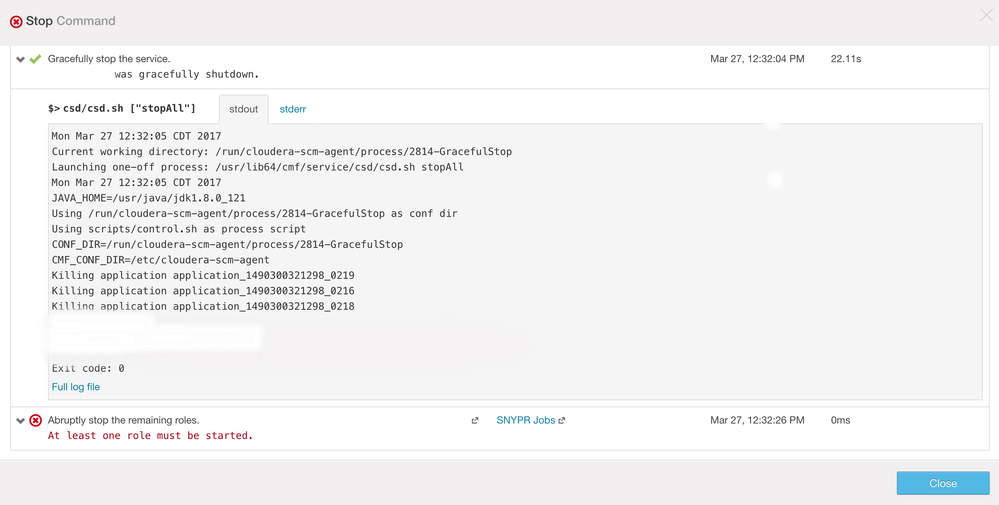
Please find attached the screenshot displaying the error. The error says
"atleast one role must be started".
I had to write a custom stopRunner for the service as the roles were used
to start a spark job which escapes the Cloudera Manager's stop action.
Please let me know how I could fix this or if I can skip the "abruptly
stop".
Thank you.
Regards,
Chandni Shankar
Created 03-28-2017 02:27 PM
- Mark as New
- Bookmark
- Subscribe
- Mute
- Subscribe to RSS Feed
- Permalink
- Report Inappropriate Content
This does indeed appear to be a bug (Paolo dug into it internally, credit to him) and we'll get a fix out in a future release.
The abruptly stop step should skip when there's no started roles, rather than error.
Thanks,
Darren
Created 03-28-2017 02:35 PM
- Mark as New
- Bookmark
- Subscribe
- Mute
- Subscribe to RSS Feed
- Permalink
- Report Inappropriate Content
Thank you for all the input! 🙂

Created 10-23-2019 10:35 PM
- Mark as New
- Bookmark
- Subscribe
- Mute
- Subscribe to RSS Feed
- Permalink
- Report Inappropriate Content
Hi @Darren,
Is this fix delivered to CDH 6.2, I am facing this issue in 6.2.
The custom stopRunner is not invoked when I stop the service via CM.
BR/ Srikanth


