
Our Community is getting an upgrade! To get everything ready for the relaunch, we’ll be placing the site in read-only mode starting September 21st.
We really appreciate your understanding while we get things set up behind the scenes. Catch up on all the exciting details about the move here.
Need help or have questions? Drop us a line at [email protected]

Archives of Support Questions (Read Only)
- Cloudera Community
- Board Archive
- Archives of Support Questions (Read Only)
- TailFile cannot find directory/file which exists
- Subscribe to RSS Feed
- Mark Question as New
- Mark Question as Read
- Float this Question for Current User
- Bookmark
- Subscribe
- Mute
- Printer Friendly Page
- Subscribe to RSS Feed
- Mark Question as New
- Mark Question as Read
- Float this Question for Current User
- Bookmark
- Subscribe
- Mute
- Printer Friendly Page
TailFile cannot find directory/file which exists
- Labels:
-
Apache NiFi


Created 02-20-2018 06:46 PM
- Mark as New
- Bookmark
- Subscribe
- Mute
- Subscribe to RSS Feed
- Permalink
- Report Inappropriate Content
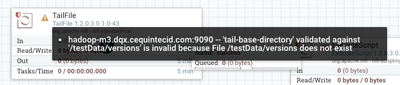
I am getting an error with my TailFile processor saying that it cannot ingest cause the directory doesn't exist (and it does, believe me.)
Interestingly enough, I have in /testData/versions called dzl.log which it finds and doesnt throw an error. So its going into /testData/versions and finding dzl.log and saying "Ok, that file exists" but then its telling me that the directory /testData/versions does not exist.
Anybody have any idea what Im missing here?
Permissions for /testData = 777, root root
Permissions for /testData/versions = 777, root root
I have tried changing the group and owner to nifi/nifi and still get the same problem (besides I have another production directory that is 755, root/root that is ingesting fine)
For some reason Nifi refuses to acknowledge this folder. Any ideas?
Created 02-20-2018 07:40 PM
- Mark as New
- Bookmark
- Subscribe
- Mute
- Subscribe to RSS Feed
- Permalink
- Report Inappropriate Content
Nevermind, I figured it out.
We have two hosts m1 and m3. m3 is currently our primary controller.
The dummy directory I created on m1 instead of m3.


Created 02-20-2018 07:12 PM
- Mark as New
- Bookmark
- Subscribe
- Mute
- Subscribe to RSS Feed
- Permalink
- Report Inappropriate Content
My first thought would be inclusion of a leading or trailing whitespace in your processor configuration.
"/testData/versions " is not treated the same as "/testData/versions".
Can you provide a screenshot of your processor configuration and the stack trace for this error from the nifi-app.log?
Thanks,
Matt
Created on 02-20-2018 07:24 PM - edited 08-17-2019 07:16 PM
- Mark as New
- Bookmark
- Subscribe
- Mute
- Subscribe to RSS Feed
- Permalink
- Report Inappropriate Content
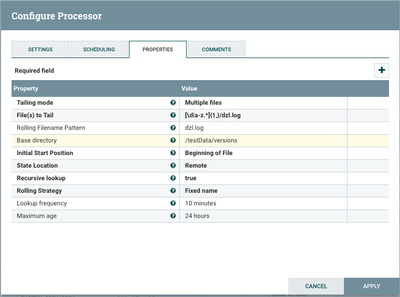
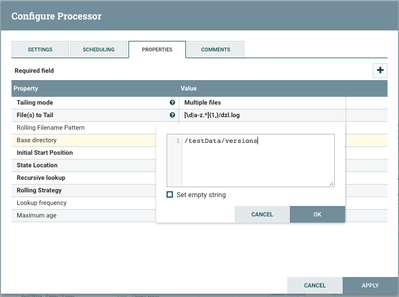
I actually don't see the stack trace for this error in nifi-app.log. I do have debugging on the TailFile processor. I searched by ID. I suspect its because the processor never actually runs. This error appears before I hit play on it and does not appear even if I press play on it. It has the yellow exclamation point before it is run so I assume nifi has functionality that goes and searches for a folder once you hit ACCEPT on the processors configuration.
I did not see any whitespace in my processor config. Here are some screenshots.
Created on 02-20-2018 07:35 PM - edited 08-17-2019 07:15 PM
- Mark as New
- Bookmark
- Subscribe
- Mute
- Subscribe to RSS Feed
- Permalink
- Report Inappropriate Content
Also here is the error from the interface
Created 02-20-2018 07:40 PM
- Mark as New
- Bookmark
- Subscribe
- Mute
- Subscribe to RSS Feed
- Permalink
- Report Inappropriate Content
Nevermind, I figured it out.
We have two hosts m1 and m3. m3 is currently our primary controller.
The dummy directory I created on m1 instead of m3.
Created 02-20-2018 08:11 PM
- Mark as New
- Bookmark
- Subscribe
- Mute
- Subscribe to RSS Feed
- Permalink
- Report Inappropriate Content
I stand corrected. It seems if you are doing Tailfile in a cluster, the directories and files must exist on all hosts.


