
Our Community is getting an upgrade! To get everything ready for the relaunch, we’ll be placing the site in read-only mode starting September 21st.
We really appreciate your understanding while we get things set up behind the scenes. Catch up on all the exciting details about the move here.
Need help or have questions? Drop us a line at [email protected]

Archives of Support Questions (Read Only)
- Cloudera Community
- Board Archive
- Archives of Support Questions (Read Only)
- There is no way to get ambari UI after installatio...
- Subscribe to RSS Feed
- Mark Question as New
- Mark Question as Read
- Float this Question for Current User
- Bookmark
- Subscribe
- Mute
- Printer Friendly Page
- Subscribe to RSS Feed
- Mark Question as New
- Mark Question as Read
- Float this Question for Current User
- Bookmark
- Subscribe
- Mute
- Printer Friendly Page
There is no way to get ambari UI after installation
- Labels:
-
Apache Ambari


Created 03-17-2018 06:15 PM
- Mark as New
- Bookmark
- Subscribe
- Mute
- Subscribe to RSS Feed
- Permalink
- Report Inappropriate Content
I installed ambari and setup it with help this man: https://docs.hortonworks.com/HDPDocuments/Ambari-2.6.1.0/bk_ambari-installation/content/log_in_to_ap...
I user virtualbox on which installed centos7.
I installed ambari-server, after I started it. It started with message "Server started listening on 8080". But I can't get ambariUI at all. My inet address in ifconfig -a is "inet 10.0.2.15". So I try to ping 10.0.2.15:8080 and it messages that no such service or server. After I tried to connect via browser, it's the same. I can't get AmbariUI and I don't know how to fix it. It seems to be easy but something went wrong. After ambari installation and starting it I checked log file and everything is fine. So what's the problem can't got it.
Thank you.


Created 03-17-2018 06:42 PM
- Mark as New
- Bookmark
- Subscribe
- Mute
- Subscribe to RSS Feed
- Permalink
- Report Inappropriate Content
Are you accessing the Ambari from your Virtual box host? If so make sure the VirtualBox IP entry is in your local host's file in C:\Windows\System32\drivers\etc assuming you are using windows.
In the below example my VirtualBox network setting is set to Bridged adapter so it picks my LAN network a class C
192.168.0.227 sandbox.hortonworks.com sandbox
So I can access my Ambari from my laptop using http://sandbox:8080
I think 10.0.2.15:8080 is only accessible if you are running firefox from the virtual box can you verify using curl
curl -u username:password -G http://ambari_server_ip:8080/api/v1/check
The desired output should be running that will confirm ambari is indeed accepting connections


Created 03-17-2018 06:19 PM
- Mark as New
- Bookmark
- Subscribe
- Mute
- Subscribe to RSS Feed
- Permalink
- Report Inappropriate Content
Try to see if process if running or not
ps -ef | grep ambari-server
see whether port is lessoning
lsof -nalp | grep 8080
Then if everything is working as expected, the try with full qualified domain name like FQDN:8080
Hope this helps you.
Created 03-17-2018 06:29 PM
- Mark as New
- Bookmark
- Subscribe
- Mute
- Subscribe to RSS Feed
- Permalink
- Report Inappropriate Content
[root@localhost /]# ps -ef | grep ambari-server
root 1009113210 Mar16 pts/000:00:00 tail -f -n 1000 ambari-server.out
root 1031213210 Mar16 pts/000:00:00 tail -f -n 1000 ambari-server.log
root 1032313210 Mar16 pts/000:00:00 tail -f -n 500 ambari-server.pid
root 1032713210 Mar16 pts/000:00:00 tail -f -n 500 ambari-server.out
root 1034513210 Mar16 pts/000:00:00 tail -f -n 1000 ambari-server.out
root 1034613210 Mar16 pts/000:00:00 tail -f -n 1000 ambari-server.log
root 12840 13 00:50 pts/000:00:51 /usr/jdk64/jdk1.8.0_112/bin/java -server -XX:NewRatio=3 -XX:+UseConcMarkSweepGC -XX:-UseGCOverheadLimit -XX:CMSInitiatingOccupancyFraction=60 -XX:+CMSClassUnloadingEnabled -Dsun.zip.disableMemoryMapping=true -Xms512m -Xmx2048m -XX:MaxPermSize=128m -Djava.security.auth.login.config=/etc/ambari-server/conf/krb5JAASLogin.conf -Djava.security.krb5.conf=/etc/krb5.conf -Djavax.security.auth.useSubjectCredsOnly=false -cp /etc/ambari-server/conf:/usr/lib/ambari-server/*:/usr/share/java/mysql-connector-java.jar org.apache.ambari.server.controller.AmbariServer
root 1383913210 01:13 pts/000:00:00 grep --color=auto ambari-server
Created 03-17-2018 06:39 PM
- Mark as New
- Bookmark
- Subscribe
- Mute
- Subscribe to RSS Feed
- Permalink
- Report Inappropriate Content
Thank you for your answer. It doesn't work with FQDN.
[root@localhost /]# hostname -f
localhost
[root@localhost /]# ping localhost:8080
ping: localhost:8080: Name or service not known


Created 03-17-2018 06:30 PM
- Mark as New
- Bookmark
- Subscribe
- Mute
- Subscribe to RSS Feed
- Permalink
- Report Inappropriate Content
This seems to be a virtualbox network configuration issue. Check your port forwarding and add a rule for 8080.
Created 03-17-2018 06:37 PM
- Mark as New
- Bookmark
- Subscribe
- Mute
- Subscribe to RSS Feed
- Permalink
- Report Inappropriate Content
I added it
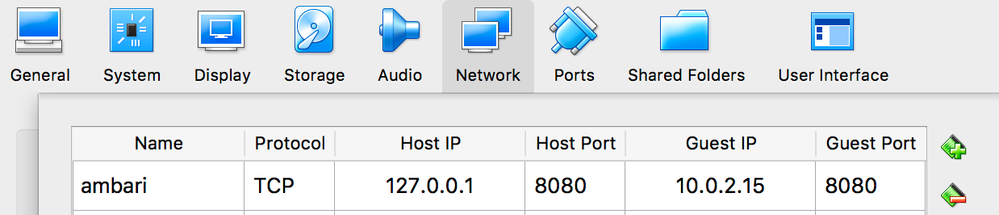
Created 03-17-2018 06:40 PM
- Mark as New
- Bookmark
- Subscribe
- Mute
- Subscribe to RSS Feed
- Permalink
- Report Inappropriate Content
Thank you for your answer. It doesn't help. As well as I can't even to ping it.
Created 03-17-2018 06:42 PM
- Mark as New
- Bookmark
- Subscribe
- Mute
- Subscribe to RSS Feed
- Permalink
- Report Inappropriate Content
Are you accessing the Ambari from your Virtual box host? If so make sure the VirtualBox IP entry is in your local host's file in C:\Windows\System32\drivers\etc assuming you are using windows.
In the below example my VirtualBox network setting is set to Bridged adapter so it picks my LAN network a class C
192.168.0.227 sandbox.hortonworks.com sandbox
So I can access my Ambari from my laptop using http://sandbox:8080
I think 10.0.2.15:8080 is only accessible if you are running firefox from the virtual box can you verify using curl
curl -u username:password -G http://ambari_server_ip:8080/api/v1/check
The desired output should be running that will confirm ambari is indeed accepting connections
Created 03-17-2018 09:35 PM
- Mark as New
- Bookmark
- Subscribe
- Mute
- Subscribe to RSS Feed
- Permalink
- Report Inappropriate Content
I can get connect to virtual host from local. My virtualhost ip address is 192.168.0.75 and when I make ping from local host it works but when I try to add port 8080 for checking ambari it doesn't work and the browser the same situation. I tried to rich via curl in virtualbox as you suggested and it works.
Created 03-17-2018 09:37 PM
- Mark as New
- Bookmark
- Subscribe
- Mute
- Subscribe to RSS Feed
- Permalink
- Report Inappropriate Content
My networks is bridge-netowork and host-only as well. Neither bridge nor host-only doesn't allow me to make request from local machine


