
Our Community is getting an upgrade! To get everything ready for the relaunch, we’ll be placing the site in read-only mode starting September 21st.
We really appreciate your understanding while we get things set up behind the scenes. Catch up on all the exciting details about the move here.
Need help or have questions? Drop us a line at [email protected]

Archives of Support Questions (Read Only)
- Cloudera Community
- Board Archive
- Archives of Support Questions (Read Only)
- Unable to add phoenix application using Cloudbreak...
- Subscribe to RSS Feed
- Mark Question as New
- Mark Question as Read
- Float this Question for Current User
- Bookmark
- Subscribe
- Mute
- Printer Friendly Page
- Subscribe to RSS Feed
- Mark Question as New
- Mark Question as Read
- Float this Question for Current User
- Bookmark
- Subscribe
- Mute
- Printer Friendly Page
Unable to add phoenix application using Cloudbreak.


Created 09-22-2017 10:58 PM
- Mark as New
- Bookmark
- Subscribe
- Mute
- Subscribe to RSS Feed
- Permalink
- Report Inappropriate Content
Hi there,
We are unable to add phoenix application to slave nodes in our presently running cluster which was spun up using Cloudbreak. We were of the opinion that if we add HBase as a service then Phoenix would be available for addition later when we need it. Would like to know if we have missed something. I am attaching the blueprint as well :
{ "host_groups": [ { "name": "host_group_master_1", "configurations": [], "components": [ { "name": "HBASE_MASTER" }, { "name": "ZOOKEEPER_SERVER" }, { "name": "NAMENODE" }, { "name": "HDFS_CLIENT" }, { "name": "ZOOKEEPER_CLIENT" }, { "name": "METRICS_MONITOR" }, { "name": "HBASE_CLIENT" } ], "cardinality": "1" }, { "name": "host_group_master_2", "configurations": [], "components": [ { "name": "HBASE_MASTER" }, { "name": "ZOOKEEPER_SERVER" }, { "name": "PIG" }, { "name": "ZOOKEEPER_CLIENT" }, { "name": "METRICS_MONITOR" }, { "name": "HDFS_CLIENT" }, { "name": "HBASE_CLIENT" }, { "name": "SECONDARY_NAMENODE" } ], "cardinality": "1" }, { "name": "host_group_master_3", "configurations": [], "components": [ { "name": "ZOOKEEPER_SERVER" }, { "name": "HBASE_CLIENT" }, { "name": "HDFS_CLIENT" }, { "name": "METRICS_MONITOR" }, { "name": "METRICS_COLLECTOR" } ], "cardinality": "1" }, { "name": "host_group_client_1", "configurations": [], "components": [ { "name": "ZOOKEEPER_CLIENT" }, { "name": "PIG" }, { "name": "HBASE_CLIENT" }, { "name": "METRICS_MONITOR" }, { "name": "SQOOP" }, { "name": "HDFS_CLIENT" }, { "name": "METRICS_MONITOR" } ], "cardinality": "1" }, { "name": "host_group_slave_1", "configurations": [], "components": [ { "name": "HBASE_REGIONSERVER" }, { "name": "METRICS_MONITOR" }, { "name": "ZOOKEEPER_CLIENT" }, { "name": "HBASE_CLIENT" }, { "name": "DATANODE" }, { "name": "HDFS_CLIENT" } ], "cardinality": "4" } ], "Blueprints": { "blueprint_name": "hbase-sec-nn", "stack_name": "HDP", "stack_version": "2.6" } }
Thank you.!!


Created on 09-24-2017 04:06 AM - edited 08-18-2019 12:11 AM
- Mark as New
- Bookmark
- Subscribe
- Mute
- Subscribe to RSS Feed
- Permalink
- Report Inappropriate Content
I used your blue print to create a cluster via Cloud Break and I am able to enable Phoenix without any issues.
Log into Ambari --> Select Hbase Service --> Click the Config Tab (Settings, not Advanced) -- > Scroll to the bottom of the page to the section called Phoenix SQL --> Click on the switch called "Enable Phoenix" --> Save Settings --> Restart all affected services .
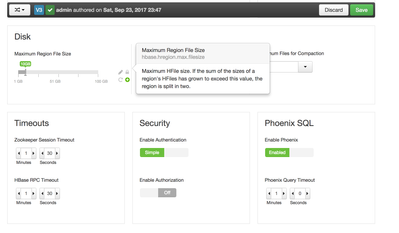
This will start an install and config process that will install Phoenix binaries and make a few configuration tweaks to hbase-site.
If you SSH to the console, you can run: /usr/hdp/current/phoenix-client/bin/sqlline.py, you can immediately start creating tables. Once you get data loaded, you can issue queries from here as well.
Created on 09-24-2017 04:06 AM - edited 08-18-2019 12:11 AM
- Mark as New
- Bookmark
- Subscribe
- Mute
- Subscribe to RSS Feed
- Permalink
- Report Inappropriate Content
I used your blue print to create a cluster via Cloud Break and I am able to enable Phoenix without any issues.
Log into Ambari --> Select Hbase Service --> Click the Config Tab (Settings, not Advanced) -- > Scroll to the bottom of the page to the section called Phoenix SQL --> Click on the switch called "Enable Phoenix" --> Save Settings --> Restart all affected services .
This will start an install and config process that will install Phoenix binaries and make a few configuration tweaks to hbase-site.
If you SSH to the console, you can run: /usr/hdp/current/phoenix-client/bin/sqlline.py, you can immediately start creating tables. Once you get data loaded, you can issue queries from here as well.


