
Our Community is getting an upgrade! To get everything ready for the relaunch, we’ll be placing the site in read-only mode starting September 21st.
We really appreciate your understanding while we get things set up behind the scenes. Catch up on all the exciting details about the move here.
Need help or have questions? Drop us a line at [email protected]

Archives of Support Questions (Read Only)
- Cloudera Community
- Board Archive
- Archives of Support Questions (Read Only)
- Unable to connect hive via ODBC zookeeper
- Subscribe to RSS Feed
- Mark Question as New
- Mark Question as Read
- Float this Question for Current User
- Bookmark
- Subscribe
- Mute
- Printer Friendly Page
- Subscribe to RSS Feed
- Mark Question as New
- Mark Question as Read
- Float this Question for Current User
- Bookmark
- Subscribe
- Mute
- Printer Friendly Page
Unable to connect hive via ODBC zookeeper
- Labels:
-
Apache Hive


Created on 09-06-2017 06:52 AM - edited 08-18-2019 02:47 AM
- Mark as New
- Bookmark
- Subscribe
- Mute
- Subscribe to RSS Feed
- Permalink
- Report Inappropriate Content
Hi hortonworks Community,
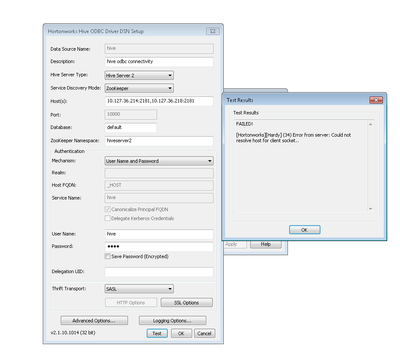
I am facing some issues while connecting hive via ODBC using zookeeper.
HDP version: 2.6
Zookeeper:3.4.6



Created 09-06-2017 07:43 PM
- Mark as New
- Bookmark
- Subscribe
- Mute
- Subscribe to RSS Feed
- Permalink
- Report Inappropriate Content
HDP 2.3
Ambari 2.1.2
Non kerberized.
Installed HortonworksHiveODBC32 and HortonworksHiveODBC64 bit
Laptop C:\Windows\System32\drivers\etc\hosts entry
# localhost name resolution is handled within DNS itself.
#127.0.0.1       localhost
#::1             localhost
192.168.0.80   gulu.uganda.com   gulu
192.168.0.157  bombo.uganda.com  bombo
192.168.0.213  sandbox.hortonworks.com   sandbox
Logged to my I node cluster using putty
[hive@bombo ~]$ hive WARNING: Use "yarn jar" to launch YARN applications.
Logging initialized using configuration in file:/etc/hive/2.3.6.0-3796/0/hive-log4j.properties
hive> show databases;
OK
default Time taken: 4.796 seconds, Fetched: 1 row(s)
hive> SET hive.cli.print.header=true;
hive> create database amin;
OK
Time taken: 1.79 seconds
hive> use amin;
OK
Time taken: 0.355 seconds
Created a table
hive>CREATE TABLE amin.orders_hive
(
  Order_ID                      string
, Customer_ID                   int
, Store_ID                      int
-- , Order_Datetime_Orig           timestamp
, Order_Datetime                timestamp
, Ship_Completion_Datetime      timestamp
, Return_Datetime               timestamp
, Refund_Datetime               timestamp
, Payment_Method_Code           string
)
  -- PARTITIONED BY (Order_Datetime timestamp)
  ROW FORMAT DELIMITED FIELDS TERMINATED BY '\t'
  STORED AS TEXTFILE
  LOCATION '/apps/hive/warehouse/';
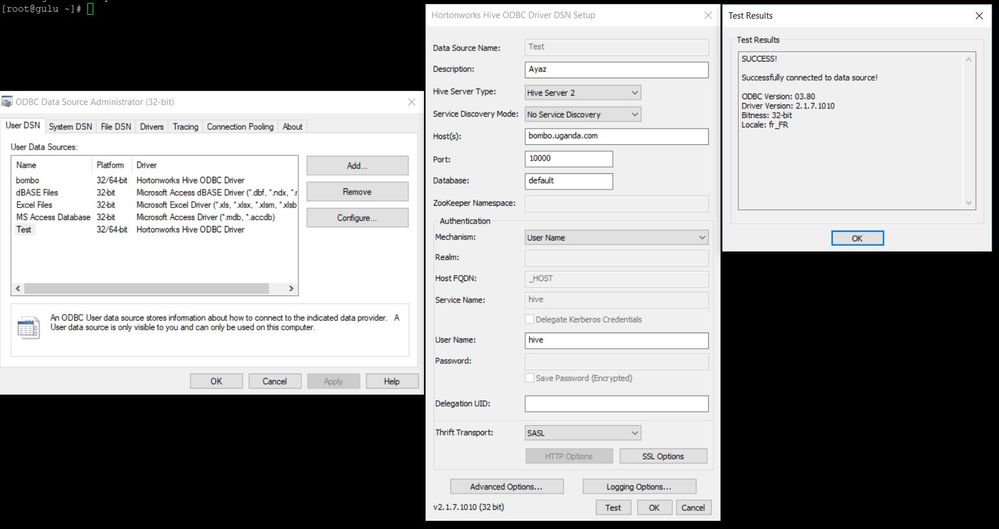
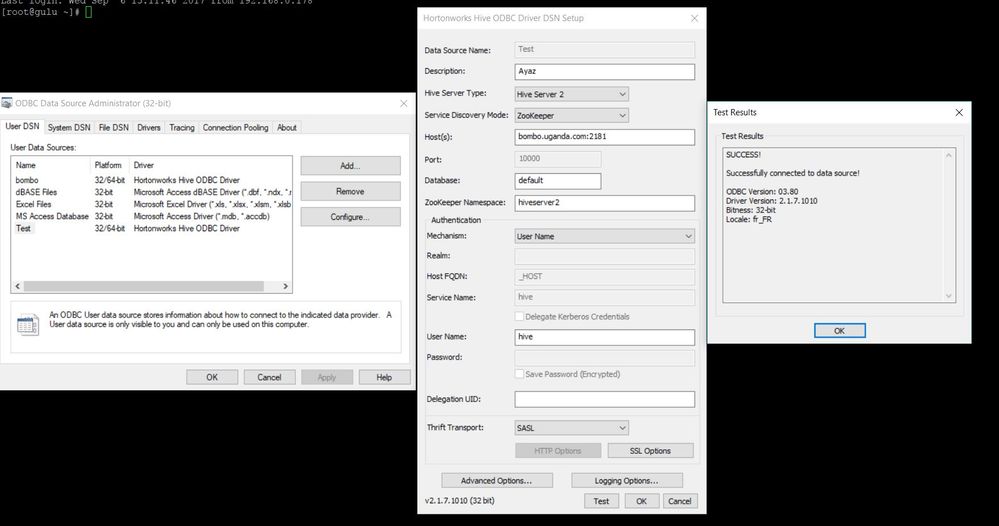
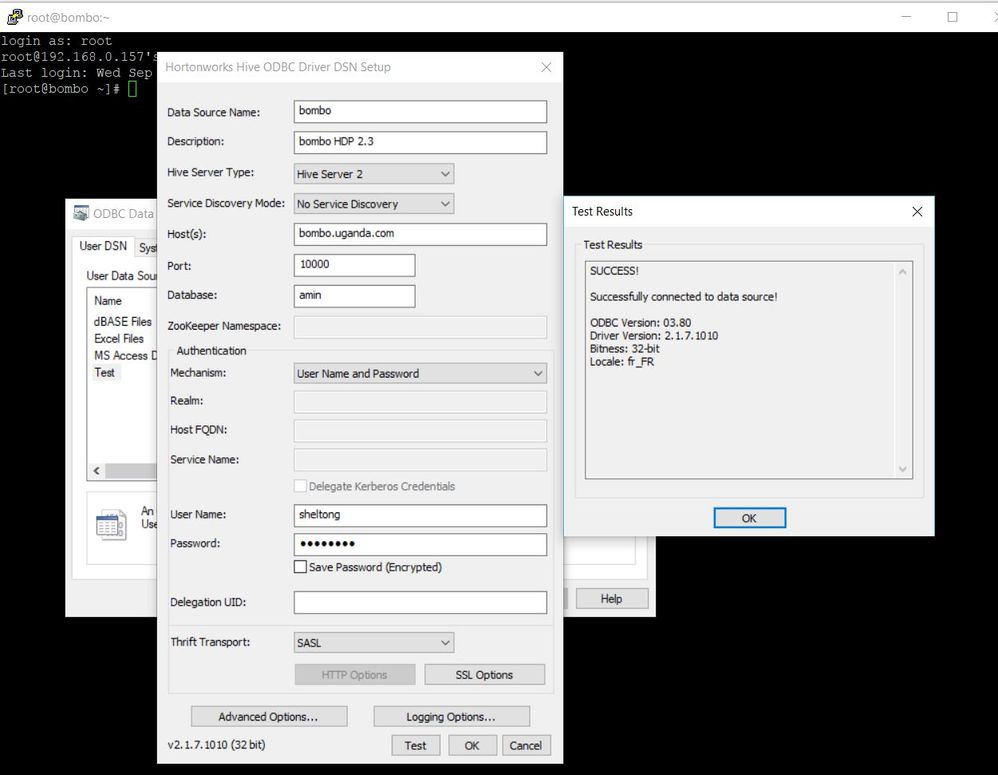
I choose 2 types of connection with and without zookeeper and my connection was successful. I then created a third connection with my user/password and that too was successful using option.
See attached screenshots
Hope that helps
Created 09-06-2017 11:00 AM
- Mark as New
- Bookmark
- Subscribe
- Mute
- Subscribe to RSS Feed
- Permalink
- Report Inappropriate Content
Can you paste here your hosts entry ?
Created 09-06-2017 01:12 PM
- Mark as New
- Bookmark
- Subscribe
- Mute
- Subscribe to RSS Feed
- Permalink
- Report Inappropriate Content
10.127.36.221 ambari.hdp.local hdpc
10.127.36.214 hadoopmaster.hdp.local hdpm
10.127.36.217 hadoopslave1.hdp.local hdps1
10.127.36.218 hadoopslave2.hdp.local hdps2
Created 09-06-2017 07:43 PM
- Mark as New
- Bookmark
- Subscribe
- Mute
- Subscribe to RSS Feed
- Permalink
- Report Inappropriate Content
HDP 2.3
Ambari 2.1.2
Non kerberized.
Installed HortonworksHiveODBC32 and HortonworksHiveODBC64 bit
Laptop C:\Windows\System32\drivers\etc\hosts entry
# localhost name resolution is handled within DNS itself.
#127.0.0.1       localhost
#::1             localhost
192.168.0.80   gulu.uganda.com   gulu
192.168.0.157  bombo.uganda.com  bombo
192.168.0.213  sandbox.hortonworks.com   sandbox
Logged to my I node cluster using putty
[hive@bombo ~]$ hive WARNING: Use "yarn jar" to launch YARN applications.
Logging initialized using configuration in file:/etc/hive/2.3.6.0-3796/0/hive-log4j.properties
hive> show databases;
OK
default Time taken: 4.796 seconds, Fetched: 1 row(s)
hive> SET hive.cli.print.header=true;
hive> create database amin;
OK
Time taken: 1.79 seconds
hive> use amin;
OK
Time taken: 0.355 seconds
Created a table
hive>CREATE TABLE amin.orders_hive
(
  Order_ID                      string
, Customer_ID                   int
, Store_ID                      int
-- , Order_Datetime_Orig           timestamp
, Order_Datetime                timestamp
, Ship_Completion_Datetime      timestamp
, Return_Datetime               timestamp
, Refund_Datetime               timestamp
, Payment_Method_Code           string
)
  -- PARTITIONED BY (Order_Datetime timestamp)
  ROW FORMAT DELIMITED FIELDS TERMINATED BY '\t'
  STORED AS TEXTFILE
  LOCATION '/apps/hive/warehouse/';
I choose 2 types of connection with and without zookeeper and my connection was successful. I then created a third connection with my user/password and that too was successful using option.
See attached screenshots
Hope that helps
Created 09-07-2017 05:51 AM
- Mark as New
- Bookmark
- Subscribe
- Mute
- Subscribe to RSS Feed
- Permalink
- Report Inappropriate Content
Thank you @Geoffrey Shelton Okot,
I have added hosts in client machine, it works like charm.


