Our Community is getting an upgrade! To get everything ready for the relaunch, we’ll be placing the site in read-only mode starting September 21st.
We really appreciate your understanding while we get things set up behind the scenes. Catch up on all the exciting details about the move here.
Need help or have questions? Drop us a line at [email protected]

Archives of Support Questions (Read Only)
- Cloudera Community
- Board Archive
- Archives of Support Questions (Read Only)
- Unable to have view in kerberized cluster.
- Subscribe to RSS Feed
- Mark Question as New
- Mark Question as Read
- Float this Question for Current User
- Bookmark
- Subscribe
- Mute
- Printer Friendly Page
- Subscribe to RSS Feed
- Mark Question as New
- Mark Question as Read
- Float this Question for Current User
- Bookmark
- Subscribe
- Mute
- Printer Friendly Page
Unable to have view in kerberized cluster.


Created on 01-05-2017 12:27 PM - edited 09-16-2022 03:53 AM
- Mark as New
- Bookmark
- Subscribe
- Mute
- Subscribe to RSS Feed
- Permalink
- Report Inappropriate Content
Hi experts
I have 3 nodes hadoop kerberized cluster. But while i am opening view i am getting below error:
SIMPLE authentication is not enabled. Available:[TOKEN]
Below is the solution i came across as per the link.
As per the above solution i have made 2 changes:
"hadoop.security.authentication" to "simple" in the file /etc/hadoop/conf/core-site.xml in ambari.
'hive.server2.authentication' is set to 'None'
But while i am able to open the views but node managers and datanodes gives error to kerberos..as below:
2017-01-05 16:12:22,661 WARN authorize.ServiceAuthorizationManager (ServiceAuthorizationManager.java:authorize(119)) - Authorization failed for yarn (auth:SIMPLE) for protocol=interface org.apache.hadoop.yarn.server.api.ResourceTrackerPB, expected client Kerberos principal is nm/[email protected] 2017-01-05 16:12:22,661 INFO ipc.Server (Server.java:authorizeConnection(2039)) - Connection from 192.168.56.41:34702 for protocol org.apache.hadoop.yarn.server.api.ResourceTrackerPB is unauthorized for user yarn (auth:SIMPLE) 2017-01-05 16:12:22,661 INFO ipc.Server (Server.java:doRead(850)) - Socket Reader #1 for port 8025: readAndProcess from client 192.168.56.41 threw exception [org.apache.hadoop.security.authorize.AuthorizationException: User yarn (auth:SIMPLE) is not authorized for protocol interface org.apache.hadoop.yarn.server.api.ResourceTrackerPB, expected client Kerberos principal is nm/[email protected]]
Please help me to have kerberize cluster and views.



Created 01-06-2017 06:50 AM
- Mark as New
- Bookmark
- Subscribe
- Mute
- Subscribe to RSS Feed
- Permalink
- Report Inappropriate Content
As the error you attached as part of "files.txt" shows:
500 SIMPLE authentication is not enabled. Available:[TOKEN, KERBEROS]
Please refer to last point : https://docs.hortonworks.com/HDPDocuments/Ambari-2.2.0.0/bk_ambari_views_guide/content/_Troubleshoot...
.
If your cluster is configured for Kerberos, you cannot use the Local Cluster Configuration option. You must use the Custom Cluster Configuration option and enter the WebHDFS FileSystem URI.
For example: webhdfs://namenode:50070
As per your screenshot you are using "Local Cluster". Following link talks about configuring "Custom Cluster Configuration"
.
Created 01-05-2017 01:13 PM
- Mark as New
- Bookmark
- Subscribe
- Mute
- Subscribe to RSS Feed
- Permalink
- Report Inappropriate Content
Also can you please share the screenshot of the HIve/File view configuration here.
Which version of Ambari are you using?
Created on 01-05-2017 05:12 PM - edited 08-19-2019 04:02 AM
- Mark as New
- Bookmark
- Subscribe
- Mute
- Subscribe to RSS Feed
- Permalink
- Report Inappropriate Content

Created 01-05-2017 05:15 PM
- Mark as New
- Bookmark
- Subscribe
- Mute
- Subscribe to RSS Feed
- Permalink
- Report Inappropriate Content
ambari version-Version2.2.0.0


Created 01-05-2017 01:20 PM
- Mark as New
- Bookmark
- Subscribe
- Mute
- Subscribe to RSS Feed
- Permalink
- Report Inappropriate Content
You dont need to change hadoop properties in core-site.xml. Problem is not with hadoop components, it is with hive/files view settings that needs to be modified to set webhdfs authentication to auth=KERBEROS,proxyuser=<proxyuser>
Refer below doc about how to configure Ambari views if cluster is kerberized.
Revert back the changes in core-site and make sure all the services are UP and follow the above doc for view setting for kerberized cluster.
Created 01-06-2017 06:26 AM
- Mark as New
- Bookmark
- Subscribe
- Mute
- Subscribe to RSS Feed
- Permalink
- Report Inappropriate Content
i have done the changes still it doesnt work.. i have posted the log file and the view setting above.


Created 01-05-2017 05:23 PM
- Mark as New
- Bookmark
- Subscribe
- Mute
- Subscribe to RSS Feed
- Permalink
- Report Inappropriate Content
In addition to above answers,
Please refer below article and let us know if you face any further issues.
https://community.hortonworks.com/articles/40658/configure-hive-view-for-kerberized-cluster.html
Created 01-06-2017 06:26 AM
- Mark as New
- Bookmark
- Subscribe
- Mute
- Subscribe to RSS Feed
- Permalink
- Report Inappropriate Content
i have done the changes still it doesnt work.. i have posted the log file and the view setting above.
Created 01-06-2017 06:50 AM
- Mark as New
- Bookmark
- Subscribe
- Mute
- Subscribe to RSS Feed
- Permalink
- Report Inappropriate Content
As the error you attached as part of "files.txt" shows:
500 SIMPLE authentication is not enabled. Available:[TOKEN, KERBEROS]
Please refer to last point : https://docs.hortonworks.com/HDPDocuments/Ambari-2.2.0.0/bk_ambari_views_guide/content/_Troubleshoot...
.
If your cluster is configured for Kerberos, you cannot use the Local Cluster Configuration option. You must use the Custom Cluster Configuration option and enter the WebHDFS FileSystem URI.
For example: webhdfs://namenode:50070
As per your screenshot you are using "Local Cluster". Following link talks about configuring "Custom Cluster Configuration"
.
Created on 01-06-2017 11:28 AM - edited 08-19-2019 04:01 AM
- Mark as New
- Bookmark
- Subscribe
- Mute
- Subscribe to RSS Feed
- Permalink
- Report Inappropriate Content
Thanks for the help 🙂 File view is working fine now.
But now i am having problem with hive view.
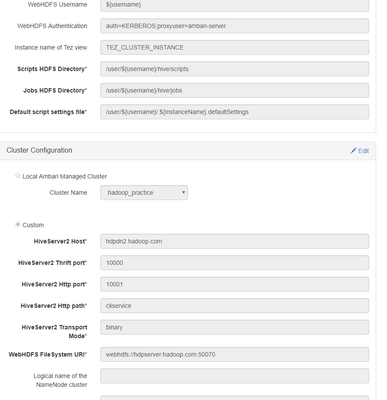
Here is the log below.. also i have attached the hive view config setting.
05 Jan 2017 22:16:26,599 ERROR [qtp-ambari-client-618] ServiceFormattedException:95 - H020 Could not establish connecton to hdpdn2.hadoop.com:10000: org.apache.thrift.transport.TTransportException: Peer indicated failure: Unsupported mechanism type GSSAPI: org.apache.thrift.transport.TTransportException: Peer indicated failure: Unsupported mechanism type GSSAPI 05 Jan 2017 22:16:26,600 ERROR [qtp-ambari-client-618] ServiceFormattedException:96 - org.apache.ambari.view.hive.client.HiveClientException: H020 Could not establish connecton to hdpdn2.hadoop.com:10000: org.apache.thrift.transport.TTransportException: Peer indicated failure: Unsupported mechanism type GSSAPI: org.apache.thrift.transport.TTransportException: Peer indicated failure: Unsupported mechanism type GSSAPI
Also the port is working fine:
[root@hdpdn2 keytabs]# netstat -tulpn|grep 10000 tcp 0 0 0.0.0.0:10000 0.0.0.0:* LISTEN 14800/java [root@hdpdn2 keytabs]# ps -ef|grep 14800 hive 14800 1 0 15:24 ? 00:00:35 /usr/jdk64/jdk1.8.0_60/bin/java -Xmx1024m -Dhdp.version=2.3.4.0-3485 -Djava.net.preferIPv4Stack=true -Dhdp.version=2.3.4.0-3485 -Dhadoop.log.dir=/var/log/hadoop/hive -Dhadoop.log.file=hadoop.log -Dhadoop.home.dir=/usr/hdp/2.3.4.0-3485/hadoop -Dhadoop.id.str=hive -Dhadoop.root.logger=INFO,console -Djava.library.path=:/usr/hdp/current/hadoop-client/lib/native/Linux-amd64-64:/usr/hdp/2.3.4.0-3485/hadoop/lib/native -Dhadoop.policy.file=hadoop-policy.xml -Djava.net.preferIPv4Stack=true -Xmx1024m -Xmx1203m -Dhadoop.security.logger=INFO,NullAppender org.apache.hadoop.util.RunJar /usr/hdp/2.3.4.0-3485/hive/lib/hive-service-1.2.1.2.3.4.0-3485.jar org.apache.hive.service.server.HiveServer2 --hiveconf hive.aux.jars.path=file:///usr/hdp/current/hive-webhcat/share/hcatalog/hive-hcatalog-core.jar -hiveconf hive.metastore.uris= -hiveconf hive.log.file=hiveserver2.log -hiveconf hive.log.dir=/var/log/hive
The hive view setting: