
Our Community is getting an upgrade! To get everything ready for the relaunch, we’ll be placing the site in read-only mode starting September 21st.
We really appreciate your understanding while we get things set up behind the scenes. Catch up on all the exciting details about the move here.
Need help or have questions? Drop us a line at [email protected]

Archives of Support Questions (Read Only)
- Cloudera Community
- Board Archive
- Archives of Support Questions (Read Only)
- Re: Unable to install hdp through ambari stack ver...
- Subscribe to RSS Feed
- Mark Question as New
- Mark Question as Read
- Float this Question for Current User
- Bookmark
- Subscribe
- Mute
- Printer Friendly Page
- Subscribe to RSS Feed
- Mark Question as New
- Mark Question as Read
- Float this Question for Current User
- Bookmark
- Subscribe
- Mute
- Printer Friendly Page
Unable to install hdp through ambari stack version error centos


Created on 05-18-2016 05:26 AM - edited 08-18-2019 05:36 AM
- Mark as New
- Bookmark
- Subscribe
- Mute
- Subscribe to RSS Feed
- Permalink
- Report Inappropriate Content
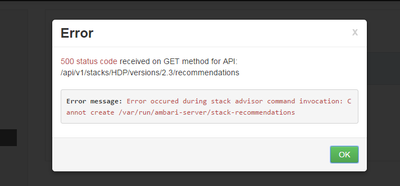


Created 05-18-2016 05:39 AM
- Mark as New
- Bookmark
- Subscribe
- Mute
- Subscribe to RSS Feed
- Permalink
- Report Inappropriate Content
Can you let me know through which user you have installed ambari ? Can you check if the ambari server user has the permission to create the folder?
Created 05-18-2016 05:39 AM
- Mark as New
- Bookmark
- Subscribe
- Mute
- Subscribe to RSS Feed
- Permalink
- Report Inappropriate Content
Can you let me know through which user you have installed ambari ? Can you check if the ambari server user has the permission to create the folder?
Created 05-18-2016 06:07 AM
- Mark as New
- Bookmark
- Subscribe
- Mute
- Subscribe to RSS Feed
- Permalink
- Report Inappropriate Content
bro yes u r rt i have setup ambari with without root user

Created 05-18-2016 05:42 AM
- Mark as New
- Bookmark
- Subscribe
- Mute
- Subscribe to RSS Feed
- Permalink
- Report Inappropriate Content
Which user are you using to run ambari ?
If it is root then make sure that the directory "/var/run/ambari-server/" has root permission.
chmod -R 777 /var/run/ambari-server/
Created 05-18-2016 05:58 AM
- Mark as New
- Bookmark
- Subscribe
- Mute
- Subscribe to RSS Feed
- Permalink
- Report Inappropriate Content
Its not good to give 777 permission, usually it should be 755 if i am not wrong.
Created on 05-18-2016 07:32 AM - edited 08-18-2019 05:36 AM
- Mark as New
- Bookmark
- Subscribe
- Mute
- Subscribe to RSS Feed
- Permalink
- Report Inappropriate Content
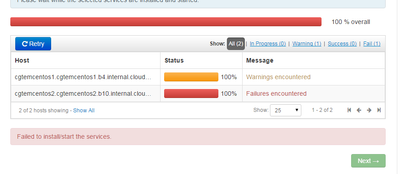
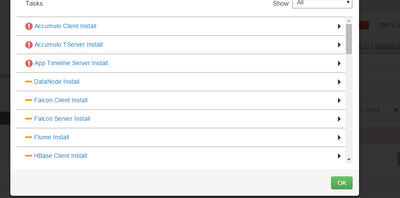
Now am gettting this error
Created 05-18-2016 09:03 AM
- Mark as New
- Bookmark
- Subscribe
- Mute
- Subscribe to RSS Feed
- Permalink
- Report Inappropriate Content
accumulo.txt
Created 05-18-2016 09:07 AM
- Mark as New
- Bookmark
- Subscribe
- Mute
- Subscribe to RSS Feed
- Permalink
- Report Inappropriate Content
There is nothing displayed. Can you check for other services?
Created 05-18-2016 08:32 AM
- Mark as New
- Bookmark
- Subscribe
- Mute
- Subscribe to RSS Feed
- Permalink
- Report Inappropriate Content
I see this is another issue now. Are you able to resolve the previous issue ? If so please accept best answer.
For current issue i will request to get a new post. Also if you can click on he failed task Eg. "Accumulo Client install" and post the logs that will be helpful.
Make sure you have access to download packages.
Make sure your firewall is off.


