
Our Community is getting an upgrade! To get everything ready for the relaunch, we’ll be placing the site in read-only mode starting September 21st.
We really appreciate your understanding while we get things set up behind the scenes. Catch up on all the exciting details about the move here.
Need help or have questions? Drop us a line at [email protected]

Archives of Support Questions (Read Only)
- Cloudera Community
- Board Archive
- Archives of Support Questions (Read Only)
- Re: Unable to overcome this exception (HiveAccessC...
- Subscribe to RSS Feed
- Mark Question as New
- Mark Question as Read
- Float this Question for Current User
- Bookmark
- Subscribe
- Mute
- Printer Friendly Page
- Subscribe to RSS Feed
- Mark Question as New
- Mark Question as Read
- Float this Question for Current User
- Bookmark
- Subscribe
- Mute
- Printer Friendly Page
Unable to overcome this exception (HiveAccessControlException Permission denied: user [admin] does not have [READ] )


Created on 01-27-2016 11:13 AM - edited 09-16-2022 03:00 AM
- Mark as New
- Bookmark
- Subscribe
- Mute
- Subscribe to RSS Feed
- Permalink
- Report Inappropriate Content
I am trying to run this sample, http://hortonworks.com/hadoop-tutorial/how-to-refine-and-visualize-server-log-data/
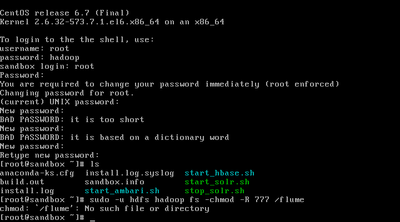
sudo -u hdfs hadoop fs -chmod -R 777/flume/flume - no such file or directory.


Created 01-27-2016 11:28 AM
- Mark as New
- Bookmark
- Subscribe
- Mute
- Subscribe to RSS Feed
- Permalink
- Report Inappropriate Content
Hi @Sai ram
Your question title and description does not match.
I have looked into the article and looks like /flume does not exist.
if the query doesn’t run successfully due to a permissions error you then you might need to update the permission on the directory. Run the following commands over SSH on the Sandbox
<code>sudo -u hdfs hadoop fs -mkdir /flume
<code>sudo -u hdfs hadoop fs -chmod -R 777 /flume
sudo -u hdfs hadoop fs -chown -R admin /flume

Created 01-27-2016 11:16 AM
- Mark as New
- Bookmark
- Subscribe
- Mute
- Subscribe to RSS Feed
- Permalink
- Report Inappropriate Content
Created on 01-27-2016 11:25 AM - edited 08-19-2019 04:08 AM
- Mark as New
- Bookmark
- Subscribe
- Mute
- Subscribe to RSS Feed
- Permalink
- Report Inappropriate Content
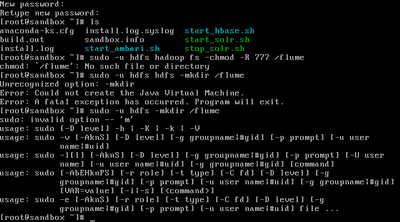
@Artem Ervits PFA.
Created 01-27-2016 11:29 AM
- Mark as New
- Bookmark
- Subscribe
- Mute
- Subscribe to RSS Feed
- Permalink
- Report Inappropriate Content
Sorry
Sudo -u hdfs hdfs dfs -mkdir /flume
Sudo -u hdfs hdfs dfs -chmod -R 777 /flume
It's too early 🙂
Created 01-27-2016 11:28 AM
- Mark as New
- Bookmark
- Subscribe
- Mute
- Subscribe to RSS Feed
- Permalink
- Report Inappropriate Content
Hi @Sai ram
Your question title and description does not match.
I have looked into the article and looks like /flume does not exist.
if the query doesn’t run successfully due to a permissions error you then you might need to update the permission on the directory. Run the following commands over SSH on the Sandbox
<code>sudo -u hdfs hadoop fs -mkdir /flume
<code>sudo -u hdfs hadoop fs -chmod -R 777 /flume
sudo -u hdfs hadoop fs -chown -R admin /flume
Created on 01-27-2016 11:33 AM - edited 08-19-2019 04:08 AM
- Mark as New
- Bookmark
- Subscribe
- Mute
- Subscribe to RSS Feed
- Permalink
- Report Inappropriate Content
Created 01-27-2016 11:35 AM
- Mark as New
- Bookmark
- Subscribe
- Mute
- Subscribe to RSS Feed
- Permalink
- Report Inappropriate Content


Created 01-27-2016 12:28 PM
- Mark as New
- Bookmark
- Subscribe
- Mute
- Subscribe to RSS Feed
- Permalink
- Report Inappropriate Content
Hi @Sai ram ,
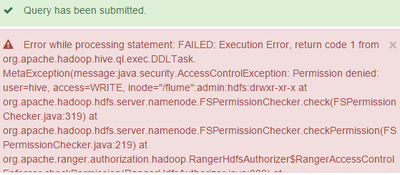
looks like you are using Ranger and you do not have a Ranger-HDFS-policy which allows the user hive to write to "/flume"
On the one hand, the solution from @Neeraj Sabharwal is granting permissions on HDFS level and solves your problem, on the other hand, if you want to go with Ranger I'd recommend to create/adjust Ranger-HDFS-policies for certain folders/users (and do a, at least, chmod 700 on HDFS level itself to prevent accessing folders/files "by accident")


