
Our Community is getting an upgrade! To get everything ready for the relaunch, we’ll be placing the site in read-only mode starting September 21st.
We really appreciate your understanding while we get things set up behind the scenes. Catch up on all the exciting details about the move here.
Need help or have questions? Drop us a line at [email protected]

Archives of Support Questions (Read Only)
- Cloudera Community
- Board Archive
- Archives of Support Questions (Read Only)
- Re: Upgrade ambari 2.4.1 to 2.4.2.0
- Subscribe to RSS Feed
- Mark Question as New
- Mark Question as Read
- Float this Question for Current User
- Bookmark
- Subscribe
- Mute
- Printer Friendly Page
- Subscribe to RSS Feed
- Mark Question as New
- Mark Question as Read
- Float this Question for Current User
- Bookmark
- Subscribe
- Mute
- Printer Friendly Page
Upgrade ambari 2.4.1 to 2.4.2.0
- Labels:
-
Apache Ambari


Created on 02-15-2017 04:43 PM - edited 08-19-2019 04:45 AM
- Mark as New
- Bookmark
- Subscribe
- Mute
- Subscribe to RSS Feed
- Permalink
- Report Inappropriate Content
Hello,
I try to update ambari 2.4.1 to 2.4.2.0. it don't walk so the only failed error is this :

I follow this step :
- i download new ambari repo and copy it to /etc/yum.repo.d
- and i execute this commands :
$ yum clean all
$ yum upgrade ambari-server
$ yum info ambari-server
I don't find what's the problem
Thanks


Created 02-16-2017 04:55 PM
- Mark as New
- Bookmark
- Subscribe
- Mute
- Subscribe to RSS Feed
- Permalink
- Report Inappropriate Content
You don't have Ambari2.4.2 version available in your Repo.
First set up repo with Ambari-server2.4.2
and run yum list ambari-server again.
ideally you command will show like
Available Package
Ambari-server2.4.2
Installed Package
Ambari-server2.4.0
Once you are getting available package with 2.4.2 then try to Upgarde.



Created 02-15-2017 04:52 PM
- Mark as New
- Bookmark
- Subscribe
- Mute
- Subscribe to RSS Feed
- Permalink
- Report Inappropriate Content
What is the output of "yum info ambari-server" command?
Also the output of "ambari-server --version" (If already yum upgraded then you should see latest version).
.
I hope that you have already done the following:
ambari-server stop


wget -nv http://public-repo-1.hortonworks.com/ambari/centos6/2.x/updates/2.4.2.0/ambari.repo -O /etc/yum.repos.d/ambari.repo

yum clean all
yum info ambari-server
yum repolist | grep ambari

yum update ambari-server
.
Followed by:
ambari-server upgrade
.
Created on 02-16-2017 09:20 AM - edited 08-19-2019 04:44 AM
- Mark as New
- Bookmark
- Subscribe
- Mute
- Subscribe to RSS Feed
- Permalink
- Report Inappropriate Content
Yes i follow all step for ambari upgrade and i restart it after your answers. I have following :
yum info ambari-server
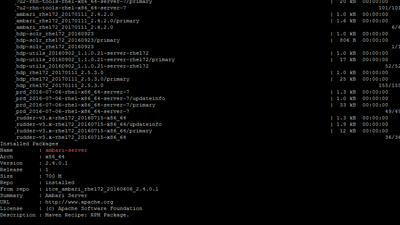
yum repolist | grep ambari
yum upgrade ambari-server
yum upgrade ambari-server

ambari-server upgrade
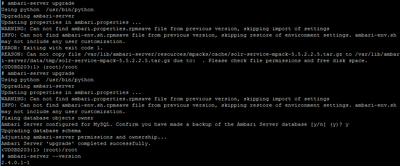
But the version not change. I don't understand why
Thanks
Created 02-16-2017 03:33 PM
- Mark as New
- Bookmark
- Subscribe
- Mute
- Subscribe to RSS Feed
- Permalink
- Report Inappropriate Content
Hello @Jay SenSharma
Please are you check my output?
Created 02-16-2017 04:15 PM
- Mark as New
- Bookmark
- Subscribe
- Mute
- Subscribe to RSS Feed
- Permalink
- Report Inappropriate Content
Created on 02-16-2017 04:19 PM - edited 08-19-2019 04:44 AM
- Mark as New
- Bookmark
- Subscribe
- Mute
- Subscribe to RSS Feed
- Permalink
- Report Inappropriate Content

@Divakar Annapureddy this is output for the command
Created 02-16-2017 04:55 PM
- Mark as New
- Bookmark
- Subscribe
- Mute
- Subscribe to RSS Feed
- Permalink
- Report Inappropriate Content
You don't have Ambari2.4.2 version available in your Repo.
First set up repo with Ambari-server2.4.2
and run yum list ambari-server again.
ideally you command will show like
Available Package
Ambari-server2.4.2
Installed Package
Ambari-server2.4.0
Once you are getting available package with 2.4.2 then try to Upgarde.


