
Our Community is getting an upgrade! To get everything ready for the relaunch, we’ll be placing the site in read-only mode starting September 21st.
We really appreciate your understanding while we get things set up behind the scenes. Catch up on all the exciting details about the move here.
Need help or have questions? Drop us a line at [email protected]

Archives of Support Questions (Read Only)
- Cloudera Community
- Board Archive
- Archives of Support Questions (Read Only)
- Re: VNC Server install failed in Ambari on curl st...
- Subscribe to RSS Feed
- Mark Question as New
- Mark Question as Read
- Float this Question for Current User
- Bookmark
- Subscribe
- Mute
- Printer Friendly Page
- Subscribe to RSS Feed
- Mark Question as New
- Mark Question as Read
- Float this Question for Current User
- Bookmark
- Subscribe
- Mute
- Printer Friendly Page
VNC Server install failed in Ambari on curl statement. How do I edit?
- Labels:
-
Apache Ambari


Created on 12-07-2016 04:00 PM - edited 08-19-2019 01:12 AM
- Mark as New
- Bookmark
- Subscribe
- Mute
- Subscribe to RSS Feed
- Permalink
- Report Inappropriate Content
Fellow Techies--
The VNC install on Ambari failed on:
resource_management.core.exceptions.Fail: Execution of 'curl -o /etc/yum.repos.d/epel-apache-maven.repo https://repos.fedorapeople.org/repos/dchen/apache-maven/epel-apache-maven.repo' returned 35. curl: (35) SSL connect error
When I issue the statement interactively to avoid the SSL error through my ssh terminal as:
curl -o /etc/yum.repos.d/epel-apache-maven.repo http://repos.fedorapeople.org/repos/dchen/apache-maven/epel-apache-maven.repo , the file downloads as expected.

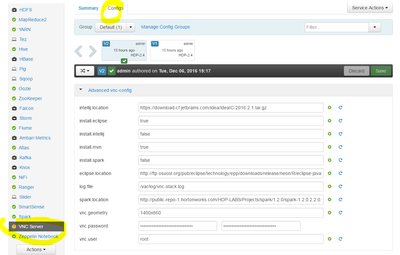
Where or how do I edit this? Here's what I see on the config page for the VNC Server install. The curl statement must be embedded in one of the *.tar files. Please advise on what the next step is toward resolution.



Created 12-07-2016 05:03 PM
- Mark as New
- Bookmark
- Subscribe
- Mute
- Subscribe to RSS Feed
- Permalink
- Report Inappropriate Content
try setting install.mvn to false and see if that helps.
Created 12-07-2016 04:03 PM
- Mark as New
- Bookmark
- Subscribe
- Mute
- Subscribe to RSS Feed
- Permalink
- Report Inappropriate Content
in the curl where you get error you are using https and in the curl command from ssh, you are using http.
Created 12-07-2016 04:10 PM
- Mark as New
- Bookmark
- Subscribe
- Mute
- Subscribe to RSS Feed
- Permalink
- Report Inappropriate Content
Thanks Karthik--I am not directly using either. The curl statement is embedded somewhere. Do you know where, or how I can bypass the failure event?
Created 12-07-2016 04:19 PM
- Mark as New
- Bookmark
- Subscribe
- Mute
- Subscribe to RSS Feed
- Permalink
- Report Inappropriate Content
not sure what the issue is .. are you following this guide https://github.com/hortonworks-gallery/ambari-vnc-service
the only difference i see between the guide and your screenshot is the intellij location, you have https, while the guide has http. try that.
Created 12-07-2016 05:03 PM
- Mark as New
- Bookmark
- Subscribe
- Mute
- Subscribe to RSS Feed
- Permalink
- Report Inappropriate Content
try setting install.mvn to false and see if that helps.
Created 12-07-2016 07:33 PM
- Mark as New
- Bookmark
- Subscribe
- Mute
- Subscribe to RSS Feed
- Permalink
- Report Inappropriate Content
Karthik, That is a good idea. I can manually install Maven! Thank you so much for answering my question.


