
Our Community is getting an upgrade! To get everything ready for the relaunch, we’ll be placing the site in read-only mode starting September 21st.
We really appreciate your understanding while we get things set up behind the scenes. Catch up on all the exciting details about the move here.
Need help or have questions? Drop us a line at [email protected]

Archives of Support Questions (Read Only)
- Cloudera Community
- Board Archive
- Archives of Support Questions (Read Only)
- Re: What is the correct way to update Navigator Me...
- Subscribe to RSS Feed
- Mark Question as New
- Mark Question as Read
- Float this Question for Current User
- Bookmark
- Subscribe
- Mute
- Printer Friendly Page
- Subscribe to RSS Feed
- Mark Question as New
- Mark Question as Read
- Float this Question for Current User
- Bookmark
- Subscribe
- Mute
- Printer Friendly Page
What is the correct way to update Navigator Metadata Server Storage Dir
- Labels:
-
Apache Solr
-
Cloudera Navigator


Created on 04-17-2018 06:22 AM - edited 09-16-2022 06:06 AM
- Mark as New
- Bookmark
- Subscribe
- Mute
- Subscribe to RSS Feed
- Permalink
- Report Inappropriate Content
Hi,
currently we setup our Navigator Metadata Server Storage Dir into /var/lib/cloudera-scm-navigator
and the problems is the free space of /var partition is very low, now.
could you guys inform me, what is the correct way to move /var/lib/cloudera-scm-navigator/solr into /data1/solr
note: sorry for my english
Thanks


Created 04-17-2018 08:03 AM
- Mark as New
- Bookmark
- Subscribe
- Mute
- Subscribe to RSS Feed
- Permalink
- Report Inappropriate Content
First of all, you have to stop Navigator.
Then it depends on what you decide.
The easiest approach (not requiring changes in configuration) is to move the directory and create a link:
# mv /var/lib/cloudera-scm-navigator/solr  /data1/
# ln -s /data1/solr  /var/lib/cloudera-scm-navigator/solr
Although I would prefer to move the whole navigator directory:
# mv /var/lib/cloudera-scm-navigator/ data1/
# ln -s /data1/cloudera-scm-navigator  /var/lib/cloudera-scm-navigator
The last approach is again to move the directory without link
# mv /var/lib/cloudera-scm-navigator/ data1/
and change
in Cloudera Manager to
/data1/cloudera-scm-navigator
Hope, that helps. As mentioned above, I prefer the second approach, because all directory is in one partition plus, someone new in your team won't have to check CM for the new location.
Created 04-17-2018 08:03 AM
- Mark as New
- Bookmark
- Subscribe
- Mute
- Subscribe to RSS Feed
- Permalink
- Report Inappropriate Content
First of all, you have to stop Navigator.
Then it depends on what you decide.
The easiest approach (not requiring changes in configuration) is to move the directory and create a link:
# mv /var/lib/cloudera-scm-navigator/solr  /data1/
# ln -s /data1/solr  /var/lib/cloudera-scm-navigator/solr
Although I would prefer to move the whole navigator directory:
# mv /var/lib/cloudera-scm-navigator/ data1/
# ln -s /data1/cloudera-scm-navigator  /var/lib/cloudera-scm-navigator
The last approach is again to move the directory without link
# mv /var/lib/cloudera-scm-navigator/ data1/
and change
in Cloudera Manager to
/data1/cloudera-scm-navigator
Hope, that helps. As mentioned above, I prefer the second approach, because all directory is in one partition plus, someone new in your team won't have to check CM for the new location.
Created 04-17-2018 09:18 PM
- Mark as New
- Bookmark
- Subscribe
- Mute
- Subscribe to RSS Feed
- Permalink
- Report Inappropriate Content
Hi GeKas,
Thank you for your answer.
about this
do I need to stop all of Cloudera Management Service or just Navigator Audit Server & Navigator Metadata Server.
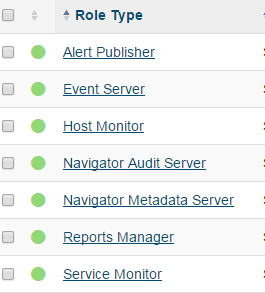
Thanks
Created 04-18-2018 01:57 AM
- Mark as New
- Bookmark
- Subscribe
- Mute
- Subscribe to RSS Feed
- Permalink
- Report Inappropriate Content
No you don't have to stop all Management Services.
Only Navigator Metadata Server is enough, but you can stop also Navigator Audit server if you feel more safe.
Created 04-18-2018 02:42 AM
- Mark as New
- Bookmark
- Subscribe
- Mute
- Subscribe to RSS Feed
- Permalink
- Report Inappropriate Content
Thank you very much for your answer.
I will test it on UAT & will give you & community the update.
Thanks


