
Our Community is getting an upgrade! To get everything ready for the relaunch, we’ll be placing the site in read-only mode starting September 21st.
We really appreciate your understanding while we get things set up behind the scenes. Catch up on all the exciting details about the move here.
Need help or have questions? Drop us a line at [email protected]

Archives of Support Questions (Read Only)
- Cloudera Community
- Board Archive
- Archives of Support Questions (Read Only)
- Re: Where do I control hbase namespace from ranger...
- Subscribe to RSS Feed
- Mark Question as New
- Mark Question as Read
- Float this Question for Current User
- Bookmark
- Subscribe
- Mute
- Printer Friendly Page
- Subscribe to RSS Feed
- Mark Question as New
- Mark Question as Read
- Float this Question for Current User
- Bookmark
- Subscribe
- Mute
- Printer Friendly Page
Where do I control hbase namespace from ranger?
- Labels:
-
Apache HBase
-
Apache Ranger



Created on 02-23-2016 08:44 PM - edited 08-18-2019 05:30 AM
- Mark as New
- Bookmark
- Subscribe
- Mute
- Subscribe to RSS Feed
- Permalink
- Report Inappropriate Content
This option is available in ranger but I don't see it. I have ranger version .50. Screen shot:
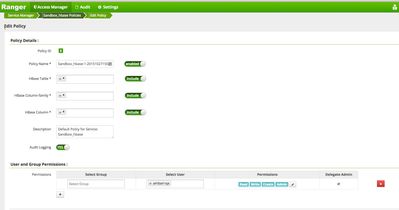
As you can see from above nothing for namespace. Am I missing something?
Created 02-24-2016 09:40 PM
- Mark as New
- Bookmark
- Subscribe
- Mute
- Subscribe to RSS Feed
- Permalink
- Report Inappropriate Content
@Neeraj Sabharwal @Artem Ervits
namespace:* works! but with a twist.
I created a namespace called 'testns'.
On ranger I am able to do testns:* and it gives me security access over all tables within this namespace. It worked with all namespace i created.
HOWEVER!!! - this does not work with default. So I need to create a new thread on HCC asking community why default namespace (default:*) is not controlable via ranger.


Created 02-23-2016 09:06 PM
- Mark as New
- Bookmark
- Subscribe
- Mute
- Subscribe to RSS Feed
- Permalink
- Report Inappropriate Content
Please see this https://issues.apache.org/jira/plugins/servlet/mobile#issue/RANGER-202
In the table section, specify the namespace with table together
Created 02-24-2016 08:48 PM
- Mark as New
- Bookmark
- Subscribe
- Mute
- Subscribe to RSS Feed
- Permalink
- Report Inappropriate Content
@Artem Ervits awesome feedback as always. I need to know if ranger can do access control at namespace level without specifying table name.
Created 02-24-2016 08:49 PM
- Mark as New
- Bookmark
- Subscribe
- Mute
- Subscribe to RSS Feed
- Permalink
- Report Inappropriate Content
@Sunile Manjee I doubt it, by design you need to specify namespace:table

Created 02-23-2016 11:42 PM
- Mark as New
- Bookmark
- Subscribe
- Mute
- Subscribe to RSS Feed
- Permalink
- Report Inappropriate Content
See this https://issues.apache.org/jira/browse/RANGER-202 and it has more information on the issues related to this particular issue
Take a look on the subtasks.
It looks like that Ramesh replied back https://community.hortonworks.com/questions/17764/ranger-hbase-namespace.html
Format:
To allow access to table(s) in a specific namespace, specify the table name with prefix as "<namespace>:<table>" - like "myNameSpace:table1", "myNamespace:*"
Created on 02-24-2016 01:51 AM - edited 08-18-2019 05:30 AM
- Mark as New
- Bookmark
- Subscribe
- Mute
- Subscribe to RSS Feed
- Permalink
- Report Inappropriate Content
Demo
my_ns1:my_table - demouser can access it
hbase(main):005:0> scan "my_ns1:my_table"
ROW COLUMN+CELL
0 row(s) in 0.0340 seconds
hbase(main):006:0>
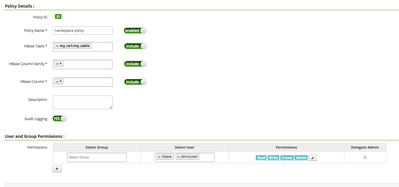
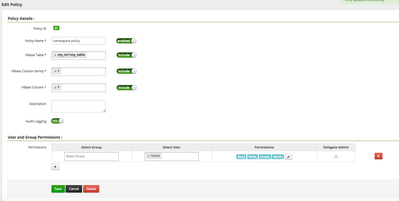
I removed demouser in policy
hbase(main):006:0> scan "my_ns1:my_table"
ROW COLUMN+CELL
ERROR: org.apache.hadoop.hbase.security.AccessDeniedException: Insufficient permissions for user ‘demouser',action: scannerOpen, tableName:my_ns1:my_table, family:fam.
Here is some help for this command:
Created 02-24-2016 08:47 PM
- Mark as New
- Bookmark
- Subscribe
- Mute
- Subscribe to RSS Feed
- Permalink
- Report Inappropriate Content
@Neeraj Sabharwal awesome feedback as always. I need to know if ranger can do access control at namespace level without specifying table name.
Created 02-24-2016 08:48 PM
- Mark as New
- Bookmark
- Subscribe
- Mute
- Subscribe to RSS Feed
- Permalink
- Report Inappropriate Content
I'm going to take a try on my sandbox... will post what I find.
Created 02-24-2016 11:26 PM
- Mark as New
- Bookmark
- Subscribe
- Mute
- Subscribe to RSS Feed
- Permalink
- Report Inappropriate Content
@Sunile Manjee Did you see the link that I shared and extra information added in my reply?
I mentioned "See this https://issues.apache.org/jira/browse/RANGER-202 and it has more information on the issues related to this particular issue
Take a look on the subtasks."
One of the subtasks is https://issues.apache.org/jira/browse/RANGER-228
Created 02-24-2016 09:40 PM
- Mark as New
- Bookmark
- Subscribe
- Mute
- Subscribe to RSS Feed
- Permalink
- Report Inappropriate Content
@Neeraj Sabharwal @Artem Ervits
namespace:* works! but with a twist.
I created a namespace called 'testns'.
On ranger I am able to do testns:* and it gives me security access over all tables within this namespace. It worked with all namespace i created.
HOWEVER!!! - this does not work with default. So I need to create a new thread on HCC asking community why default namespace (default:*) is not controlable via ranger.


