
Archives of Support Questions (Read Only)
- Cloudera Community
- Board Archive
- Archives of Support Questions (Read Only)
- Re: Where is exactly cloudera manager? How to find...
- Subscribe to RSS Feed
- Mark Question as New
- Mark Question as Read
- Float this Question for Current User
- Bookmark
- Subscribe
- Mute
- Printer Friendly Page
- Subscribe to RSS Feed
- Mark Question as New
- Mark Question as Read
- Float this Question for Current User
- Bookmark
- Subscribe
- Mute
- Printer Friendly Page
Where is exactly cloudera manager? How to find it on Vmware sandbox?
- Labels:
-
Cloudera Manager
-
Quickstart VM


Created 10-03-2017 02:29 PM
- Mark as New
- Bookmark
- Subscribe
- Mute
- Subscribe to RSS Feed
- Permalink
- Report Inappropriate Content
I just downloaded quickstart vm cloudera sandbox on Vmware software. Then, I set the processor to 2 to make it work faster. Now, I can see the homescreen.
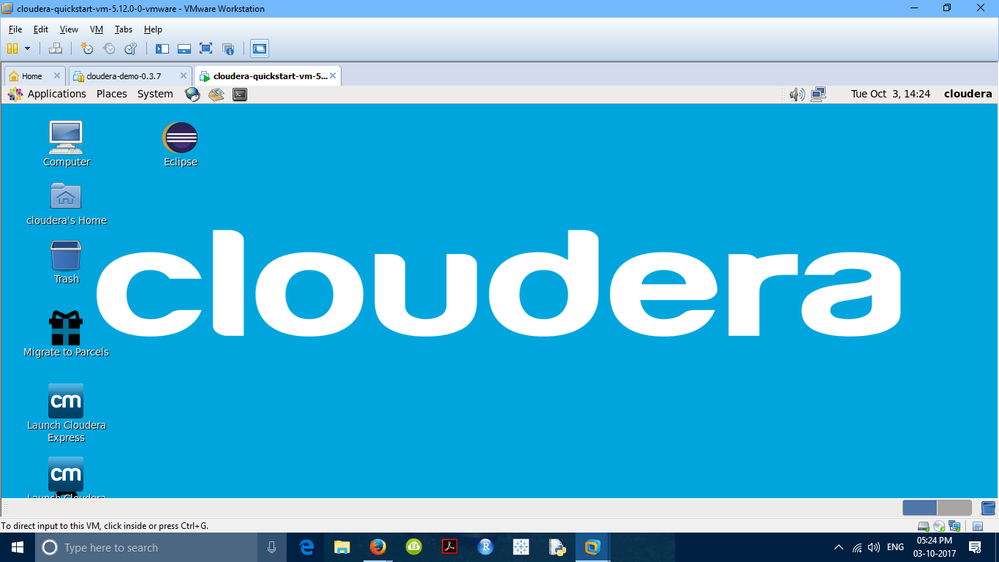
like this. I know it is a stupid question. Maybe, it is. Maybe not. But, where is cloudera manager? Is it some icon? I don't know how to and where to find it. Please HELP!


Created 10-04-2017 07:23 PM
- Mark as New
- Bookmark
- Subscribe
- Mute
- Subscribe to RSS Feed
- Permalink
- Report Inappropriate Content
You can allocate 4GB
kick off this command in the terminal . that should bring you a cloudera manager express edition
sudo /home/cloudera/cloudera-manager --force --express
Once everything is started in the terminal you wll see a Cloudera manager url along with the credentials .
Let me know if this is suffice



Created 10-04-2017 05:53 AM
- Mark as New
- Bookmark
- Subscribe
- Mute
- Subscribe to RSS Feed
- Permalink
- Report Inappropriate Content
The launch Cloudera Express icon is what you are looking for. I suggest looking over our community article on setting up the QuickStart VM to ensure you have the proper resources allocated to the VM.
Keep the questions coming,
Cy Jervis | Senior Manager, Knowledge Programs
if (helpful) { mark_as_solution(); } | if (appreciated) { give_kudos(); }
Created 10-04-2017 03:37 PM
- Mark as New
- Bookmark
- Subscribe
- Mute
- Subscribe to RSS Feed
- Permalink
- Report Inappropriate Content
When I opened lauch express, terminal appeared with warning: it is highly recommended that you run cloudera express in a vm with at least 8GB of RAM.
You can override these checks by passing in the --force option,
e.g., sudo /homecloudera/cloudera-manager --force
press [ENTER] to exit...
P.S. I have allocated 2 procrssors and ram about 3.5 GB. Do you want me to change VM settings and give 8GB of ram that all I have to Cloudera quickstart VM?
Created 10-04-2017 07:23 PM
- Mark as New
- Bookmark
- Subscribe
- Mute
- Subscribe to RSS Feed
- Permalink
- Report Inappropriate Content
You can allocate 4GB
kick off this command in the terminal . that should bring you a cloudera manager express edition
sudo /home/cloudera/cloudera-manager --force --express
Once everything is started in the terminal you wll see a Cloudera manager url along with the credentials .
Let me know if this is suffice
Created 10-04-2017 11:57 PM
- Mark as New
- Bookmark
- Subscribe
- Mute
- Subscribe to RSS Feed
- Permalink
- Report Inappropriate Content
Thanks. That works for me. 🙂


