
Our Community is getting an upgrade! To get everything ready for the relaunch, we’ll be placing the site in read-only mode starting September 21st.
We really appreciate your understanding while we get things set up behind the scenes. Catch up on all the exciting details about the move here.
Need help or have questions? Drop us a line at [email protected]

Archives of Support Questions (Read Only)
- Cloudera Community
- Board Archive
- Archives of Support Questions (Read Only)
- Re: Why I am having problem with Ambari Hadoop Ser...
- Subscribe to RSS Feed
- Mark Question as New
- Mark Question as Read
- Float this Question for Current User
- Bookmark
- Subscribe
- Mute
- Printer Friendly Page
- Subscribe to RSS Feed
- Mark Question as New
- Mark Question as Read
- Float this Question for Current User
- Bookmark
- Subscribe
- Mute
- Printer Friendly Page
Why I am having problem with Ambari Hadoop Services start?
- Labels:
-
Hortonworks Data Platform (HDP)


Created 02-26-2016 06:19 PM
- Mark as New
- Bookmark
- Subscribe
- Mute
- Subscribe to RSS Feed
- Permalink
- Report Inappropriate Content
Hi all,
Last week, I had set up a two-node HDP 2.3 on ec2 with just one master and a slave. Ambari installation went smoothly and it deployed and started the hadoop services.
I prefer to keep the cluster down when not in use for reasons of efficient cost utilisation. With the public IP changing with a reboot, ambari-server could not start hadoop services this week. Some services start if I were to launch them manually in sequence starting with HDFS. It will not start the services on reboot.
I believe the server has lost the connectivity after the change of public IP address. I am still not able to resolve the problem. I do not think changing the addresses in confg and other files are straightforward; they may be embedded in numerous files/locations.
I have got two elastic IP addresses and assigned them to two instances. I want to use the elastic IPs DNS name (example: 3c2-123.157.1.10.compute-1.amazonaws.com) to connect externally, while using the same (Elastic IP DNS) to let servers communicate with each other over the internal ec2 network. I wont be charged for the network traffic as long as my servers are in the same ec2 availability zone. I am aware there would be a tiny charge for the duration where the elastic IPs are not in use, which may be a few $ a month. I do not want to use the external elastic IP address (example: 123.157.1.10) directly for internal server access as I would be charged for network traffic.
Please advise the best way to resolve the hadoop services breakdown issue. Please note that I am also a Linux newbie. A detailed guidance is very much appreciated.
Thanks,
Created 03-13-2016 12:43 AM
- Mark as New
- Bookmark
- Subscribe
- Mute
- Subscribe to RSS Feed
- Permalink
- Report Inappropriate Content
I am cleaning them out and attempt a fresh install. I will close this thread and post a new one, if required. Thanks every one for the help
Created on 03-11-2016 05:11 PM - edited 08-18-2019 04:41 AM
- Mark as New
- Bookmark
- Subscribe
- Mute
- Subscribe to RSS Feed
- Permalink
- Report Inappropriate Content
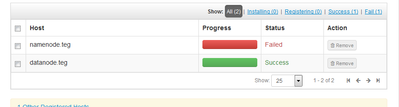
- I manually registered the datanode (slave) after installing/starting ambari-agent. Cllcking register and confirm produced (1) one failed --- master node and (2) one success - datanode containing the agent - response.
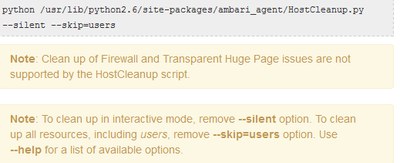
- I ran python /usr/lib/python2.6/site-packages/ambari_agent/HostCleanup.py in the master node. I got "no such file or directory"
Thanks for looking into this.
Created 03-12-2016 12:22 AM
- Mark as New
- Bookmark
- Subscribe
- Mute
- Subscribe to RSS Feed
- Permalink
- Report Inappropriate Content
Can I ignore this warning message please?
Process Issues (1)
The following process should not be running
/usr/lib/jvm/jre/bin/java -classpath
Created 03-12-2016 03:45 AM
- Mark as New
- Bookmark
- Subscribe
- Mute
- Subscribe to RSS Feed
- Permalink
- Report Inappropriate Content
Having not found anything on the net to resolve the process issue warning, I ignored it (not sure if this is wise). It will be great to get a resolution of this java-classpath warning. In addition, after ignoring it, I am now stuck on a mysql error. I have not found anything on this either. My repository does not have anything on mysql either, although community edition 5.7.11 is running. The error on the namenode is as follows. I hope some one will be able to guide me on the process issue as well as the mysql conflict.
resource_management.core.exceptions.Fail: Execution of '/usr/bin/yum -d 0 -e 0 -y install mysql-community-release' returned 1. Error: mysql57-community-release conflicts with mysql-community-release-el7-5.noarch
 You could try using --skip-broken to work around the problem
 You could try running: rpm -Va --nofiles --nodigest
Created 03-12-2016 08:18 PM
- Mark as New
- Bookmark
- Subscribe
- Mute
- Subscribe to RSS Feed
- Permalink
- Report Inappropriate Content
What a struggle this has become!
I cleaned out everything. All the errors and warnings in the previous posts have gone 🙂
App timeline server failed to install
File "/usr/lib/python2.6/site-packages/resource_management/core/shell.py", line 291, in _call
    raise Fail(err_msg)
resource_management.core.exceptions.Fail: Execution of 'ambari-sudo.sh /usr/bin/hdp-select set all `ambari-python-wrap /usr/bin/hdp-select versions | grep ^2.4 | tail -1`' returned 1. Traceback (most recent call last):
  File "/usr/bin/hdp-select", line 375, in <module>
    setPackages(pkgs, args[2], options.rpm_mode)
  File "/usr/bin/hdp-select", line 268, in setPackages
    os.symlink(target + "/" + leaves[pkg], linkname)
OSError: [Errno 17] File exists
@Neeraj Sabharwal : Could you please advise what's causing this error please?
I have no idea what's causing this problem. I did clean everything inc ambari-server and ambari-agent before this reinstall. I look forward to some help and guidance.
Thanks - Sundar
Created 03-13-2016 12:43 AM
- Mark as New
- Bookmark
- Subscribe
- Mute
- Subscribe to RSS Feed
- Permalink
- Report Inappropriate Content
I am cleaning them out and attempt a fresh install. I will close this thread and post a new one, if required. Thanks every one for the help

- « Previous
- Next »

