
Our Community is getting an upgrade! To get everything ready for the relaunch, we’ll be placing the site in read-only mode starting September 21st.
We really appreciate your understanding while we get things set up behind the scenes. Catch up on all the exciting details about the move here.
Need help or have questions? Drop us a line at [email protected]

Archives of Support Questions (Read Only)
- Cloudera Community
- Board Archive
- Archives of Support Questions (Read Only)
- Re: Zeppelin 0.6: Chrome not displaying Login elem...
- Subscribe to RSS Feed
- Mark Question as New
- Mark Question as Read
- Float this Question for Current User
- Bookmark
- Subscribe
- Mute
- Printer Friendly Page
- Subscribe to RSS Feed
- Mark Question as New
- Mark Question as Read
- Float this Question for Current User
- Bookmark
- Subscribe
- Mute
- Printer Friendly Page
Zeppelin 0.6: Chrome not displaying Login element with authentication enabled
- Labels:
-
Apache Zeppelin


Created on 07-25-2016 03:18 PM - edited 08-18-2019 06:26 AM
- Mark as New
- Bookmark
- Subscribe
- Mute
- Subscribe to RSS Feed
- Permalink
- Report Inappropriate Content
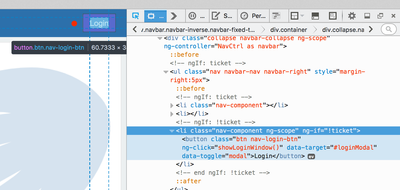
I am using the 0.60 Zeppelin binaries and I have enabled authentication using the directions here. In Firefox 41.0.1 (on OS X 10.11.5), as well as in Safari, I am seeing the expected behavior where users are required to login (the Login UI element renders in the upper right corner).
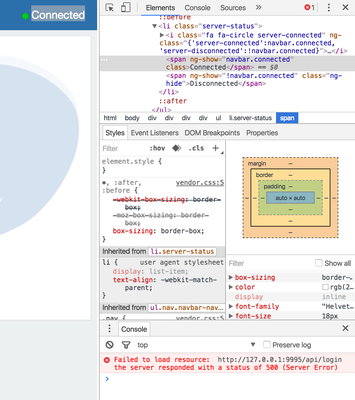
However, in Chrome 51.0.2704, this Login button does not render and I see no way to log in. I also see the following message in the Developer Console: http://127.0.0.1:9995/api/login Failed to load resource: the server responded with a status of 500 (Server Error). I am not seeing any errors in Firefox.
Should this be logged as an issue?
Chrome:
Firefox:


Created 07-25-2016 07:20 PM
- Mark as New
- Bookmark
- Subscribe
- Mute
- Subscribe to RSS Feed
- Permalink
- Report Inappropriate Content
@slachterman - In zeppelin-site.xml, try changing "zeppelin.server.addr" to the actual IP address of the host where it is running. Restart zeppelin and let us know how it goes!
Created 07-25-2016 07:20 PM
- Mark as New
- Bookmark
- Subscribe
- Mute
- Subscribe to RSS Feed
- Permalink
- Report Inappropriate Content
@slachterman - In zeppelin-site.xml, try changing "zeppelin.server.addr" to the actual IP address of the host where it is running. Restart zeppelin and let us know how it goes!
Created 07-25-2016 07:27 PM
- Mark as New
- Bookmark
- Subscribe
- Mute
- Subscribe to RSS Feed
- Permalink
- Report Inappropriate Content
I am running this on the HDP Sandbox VM. I changed zeppelin.server.addr to sandbox.hortonworks.com, which is the /etc/hosts entry that points to 127.0.0.1 on my machine, and this resolved the issue in Chrome.


