
Our Community is getting an upgrade! To get everything ready for the relaunch, we’ll be placing the site in read-only mode starting September 21st.
We really appreciate your understanding while we get things set up behind the scenes. Catch up on all the exciting details about the move here.
Need help or have questions? Drop us a line at [email protected]

Archives of Support Questions (Read Only)
- Cloudera Community
- Board Archive
- Archives of Support Questions (Read Only)
- Zepplin error in Ambari Sandbox + HDP 2.3.2
- Subscribe to RSS Feed
- Mark Question as New
- Mark Question as Read
- Float this Question for Current User
- Bookmark
- Subscribe
- Mute
- Printer Friendly Page
- Subscribe to RSS Feed
- Mark Question as New
- Mark Question as Read
- Float this Question for Current User
- Bookmark
- Subscribe
- Mute
- Printer Friendly Page
Zepplin error in Ambari Sandbox + HDP 2.3.2
- Labels:
-
Apache Spark
-
Apache Zeppelin


Created on 12-10-2015 01:45 AM - edited 08-19-2019 05:41 AM
- Mark as New
- Bookmark
- Subscribe
- Mute
- Subscribe to RSS Feed
- Permalink
- Report Inappropriate Content
Hi,
I have installed HDP 2.3.2 sandbox for virtualbox and when I try to access Zepplin through Ambari .
I am getting below screen .
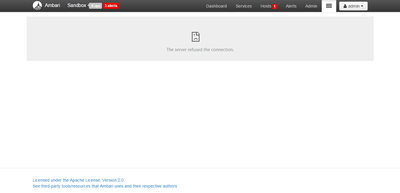
Am I missing any configuration ?
Would really appreciate your help.
Thanks,
Divya



Created 12-10-2015 01:51 AM
- Mark as New
- Bookmark
- Subscribe
- Mute
- Subscribe to RSS Feed
- Permalink
- Report Inappropriate Content
You need to create an entry in your local laptops hosts file
Please check the Release notes for the sandbox at http://hortonworks.com/products/hortonworks-sandbo... for BUG-46851
http://hortonworks.com/wp-content/uploads/2015/10/...
Also as @rmolina mentioned, once you set up the above, note that the sandbox splash screen's advance section has a direct link to Zeppelin view (as well as other useful links like ability to ssh via browser) as well. The splash screen can be accessed by <sandbox ip address>:8888
Created 12-10-2015 01:51 AM
- Mark as New
- Bookmark
- Subscribe
- Mute
- Subscribe to RSS Feed
- Permalink
- Report Inappropriate Content
You need to create an entry in your local laptops hosts file
Please check the Release notes for the sandbox at http://hortonworks.com/products/hortonworks-sandbo... for BUG-46851
http://hortonworks.com/wp-content/uploads/2015/10/...
Also as @rmolina mentioned, once you set up the above, note that the sandbox splash screen's advance section has a direct link to Zeppelin view (as well as other useful links like ability to ssh via browser) as well. The splash screen can be accessed by <sandbox ip address>:8888
Created on 12-10-2015 03:35 AM - edited 08-19-2019 05:41 AM
- Mark as New
- Bookmark
- Subscribe
- Mute
- Subscribe to RSS Feed
- Permalink
- Report Inappropriate Content
Hi,
@ali Bajwa
I am using HDP2.3.2 sandbox for virtual box.
I tried the option which you have mentioned .
I edited my windows /etc/
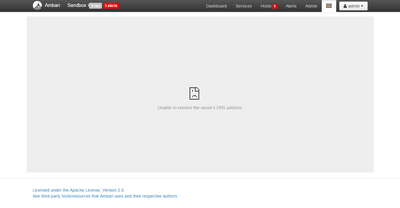
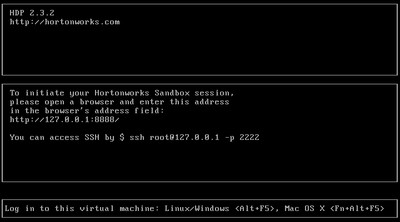
hosts file with the ip :127.0.0.1 sandbox.hortonworks.com
I tried accessing the Zeppelin page ,Now I am getting "Unable to resolve the server's DNS address."
Screenshot for your reference.
@ Neeraj Sabharwal :I am less familier with the port forwarding .Can you please elaborate more , what exact steps I need to follow for Zeppelin to work.
Thanks in advance
Divya
Created 12-10-2015 03:44 AM
- Mark as New
- Bookmark
- Subscribe
- Mute
- Subscribe to RSS Feed
- Permalink
- Report Inappropriate Content
@Divya Gehlot if your laptop is windows the way to modify hosts file is different than Linux/Mac (see here)
Can you try opening Zeppelin UI directly (instead of through Ambari). It should be http://127.0.0.1:9995
To forward ports on VirtualBox you can check this article

Created 12-10-2015 06:49 AM
- Mark as New
- Bookmark
- Subscribe
- Mute
- Subscribe to RSS Feed
- Permalink
- Report Inappropriate Content
Also the splash screen's advance section should have a direct link to Zeppelin view as well Splash screen can be accessed by <sandbox ip address>:8888
Created on 12-10-2015 04:32 AM - edited 08-19-2019 05:41 AM
- Mark as New
- Bookmark
- Subscribe
- Mute
- Subscribe to RSS Feed
- Permalink
- Report Inappropriate Content
Hi,
@AliBajwa
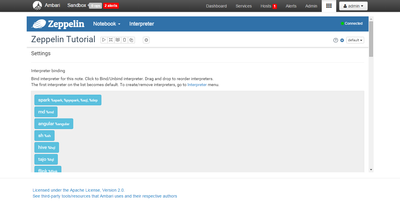
I tried the same steps mentioned in BUG-46851 with VMware Sandbox HDP 2.3.2 . Voila , I am able to view Zeppelin Page.
Thanks alot for all your help.
Still Trying to figure out whats wrong with virtual box HDP2.3.2 sandbox .

Created 12-10-2015 01:39 PM
- Mark as New
- Bookmark
- Subscribe
- Mute
- Subscribe to RSS Feed
- Permalink
- Report Inappropriate Content
@Divya Gehlot For virtualbox, try stopping and restarting the Zeppelin service in Ambari. This worked for me.


Created 02-12-2016 07:29 AM
- Mark as New
- Bookmark
- Subscribe
- Mute
- Subscribe to RSS Feed
- Permalink
- Report Inappropriate Content
For VisualBox sandbox, you can access Zeppelin at http://YourIP:9995 instead !!
It is work for me


