
Our Community is getting an upgrade! To get everything ready for the relaunch, we’ll be placing the site in read-only mode starting September 21st.
We really appreciate your understanding while we get things set up behind the scenes. Catch up on all the exciting details about the move here.
Need help or have questions? Drop us a line at [email protected]

Archives of Support Questions (Read Only)
- Cloudera Community
- Board Archive
- Archives of Support Questions (Read Only)
- Re: amabri installation on centos failed stating t...
- Subscribe to RSS Feed
- Mark Question as New
- Mark Question as Read
- Float this Question for Current User
- Bookmark
- Subscribe
- Mute
- Printer Friendly Page
- Subscribe to RSS Feed
- Mark Question as New
- Mark Question as Read
- Float this Question for Current User
- Bookmark
- Subscribe
- Mute
- Printer Friendly Page
amabri installation on centos failed stating that is process id is stale.?Please help on this guys


Created on 05-08-2017 12:40 PM - edited 08-17-2019 06:52 PM
- Mark as New
- Bookmark
- Subscribe
- Mute
- Subscribe to RSS Feed
- Permalink
- Report Inappropriate Content
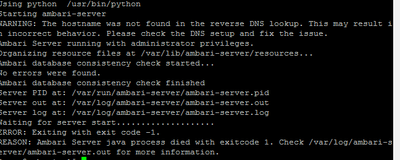



Created 05-08-2017 02:14 PM
- Mark as New
- Bookmark
- Subscribe
- Mute
- Subscribe to RSS Feed
- Permalink
- Report Inappropriate Content
Looks like you have not configured the FQDN properly on your ambari host. Please check the /etc/hosts file to verify the hostname is correct and it matches the output of the following command:
# hostname -f
.
Prerequisite of Ambari Installation : (Set the Hostname😞 http://docs.hortonworks.com/HDPDocuments/Ambari-2.5.0.3/bk_ambari-installation/content/check_dns.htm...
. Also can you please share the output of the file "/var/log/ambari-sever/ambari-server.out" here so that we can see if there are any additional issues?
Created 05-08-2017 02:14 PM
- Mark as New
- Bookmark
- Subscribe
- Mute
- Subscribe to RSS Feed
- Permalink
- Report Inappropriate Content
Looks like you have not configured the FQDN properly on your ambari host. Please check the /etc/hosts file to verify the hostname is correct and it matches the output of the following command:
# hostname -f
.
Prerequisite of Ambari Installation : (Set the Hostname😞 http://docs.hortonworks.com/HDPDocuments/Ambari-2.5.0.3/bk_ambari-installation/content/check_dns.htm...
. Also can you please share the output of the file "/var/log/ambari-sever/ambari-server.out" here so that we can see if there are any additional issues?


Created 05-08-2017 03:08 PM
- Mark as New
- Bookmark
- Subscribe
- Mute
- Subscribe to RSS Feed
- Permalink
- Report Inappropriate Content
Please check your /etc/sysconfig/network file. What is the value of hostname? This should be fully qualified domain name. Then compare it with /etc/host file.
,Ambari is not able to resolve reverse DNS. What is the value of your hostname in
/etc/sysconfig/network
It should be your fully qualified domain name. Is this what your /etc/host is also pointing to?
Created 05-09-2017 08:49 AM
- Mark as New
- Bookmark
- Subscribe
- Mute
- Subscribe to RSS Feed
- Permalink
- Report Inappropriate Content
Thankyou @mqureshi the /etc/hosts file was not updated properly


