
Our Community is getting an upgrade! To get everything ready for the relaunch, we’ll be placing the site in read-only mode starting September 21st.
We really appreciate your understanding while we get things set up behind the scenes. Catch up on all the exciting details about the move here.
Need help or have questions? Drop us a line at [email protected]

Archives of Support Questions (Read Only)
- Cloudera Community
- Board Archive
- Archives of Support Questions (Read Only)
- Re: ambari-server sync-ldap: Exiting with exit co...
- Subscribe to RSS Feed
- Mark Question as New
- Mark Question as Read
- Float this Question for Current User
- Bookmark
- Subscribe
- Mute
- Printer Friendly Page
- Subscribe to RSS Feed
- Mark Question as New
- Mark Question as Read
- Float this Question for Current User
- Bookmark
- Subscribe
- Mute
- Printer Friendly Page
ambari-server sync-ldap: Exiting with exit code 1
- Labels:
-
Apache Ambari


Created 05-08-2018 10:49 AM
- Mark as New
- Bookmark
- Subscribe
- Mute
- Subscribe to RSS Feed
- Permalink
- Report Inappropriate Content
Hello,
I have created Hortonworks Data cloud cluster on AWS, with one master node and one worker node. on master node I have configured the openLDAP server. Now, I am trying to sync openLDAP users with Ambari.
To sync the openLDAP user with Ambari execute the following command:
ambari-server sync-ldap --users users.txt
user.txt contains the name of the user to sync, seprated by comma.
After executing above command it prompts for ambari login. after I enter credential for ambari server it throws following error:
ERROR: Exiting with exit code 1. REASON: Caught exception running LDAP sync. [LDAP: error code 49 - Invalid Credentials]; nested exception is javax.naming.AuthenticationException: [LDAP: error code 49 - Invalid Credentials]
How can I resolve this error ?
Thank You.
Created 05-09-2018 10:18 AM
- Mark as New
- Bookmark
- Subscribe
- Mute
- Subscribe to RSS Feed
- Permalink
- Report Inappropriate Content
while configuring ambari by running ambari-server setup-ldap, set the value of Bind anonymously* = true. Now, I can see all the LDAP users in Ambari.
Thank You.
Created on 05-09-2018 07:00 AM - edited 08-18-2019 12:59 AM
- Mark as New
- Bookmark
- Subscribe
- Mute
- Subscribe to RSS Feed
- Permalink
- Report Inappropriate Content
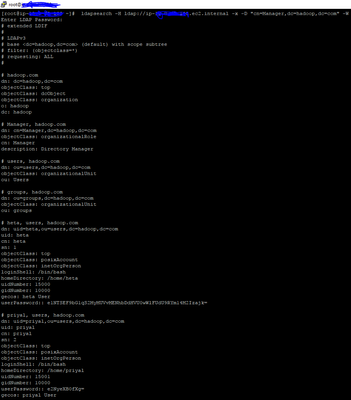
I have already configured ambari ldap setup according to the value I got from ldapsearch. but still i am facing the same issue.


Created 05-09-2018 07:12 AM
- Mark as New
- Bookmark
- Subscribe
- Mute
- Subscribe to RSS Feed
- Permalink
- Report Inappropriate Content
Can you paste the error here and also the ambari error
Created 05-09-2018 10:19 AM
- Mark as New
- Bookmark
- Subscribe
- Mute
- Subscribe to RSS Feed
- Permalink
- Report Inappropriate Content
ERROR: Exiting with exit code 1. REASON: Caught exception running LDAP sync. [LDAP: error code 49 - Invalid Credentials]; nested exception is javax.naming.AuthenticationException: [LDAP: error code 49 - Invalid Credentials]
Created 05-09-2018 10:18 AM
- Mark as New
- Bookmark
- Subscribe
- Mute
- Subscribe to RSS Feed
- Permalink
- Report Inappropriate Content
while configuring ambari by running ambari-server setup-ldap, set the value of Bind anonymously* = true. Now, I can see all the LDAP users in Ambari.
Thank You.

- « Previous
-
- 1
- 2
- Next »

