
Our Community is getting an upgrade! To get everything ready for the relaunch, we’ll be placing the site in read-only mode starting September 21st.
We really appreciate your understanding while we get things set up behind the scenes. Catch up on all the exciting details about the move here.
Need help or have questions? Drop us a line at [email protected]

Archives of Support Questions (Read Only)
- Cloudera Community
- Board Archive
- Archives of Support Questions (Read Only)
- cloudera not starting after rebooting machine
- Subscribe to RSS Feed
- Mark Question as New
- Mark Question as Read
- Float this Question for Current User
- Bookmark
- Subscribe
- Mute
- Printer Friendly Page
- Subscribe to RSS Feed
- Mark Question as New
- Mark Question as Read
- Float this Question for Current User
- Bookmark
- Subscribe
- Mute
- Printer Friendly Page
cloudera not starting after rebooting machine
- Labels:
-
Cloudera Manager


Created 07-24-2017 02:33 PM
- Mark as New
- Bookmark
- Subscribe
- Mute
- Subscribe to RSS Feed
- Permalink
- Report Inappropriate Content
I had a working CDH5 on RHEL in cluster mode.
My machine hanged somehow,so I had to reboot it.
I see everything in bad shape. I am trying to restart CDH management services, but I see timeout message and no service is starting.
if I start from command line, I see following message:
[root@pc1 Downloads]# service cloudera-scm-agent  status
● cloudera-scm-agent.service - LSB: Cloudera SCM Agent
   Loaded: loaded (/etc/rc.d/init.d/cloudera-scm-agent; bad; vendor preset: disabled)
   Active: active (exited) since Mon 2017-07-24 15:14:15 CDT; 1h 15min ago
     Docs: man:systemd-sysv-generator(8)
  Process: 9482 ExecStop=/etc/rc.d/init.d/cloudera-scm-agent stop (code=exited, status=0/SUCCESS)
  Process: 9531 ExecStart=/etc/rc.d/init.d/cloudera-scm-agent start (code=exited, status=0/SUCCESS)

Jul 24 15:14:14 pc1.localdomain.com systemd[1]: Starting LSB: Cloudera SCM A....
Jul 24 15:14:14 pc1.localdomain.com su[9545]: (to root) root on none
Jul 24 15:14:15 pc1.localdomain.com cloudera-scm-agent[9531]: Starting cloude...
Jul 24 15:14:15 pc1.localdomain.com systemd[1]: Started LSB: Cloudera SCM Agent.
I am not sure what has gone wrong.
Created 07-24-2017 08:05 PM
- Mark as New
- Bookmark
- Subscribe
- Mute
- Subscribe to RSS Feed
- Permalink
- Report Inappropriate Content
It is very wierd that I rebooted the system, started the cloudera-management-services, and then started others services individually. It is working now.
I am not sure why it happened. It was really a nightmare, and I am really surprised what should I do in such scenarios (without rebooting system).


Created 07-24-2017 03:19 PM
- Mark as New
- Bookmark
- Subscribe
- Mute
- Subscribe to RSS Feed
- Permalink
- Report Inappropriate Content
There could be many reasons
1. CM -> hosts -> check the hosts are in green
2. Login as root and start ntpd service if it is not started automatically
service ntpd status
service ntpd start
chkconfig --list ntpd
chkconfig ntpd on;
wait for few mins and check the hosts status again.
post more logs if you are still facing issue
Created 07-24-2017 03:50 PM
- Mark as New
- Bookmark
- Subscribe
- Mute
- Subscribe to RSS Feed
- Permalink
- Report Inappropriate Content
following are the logs with ntpd:
[root@pc1 Downloads]# service ntpd status
Redirecting to /bin/systemctl status  ntpd.service
● ntpd.service - Network Time Service
   Loaded: loaded (/usr/lib/systemd/system/ntpd.service; enabled; vendor preset: disabled)
   Active: active (running) since Mon 2017-07-24 17:40:31 CDT; 1min 8s ago
  Process: 16053 ExecStart=/usr/sbin/ntpd -u ntp:ntp $OPTIONS (code=exited, status=0/SUCCESS)
 Main PID: 16054 (ntpd)
   CGroup: /system.slice/ntpd.service
           └─16054 /usr/sbin/ntpd -u ntp:ntp -g

Jul 24 17:40:31 pc1.localdomain.com ntpd[16054]: Listen normally on 3 wlp3s0 192.168.1.115 UDP 123

[root@pc1 Downloads]# chkconfig --list ntpd
error reading information on service ntpd: No such file or directory
[root@pc1 Downloads]# chkconfig ntpd on
Note: Forwarding request to 'systemctl enable ntpd.service'.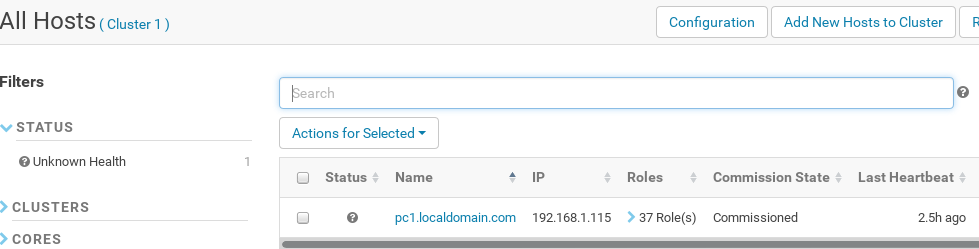
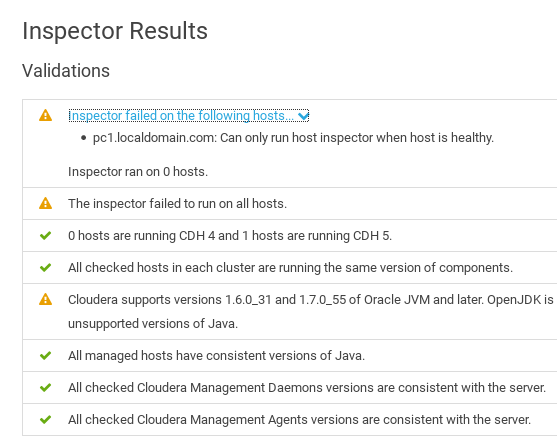
I am in a fix now where to start now.

Created on 07-24-2017 06:51 PM - edited 07-24-2017 06:55 PM
- Mark as New
- Bookmark
- Subscribe
- Mute
- Subscribe to RSS Feed
- Permalink
- Report Inappropriate Content
Could you let me know if you are able to bring up your Cloudera-scm-server / Cloudera-scm-server-db ?
whats their status ?
where you able to bring up the Cloudera manager web ui ?
could you check if you multiple java version hanging around in the host ?
/usr/java/

/usr/lib/jvm/

or you use alternatives
Meantime using the Code tag tool bar could you share the logs cloudera-scm-server / cloudera-scm-agent ?
is the location for those logs
/var/log/
Created 07-24-2017 08:05 PM
- Mark as New
- Bookmark
- Subscribe
- Mute
- Subscribe to RSS Feed
- Permalink
- Report Inappropriate Content
It is very wierd that I rebooted the system, started the cloudera-management-services, and then started others services individually. It is working now.
I am not sure why it happened. It was really a nightmare, and I am really surprised what should I do in such scenarios (without rebooting system).


