
Our Community is getting an upgrade! To get everything ready for the relaunch, we’ll be placing the site in read-only mode starting September 21st.
We really appreciate your understanding while we get things set up behind the scenes. Catch up on all the exciting details about the move here.
Need help or have questions? Drop us a line at [email protected]

Archives of Support Questions (Read Only)
- Cloudera Community
- Board Archive
- Archives of Support Questions (Read Only)
- cloudera-scm-server is dead and pid file exists
- Subscribe to RSS Feed
- Mark Question as New
- Mark Question as Read
- Float this Question for Current User
- Bookmark
- Subscribe
- Mute
- Printer Friendly Page
- Subscribe to RSS Feed
- Mark Question as New
- Mark Question as Read
- Float this Question for Current User
- Bookmark
- Subscribe
- Mute
- Printer Friendly Page
cloudera-scm-server is dead and pid file exists
- Labels:
-
Cloudera Manager


- Mark as New
- Bookmark
- Subscribe
- Mute
- Subscribe to RSS Feed
- Permalink
- Report Inappropriate Content
i am new to CDH ,due to power failure our Hadoop Cluster went down when we start our machine and try to restart cloudera-scm-server for second it shows that the service is started after a second it when we check its status it shows cloudera-scm-server is dead and pid file exists for that i checked /var/log/cloudera-scm-server .out file it gives following error
JAVA_HOME=/usr/lib/jvm/java-7-oracle-cloudera
log4j:ERROR setFile(null,true) call failed.
java.io.FileNotFoundException: /var/log/cloudera-scm-server/cloudera-scm-server.log (Permission denied)
        at java.io.FileOutputStream.open(Native Method)
        at java.io.FileOutputStream.<init>(FileOutputStream.java:221)
        at java.io.FileOutputStream.<init>(FileOutputStream.java:142)
        at org.apache.log4j.FileAppender.setFile(FileAppender.java:294)
        at org.apache.log4j.RollingFileAppender.setFile(RollingFileAppender.java:207)
        at org.apache.log4j.FileAppender.activateOptions(FileAppender.java:165)
        at org.apache.log4j.config.PropertySetter.activate(PropertySetter.java:307)
        at org.apache.log4j.config.PropertySetter.setProperties(PropertySetter.java:172)
        at org.apache.log4j.config.PropertySetter.setProperties(PropertySetter.java:104)
        at org.apache.log4j.PropertyConfigurator.parseAppender(PropertyConfigurator.java:809)
        at org.apache.log4j.PropertyConfigurator.parseCategory(PropertyConfigurator.java:735)
        at org.apache.log4j.PropertyConfigurator.configureRootCategory(PropertyConfigurator.java:615)
        at org.apache.log4j.PropertyConfigurator.doConfigure(PropertyConfigurator.java:502)
        at org.apache.log4j.PropertyConfigurator.doConfigure(PropertyConfigurator.java:547)
        at org.apache.log4j.helpers.OptionConverter.selectAndConfigure(OptionConverter.java:483)
        at org.apache.log4j.LogManager.<clinit>(LogManager.java:127)
        at org.slf4j.impl.Log4jLoggerFactory.getLogger(Log4jLoggerFactory.java:73)
        at org.slf4j.LoggerFactory.getLogger(LoggerFactory.java:242)
        at org.slf4j.LoggerFactory.getLogger(LoggerFactory.java:254)
        at com.cloudera.server.cmf.Main.<clinit>(Main.java:158)
I have installed CDH using root as user



Created 11-07-2016 06:42 AM
- Mark as New
- Bookmark
- Subscribe
- Mute
- Subscribe to RSS Feed
- Permalink
- Report Inappropriate Content
https://community.cloudera.com/t5/Cloudera-Manager-Installation/cloudera-scm-server-is-dead-and-pid-... is the same problem. It says:
Since there is a .pid file, remove it first. Check the following and delete if it exists:
/var/run/cloudera-scm-server.pid
Try this.

Created 11-07-2016 09:42 PM
- Mark as New
- Bookmark
- Subscribe
- Mute
- Subscribe to RSS Feed
- Permalink
- Report Inappropriate Content
problem sloved
stop all service - sudo service cloudera-scm-agent hard_stop_confimed
delete file /var/run/cloudera-scm-server.pid
allow read permission to /var/log/cloudera-scm-server/cloudera-scm-server.log & /var/log/cloudera-scm-server/db.log
start all service
sudo service cloudera-scm-server-db start
sudo service cloudera-scm-server start
sudo service cloudera-scm-agent hard_restart_confimed
Created 11-07-2016 06:42 AM
- Mark as New
- Bookmark
- Subscribe
- Mute
- Subscribe to RSS Feed
- Permalink
- Report Inappropriate Content
https://community.cloudera.com/t5/Cloudera-Manager-Installation/cloudera-scm-server-is-dead-and-pid-... is the same problem. It says:
Since there is a .pid file, remove it first. Check the following and delete if it exists:
/var/run/cloudera-scm-server.pid
Try this.
Created 11-07-2016 08:39 PM
- Mark as New
- Bookmark
- Subscribe
- Mute
- Subscribe to RSS Feed
- Permalink
- Report Inappropriate Content
thanks for reply
i have deleted pid file from the same location as you mentioned but after starting the cloudera server it status shows cloudera server running for a second and goes down again still unable to fix the problem
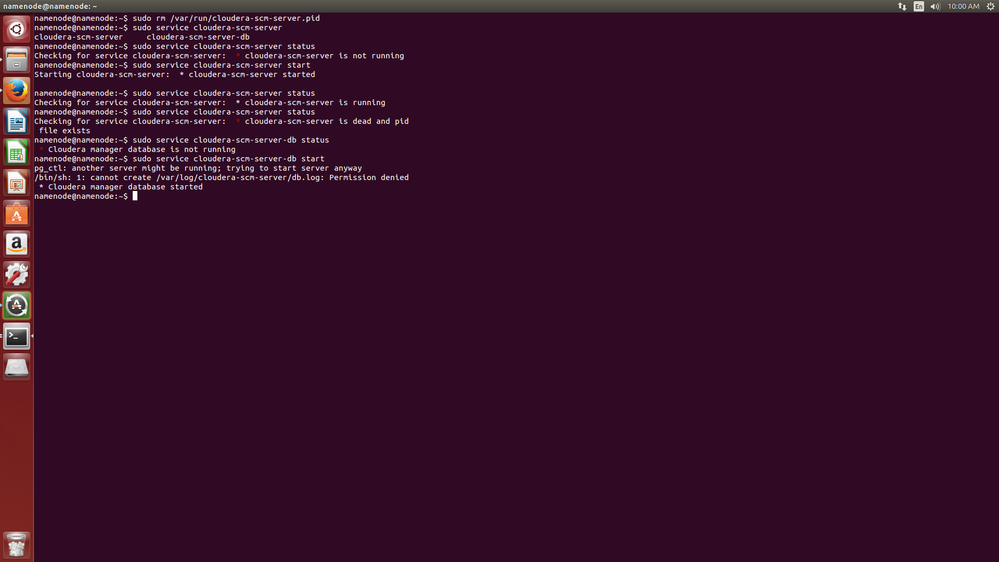
also i tried to start cloudera-scm-server-db service it shows permission denied .is their any problem of user ? because i have installed CDH as root and running command from user namenode
Created 11-07-2016 09:42 PM
- Mark as New
- Bookmark
- Subscribe
- Mute
- Subscribe to RSS Feed
- Permalink
- Report Inappropriate Content
problem sloved
stop all service - sudo service cloudera-scm-agent hard_stop_confimed
delete file /var/run/cloudera-scm-server.pid
allow read permission to /var/log/cloudera-scm-server/cloudera-scm-server.log & /var/log/cloudera-scm-server/db.log
start all service
sudo service cloudera-scm-server-db start
sudo service cloudera-scm-server start
sudo service cloudera-scm-agent hard_restart_confimed


