
Our Community is getting an upgrade! To get everything ready for the relaunch, we’ll be placing the site in read-only mode starting September 21st.
We really appreciate your understanding while we get things set up behind the scenes. Catch up on all the exciting details about the move here.
Need help or have questions? Drop us a line at [email protected]

Archives of Support Questions (Read Only)
- Cloudera Community
- Board Archive
- Archives of Support Questions (Read Only)
- Re: comfirn hosts, ambari agent error,ambari agent...
- Subscribe to RSS Feed
- Mark Question as New
- Mark Question as Read
- Float this Question for Current User
- Bookmark
- Subscribe
- Mute
- Printer Friendly Page
- Subscribe to RSS Feed
- Mark Question as New
- Mark Question as Read
- Float this Question for Current User
- Bookmark
- Subscribe
- Mute
- Printer Friendly Page
comfirn hosts, ambari agent error,ambari agent installation issue
- Labels:
-
Apache Ambari
-
Apache Hadoop


Created on 03-06-2018 02:39 PM - edited 08-18-2019 01:56 AM
- Mark as New
- Bookmark
- Subscribe
- Mute
- Subscribe to RSS Feed
- Permalink
- Report Inappropriate Content
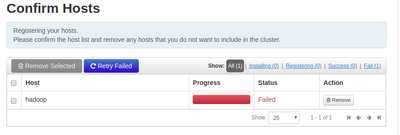
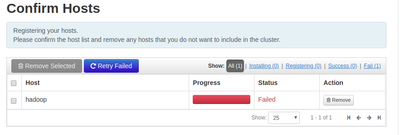
I am trying to install hdp locally on ubuntu 16.04. I installed ambari, i launched the cluster installed wizzard,I Used Local Repository, here i left it empty i don't know what i have to put. then i entred my host 'hadoop' and i entred the 'ssh private key'. In the end of all I get an error during installation of 'Ambari' agent like its showing in the picture below.
,
I am trying to install hdp locally on ubuntu 16.04. I installed ambari, i launched the cluster installed wizzard,I Used Local Repository, here i left it empty i don't know what i have to put. then i entred my host 'hadoop' and i entred the 'ssh private key'. In the end of all I get an error during installation of 'Ambari' agent like its showing in the picture below.


Created 03-06-2018 05:40 PM
- Mark as New
- Bookmark
- Subscribe
- Mute
- Subscribe to RSS Feed
- Permalink
- Report Inappropriate Content
Hi,
When registering host go with Manual Installation.
and edit /etc/ambari-agent/conf/ambari-agent.ini
change hostname=ambari server name
Then Retry Failed.



Created 03-06-2018 02:42 PM
- Mark as New
- Bookmark
- Subscribe
- Mute
- Subscribe to RSS Feed
- Permalink
- Report Inappropriate Content
Can you click on 'Failed' and share the error shown?
Created 03-06-2018 06:51 PM
- Mark as New
- Bookmark
- Subscribe
- Mute
- Subscribe to RSS Feed
- Permalink
- Report Inappropriate Content
ssh: connect to host hadoop port 22: Connection refused
SSH command execution finished
host=hadoop, exitcode=255
Command end time 2018-03-06 19:50:20

ERROR: Bootstrap of host hadoop fails because previous action finished with non-zero exit code (255)
ERROR MESSAGE: ssh: connect to host hadoop port 22: Connection refused

STDOUT:
ssh: connect to host hadoop port 22: Connection refused
Created 03-06-2018 05:40 PM
- Mark as New
- Bookmark
- Subscribe
- Mute
- Subscribe to RSS Feed
- Permalink
- Report Inappropriate Content
Hi,
When registering host go with Manual Installation.
and edit /etc/ambari-agent/conf/ambari-agent.ini
change hostname=ambari server name
Then Retry Failed.
Created 03-06-2018 07:33 PM
- Mark as New
- Bookmark
- Subscribe
- Mute
- Subscribe to RSS Feed
- Permalink
- Report Inappropriate Content
$ ambari-agent start
ambari-agent: command not found


Created 03-06-2018 09:32 PM
- Mark as New
- Bookmark
- Subscribe
- Mute
- Subscribe to RSS Feed
- Permalink
- Report Inappropriate Content
if you are doing manual installation, you need to install ambari-agent first on each of your servers. use repos to install and edit the /etc/ambari-agent/conf/ambari-agent.ini to use the ambari server hostname and start ambari-agent.
when you are adding your hosts, use manual installation .. you dont need ssh key in this case.
Created 03-06-2018 10:37 PM
- Mark as New
- Bookmark
- Subscribe
- Mute
- Subscribe to RSS Feed
- Permalink
- Report Inappropriate Content
awesome it works, thank you very much!
Created 03-07-2018 05:09 AM
- Mark as New
- Bookmark
- Subscribe
- Mute
- Subscribe to RSS Feed
- Permalink
- Report Inappropriate Content
The issue is due to 'Connection refused on the default ssh port'. Verify the following:
1. Check the ssh port under file /etc/ssh/sshd_config, if not set try setting to 22.
2. Try running ssh to the host from terminal.


