
Our Community is getting an upgrade! To get everything ready for the relaunch, we’ll be placing the site in read-only mode starting September 21st.
We really appreciate your understanding while we get things set up behind the scenes. Catch up on all the exciting details about the move here.
Need help or have questions? Drop us a line at [email protected]

Archives of Support Questions (Read Only)
- Cloudera Community
- Board Archive
- Archives of Support Questions (Read Only)
- Re: configuring Thrift Server on default port
- Subscribe to RSS Feed
- Mark Question as New
- Mark Question as Read
- Float this Question for Current User
- Bookmark
- Subscribe
- Mute
- Printer Friendly Page
- Subscribe to RSS Feed
- Mark Question as New
- Mark Question as Read
- Float this Question for Current User
- Bookmark
- Subscribe
- Mute
- Printer Friendly Page
configuring Thrift Server on default port
- Labels:
-
Apache HBase


Created 05-16-2016 06:30 PM
- Mark as New
- Bookmark
- Subscribe
- Mute
- Subscribe to RSS Feed
- Permalink
- Report Inappropriate Content
I am trying to get Thrift Server up and running as per steps mentioned here : https://docs.hortonworks.com/HDPDocuments/HDP2/HDP-2.3.4/bk_installing_manually_book/content/ref-2a6...
but it throws error when I start thrift server, Port in use: 0.0.0.0:9095 . Can someone help in configuring thrift server on different port and make it accessible outside the server I have HDP installed on.



Created 05-16-2016 06:36 PM
- Mark as New
- Bookmark
- Subscribe
- Mute
- Subscribe to RSS Feed
- Permalink
- Report Inappropriate Content
Created 05-16-2016 06:36 PM
- Mark as New
- Bookmark
- Subscribe
- Mute
- Subscribe to RSS Feed
- Permalink
- Report Inappropriate Content
Use the -p option:
hbase thrift -p 12345
Created 05-16-2016 06:41 PM
- Mark as New
- Bookmark
- Subscribe
- Mute
- Subscribe to RSS Feed
- Permalink
- Report Inappropriate Content
Thanks josh. whats the default port that HDP starts HBase Thrift Server on ? is 9090 configured to Nifi ?
Created 05-16-2016 06:45 PM
- Mark as New
- Bookmark
- Subscribe
- Mute
- Subscribe to RSS Feed
- Permalink
- Report Inappropriate Content
Yes, the default port is 9090 (the --help option would show you this too). I'm not sure what ports NiFi uses.
Created on 05-16-2016 07:02 PM - edited 08-18-2019 05:59 AM
- Mark as New
- Bookmark
- Subscribe
- Mute
- Subscribe to RSS Feed
- Permalink
- Report Inappropriate Content
Josh,
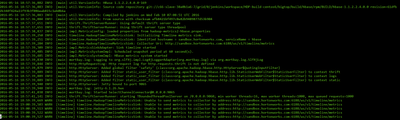
I tried configuring on different port using this command:
hbase-daemon.sh start thrift --infoport 9065 -p 9060
But when I try browsing on that port locally, I do not see that working. Here is what in output when I run above command
Created 05-16-2016 07:38 PM
- Mark as New
- Bookmark
- Subscribe
- Mute
- Subscribe to RSS Feed
- Permalink
- Report Inappropriate Content
What do you mean by "But when I try browsing on that port locally"? This isn't a service you can access with your web browser. It requires a Thrift client speaking a specific schema to interact with.


Created 05-16-2016 06:46 PM
- Mark as New
- Bookmark
- Subscribe
- Mute
- Subscribe to RSS Feed
- Permalink
- Report Inappropriate Content
You can either hbase.thrift.info.port and hbase.regionserver.thrift.port in your hbase-site.xml, or start the thrift server by passing -p <port> and --infoport <info_port> as command line arguments.
Note that port and info port are different ports. Port is used for RPCs while the info port is for the web UI.
Created 05-16-2016 08:14 PM
- Mark as New
- Bookmark
- Subscribe
- Mute
- Subscribe to RSS Feed
- Permalink
- Report Inappropriate Content
I cannot verify the port from browser using this url : http://127.0.0.1:9065/thrift.jsp as I configured my infoport on 9065


Created 05-16-2016 10:15 PM
- Mark as New
- Bookmark
- Subscribe
- Mute
- Subscribe to RSS Feed
- Permalink
- Report Inappropriate Content
I'll be updating the Manual Install Guide with this information and will post a link to the new content when I've completed it. Thanks very much for this feedback.
Created 05-19-2016 08:21 PM
- Mark as New
- Bookmark
- Subscribe
- Mute
- Subscribe to RSS Feed
- Permalink
- Report Inappropriate Content
The Manual Install Guide (versions 2.2.9, 2.3.0, 2.3.2, 2.3.4, 2.3.4.7, 2.4.0, and 2.4.2) have been updated with this information. Thank you very much for your comments and assistance.


