
Our Community is getting an upgrade! To get everything ready for the relaunch, we’ll be placing the site in read-only mode starting September 21st.
We really appreciate your understanding while we get things set up behind the scenes. Catch up on all the exciting details about the move here.
Need help or have questions? Drop us a line at [email protected]

Archives of Support Questions (Read Only)
- Cloudera Community
- Board Archive
- Archives of Support Questions (Read Only)
- Re: how to access the hive tables from spark-shell
- Subscribe to RSS Feed
- Mark Question as New
- Mark Question as Read
- Float this Question for Current User
- Bookmark
- Subscribe
- Mute
- Printer Friendly Page
- Subscribe to RSS Feed
- Mark Question as New
- Mark Question as Read
- Float this Question for Current User
- Bookmark
- Subscribe
- Mute
- Printer Friendly Page
how to access the hive tables from spark-shell
- Labels:
-
Apache Hive
-
Apache Spark
-
Quickstart VM


Created on 01-25-2016 05:07 PM - edited 09-16-2022 02:59 AM
- Mark as New
- Bookmark
- Subscribe
- Mute
- Subscribe to RSS Feed
- Permalink
- Report Inappropriate Content
Hi,
I am trying to access the already existing table in hive by using spark shell
But when I run the instructions, error comes "table not found".
e.g. in hive table is existing name as "department" in default database.
i start the spark-shell and execute the following set of instructions.
import org.apache.spark.sql.hive.HiveContext
val sqlContext = new HiveContext(sc)
val depts = sqlContext.sql("select * from departments")
depts.collecat().foreach(println)
but it coudn't find the table.
Now My questions are:
1. As I know ny using HiveContext spark can access the hive metastore. But it is not doing here, so is there any configuration setup required? I am using Cloudera quickstart VM 5..5
2. As an alternative I created the table on spark-shell , load a data file and then performed some queries and then exit the spark shell.
3. even if I create the table using spark-shell, it is not anywhere existing when I am trying to access it using hive editor.
4. when i again start the spark-shell , then earlier table i created, was no longer existing, so exactly where this table and metadata is stored and all....
I am very much confused, because accroding to theortical concepts, it should go under the hive metastore.
Thanks & Regards


Created 02-18-2019 01:34 PM
- Mark as New
- Bookmark
- Subscribe
- Mute
- Subscribe to RSS Feed
- Permalink
- Report Inappropriate Content
Hi there,
Just in case someone still needs the solution, here is what i tried and it works.
spark-shell --driver-java-options "-Dhive.metastore.uris=thrift://quickstart:9083"
I am using spark 1.6 with cloudera vm.
val df=sqlContext.sql("show databases")
df.show
You should be able to see all the databases in hive. I hope it helps.
Created 01-26-2016 01:03 PM
- Mark as New
- Bookmark
- Subscribe
- Mute
- Subscribe to RSS Feed
- Permalink
- Report Inappropriate Content
to connect to hive metastore you need to copy the hive-site.xml file into spark/conf directory. After that spark will be able to connect to hive metastore.
so run the following ommand after log in as root user
cp /usr/lib/hive/conf/hive-site.xml /usr/lib/spark/conf/


Created 09-01-2016 02:00 PM
- Mark as New
- Bookmark
- Subscribe
- Mute
- Subscribe to RSS Feed
- Permalink
- Report Inappropriate Content
Or you create a symbolic link to avoid file version syncing issues:
ln -s /usr/lib/hive/conf/hive-site.xml /usr/lib/spark/conf/hive-site.xml


Created 01-03-2017 11:47 PM
- Mark as New
- Bookmark
- Subscribe
- Mute
- Subscribe to RSS Feed
- Permalink
- Report Inappropriate Content
Still the issue is persisting,
What else can we do to make it work other than hive-site.xml
Created on 01-14-2017 09:40 PM - edited 01-14-2017 09:41 PM
- Mark as New
- Bookmark
- Subscribe
- Mute
- Subscribe to RSS Feed
- Permalink
- Report Inappropriate Content
which version spark are you using?
assuming you are using 1.4v or higher.
import org.apache.spark.sql.hive.HiveContext
import sqlContext.implicits._
val hiveObj = new HiveContext(sc)
hiveObj.refreshTable("db.table") // if you have uograded your hive do this, to refresh the tables.
val sample = sqlContext.sql("select * from table").collect()
sample.foreach(println)
This has worked for me

Created 06-29-2017 04:39 AM
- Mark as New
- Bookmark
- Subscribe
- Mute
- Subscribe to RSS Feed
- Permalink
- Report Inappropriate Content
I have downloaded Cloudera quickstart 5.10 for VirtualBox.
But it's not loading hive data into spark
import org.apache.spark.sql.hive.HiveContext
import sqlContext.implicits._
val hiveObj = new HiveContext(sc)
hiveObj.refreshTable("db.table") // if you have uograded your hive do this, to refresh the tables.
val sample = sqlContext.sql("select * from table").collect()
sample.foreach(println)
Still i'm getting the error as table not found(It's not accessing metadata)
What should i do, Any one pls help me

Created on 07-25-2017 03:26 AM - edited 07-25-2017 03:27 AM
- Mark as New
- Bookmark
- Subscribe
- Mute
- Subscribe to RSS Feed
- Permalink
- Report Inappropriate Content
I'm having the same issue. I'm using CDH 5.10 with Spark on Yarn
Also, is there a way to incllude hive-site.xml through Cloudera Manager? At the moment I have a script to make sure that the symlink is there (and links to the correct hive-site.xml) in the whole cluster, but getting Cloudera Manager to do it for me would be easier, faster and less error prone.

Created 10-23-2017 04:23 AM
- Mark as New
- Bookmark
- Subscribe
- Mute
- Subscribe to RSS Feed
- Permalink
- Report Inappropriate Content
Hi!
On the last week i have resolved the same problem for Spark 2.
For this I've select the Hive Service dependance on the Spark 2 service Configuration page (Service-Wide Category):
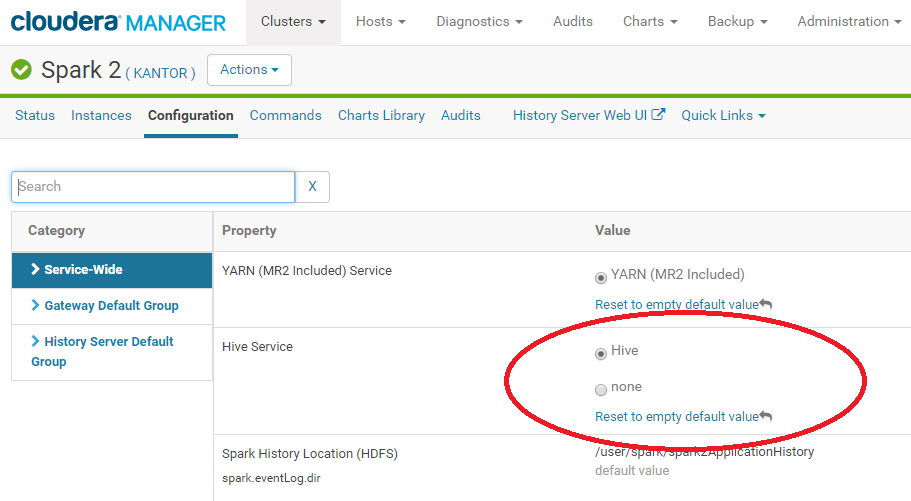
After stale services was restarted Spark 2 started to works correctly.

Created 11-08-2017 09:19 AM
- Mark as New
- Bookmark
- Subscribe
- Mute
- Subscribe to RSS Feed
- Permalink
- Report Inappropriate Content
I am having the same issue and copying the hive-site.xml did not resolve the issue for me. I am not using spark2, but the v1.6 that comes with Cloudera 5.13 - and there is no spark/hive configuration setting. Was anyone else able to figure out how to fix this? Thanks!
Created 11-08-2017 11:19 PM
- Mark as New
- Bookmark
- Subscribe
- Mute
- Subscribe to RSS Feed
- Permalink
- Report Inappropriate Content
Hi!
Have you installed the appropriate Gateways on the server where these configuration settings are required?


