
Our Community is getting an upgrade! To get everything ready for the relaunch, we’ll be placing the site in read-only mode starting September 21st.
We really appreciate your understanding while we get things set up behind the scenes. Catch up on all the exciting details about the move here.
Need help or have questions? Drop us a line at [email protected]

Archives of Support Questions (Read Only)
- Cloudera Community
- Board Archive
- Archives of Support Questions (Read Only)
- Re: how to configure Ambari Alert for Ranger Admin
- Subscribe to RSS Feed
- Mark Question as New
- Mark Question as Read
- Float this Question for Current User
- Bookmark
- Subscribe
- Mute
- Printer Friendly Page
- Subscribe to RSS Feed
- Mark Question as New
- Mark Question as Read
- Float this Question for Current User
- Bookmark
- Subscribe
- Mute
- Printer Friendly Page
how to configure Ambari Alert for Ranger Admin
- Labels:
-
Apache Ambari
-
Apache Ranger


Created 03-10-2016 04:57 PM
- Mark as New
- Bookmark
- Subscribe
- Mute
- Subscribe to RSS Feed
- Permalink
- Report Inappropriate Content
Hello,
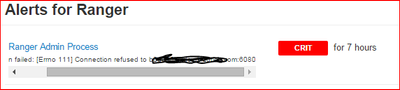
after switching the port for Ranger-Admin, Ambari is showing an alert for checking the Ranger-Admin because it is still trying to connect to Ranger-Admin on port 6080...
How can I reconfigure this Ambari-check, so that it is connecting to Ranger-Admin at the correct port (now it is 6182) ?
Thanks in advance, Gerd
PS: this is now the case for ~5 hours, in the beginning I thought to give Ambari some minutes... 😉
HDP 2.2.4.2
Ambari 2.0.1

Created 03-10-2016 09:00 PM
- Mark as New
- Bookmark
- Subscribe
- Mute
- Subscribe to RSS Feed
- Permalink
- Report Inappropriate Content
Can you see what is the port in
/var/lib/ambari-server/resources/stacks/HDP/2.3/services/RANGER/configuration/ranger-admin-site.xml Was it changed by Ambari? Change it then and see if it works.
The alerts in the following should pcik it up.
vi /var/lib/ambari-server/resources/stacks/HDP/2.3/services/RANGER/configuration/alerts.json

Created 03-10-2016 05:47 PM
- Mark as New
- Bookmark
- Subscribe
- Mute
- Subscribe to RSS Feed
- Permalink
- Report Inappropriate Content
https://github.com/apache/ambari/commit/f9e73665b48c44cb6e8118bb613d81584fddc497
Created 03-10-2016 05:55 PM
- Mark as New
- Bookmark
- Subscribe
- Mute
- Subscribe to RSS Feed
- Permalink
- Report Inappropriate Content
Many thanks @Shishir Saxena .
Created on 03-10-2016 07:52 PM - edited 08-19-2019 03:28 AM
- Mark as New
- Bookmark
- Subscribe
- Mute
- Subscribe to RSS Feed
- Permalink
- Report Inappropriate Content
Hello @Shishir Saxena ,
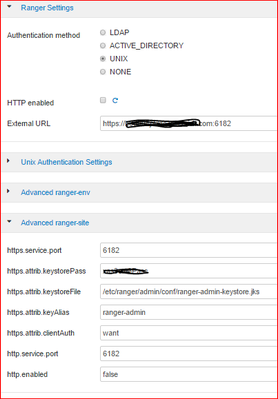
I just checked another cluster with Ambari 2.1.2, there is the same situation. HTTP disabled, port set to 6182, but Ambari Alert is checking port 6080
This is the Ranger config
used Ambari version 2.1.2.1
What else to check?
Created 03-10-2016 09:00 PM
- Mark as New
- Bookmark
- Subscribe
- Mute
- Subscribe to RSS Feed
- Permalink
- Report Inappropriate Content
Can you see what is the port in
/var/lib/ambari-server/resources/stacks/HDP/2.3/services/RANGER/configuration/ranger-admin-site.xml Was it changed by Ambari? Change it then and see if it works.
The alerts in the following should pcik it up.
vi /var/lib/ambari-server/resources/stacks/HDP/2.3/services/RANGER/configuration/alerts.json
Created 03-12-2016 01:05 PM
- Mark as New
- Bookmark
- Subscribe
- Mute
- Subscribe to RSS Feed
- Permalink
- Report Inappropriate Content
Hello @Ancil McBarnett ,
I checked that ranger-admin-site.xml, it was not updated there. I was wondering, since I am using HDP2.2.4, why is that file under .../HDP/2.3/... ?!?!
Anyways, I set the port to 6182, but unfortunately after restarting Ranger the alert was still there.
So I searched for other RANGER configs, because of the HDP2.2.4 vs. HDP2.3 and at the end it turned out that I had to update the port in file /var/lib/ambari-server/resources/common-services/RANGER/0.4.0/configuration/ranger-site.xml
After restarting Ranger the alert disappeared.
Many thanks for this hint...


