
Our Community is getting an upgrade! To get everything ready for the relaunch, we’ll be placing the site in read-only mode starting September 21st.
We really appreciate your understanding while we get things set up behind the scenes. Catch up on all the exciting details about the move here.
Need help or have questions? Drop us a line at [email protected]

Archives of Support Questions (Read Only)
- Cloudera Community
- Board Archive
- Archives of Support Questions (Read Only)
- how to delete all application logs from spark hist...
- Subscribe to RSS Feed
- Mark Question as New
- Mark Question as Read
- Float this Question for Current User
- Bookmark
- Subscribe
- Mute
- Printer Friendly Page
- Subscribe to RSS Feed
- Mark Question as New
- Mark Question as Read
- Float this Question for Current User
- Bookmark
- Subscribe
- Mute
- Printer Friendly Page
how to delete all application logs from spark history + not by rotation !!
- Labels:
-
Apache Ambari
-
Apache Spark


Created on 11-29-2017 06:13 PM - edited 08-17-2019 10:05 PM
- Mark as New
- Bookmark
- Subscribe
- Mute
- Subscribe to RSS Feed
- Permalink
- Report Inappropriate Content
from
hdfs dfs -du -h /
we see that spark history take a lot space from HDFS
from ambari GUI
I choose spark
and then quick links
and then I get the history server page with all applications
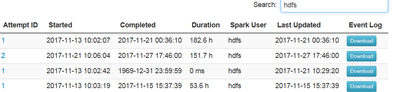
I want to delete all applications from the page
how to do it because I not see the delete button ?
second
is it possible to delete the application that use hdfs by API or CLI ?


Created 11-29-2017 06:41 PM
- Mark as New
- Bookmark
- Subscribe
- Mute
- Subscribe to RSS Feed
- Permalink
- Report Inappropriate Content
If you want to delete applications in spark2
hdfs dfs -rm -R /spark2-history/{app-id}If you want to delete applications in spark1
hdfs dfs -rm -R /spark-history/{app-id}Restart history servers after running the commands.
Thanks,
Aditya



Created 11-29-2017 06:35 PM
- Mark as New
- Bookmark
- Subscribe
- Mute
- Subscribe to RSS Feed
- Permalink
- Report Inappropriate Content
Spark has a bunch of parameter to deal with job history rotation.
In particular :
spark.history.fs.cleaner.enabled true
spark.history.fs.cleaner.maxAge  12h
spark.history.fs.cleaner.interval 1h
Source : https://spark.apache.org/docs/latest/monitoring.html
In the example above :
- Rotation is active
- All Jobs > than 12 hours will be deleted
- Deletion happens at 1 hour intervals
Note these parameters need to be implemented on a environnement level ( not on a job level ).
They are usually placed in spark-default file.
Matthieu
Created 11-29-2017 06:36 PM
- Mark as New
- Bookmark
- Subscribe
- Mute
- Subscribe to RSS Feed
- Permalink
- Report Inappropriate Content
Created 11-29-2017 06:41 PM
- Mark as New
- Bookmark
- Subscribe
- Mute
- Subscribe to RSS Feed
- Permalink
- Report Inappropriate Content
If you want to delete applications in spark2
hdfs dfs -rm -R /spark2-history/{app-id}If you want to delete applications in spark1
hdfs dfs -rm -R /spark-history/{app-id}Restart history servers after running the commands.
Thanks,
Aditya
Created 11-29-2017 06:44 PM
- Mark as New
- Bookmark
- Subscribe
- Mute
- Subscribe to RSS Feed
- Permalink
- Report Inappropriate Content
@Aditya thank you -
but how to delete all application that use HDFS , because in the page I see a lot of application around 1000 , so I cant delete one by one
Created 11-29-2017 06:45 PM
- Mark as New
- Bookmark
- Subscribe
- Mute
- Subscribe to RSS Feed
- Permalink
- Report Inappropriate Content
hdfs dfs -rm -R /spark2-history/* will remove all applications
Created on 11-29-2017 06:48 PM - edited 08-17-2019 10:04 PM
- Mark as New
- Bookmark
- Subscribe
- Mute
- Subscribe to RSS Feed
- Permalink
- Report Inappropriate Content

ok , so if I want to remove it from the ambari GUI then , how to do it ( I ask because from the page I not see any delete option )
Created 11-29-2017 06:52 PM
- Mark as New
- Bookmark
- Subscribe
- Mute
- Subscribe to RSS Feed
- Permalink
- Report Inappropriate Content
You can use files view if you want to delete from GUI. I'm not sure if there is delete option in Spark history server.
Created 11-29-2017 06:55 PM
- Mark as New
- Bookmark
- Subscribe
- Mute
- Subscribe to RSS Feed
- Permalink
- Report Inappropriate Content
is it possible to print by CLI all application list so I will by grep capture the hdfs and appliaction ID and then remove it by hdfs dfs -rm -R /spark2-history//{app-id}
Created 11-29-2017 07:07 PM
- Mark as New
- Bookmark
- Subscribe
- Mute
- Subscribe to RSS Feed
- Permalink
- Report Inappropriate Content
If you want to list all and delete all applications. You can simply do
hdfs dfs -rm -R /spark2-history/*
This folder will have only spark2 app logs and no other files. Hope this helps
(Or)
You can do the below. This should print all application IDs
curl http://{spark2history server url}:18080/api/v1/applications | grep "\"id\"" > a.txt
cut -d':' -f2 a.txt  | cut -d "\"" -f 2


