
Our Community is getting an upgrade! To get everything ready for the relaunch, we’ll be placing the site in read-only mode starting September 21st.
We really appreciate your understanding while we get things set up behind the scenes. Catch up on all the exciting details about the move here.
Need help or have questions? Drop us a line at [email protected]

Archives of Support Questions (Read Only)
- Cloudera Community
- Board Archive
- Archives of Support Questions (Read Only)
- how to perform HDP upgrade to 2.6.4 while no inter...
- Subscribe to RSS Feed
- Mark Question as New
- Mark Question as Read
- Float this Question for Current User
- Bookmark
- Subscribe
- Mute
- Printer Friendly Page
- Subscribe to RSS Feed
- Mark Question as New
- Mark Question as Read
- Float this Question for Current User
- Bookmark
- Subscribe
- Mute
- Printer Friendly Page
how to perform HDP upgrade to 2.6.4 while no internet access from ambari cluster


Created on 02-27-2018 05:22 PM - edited 08-17-2019 05:33 PM
- Mark as New
- Bookmark
- Subscribe
- Mute
- Subscribe to RSS Feed
- Permalink
- Report Inappropriate Content
dear colleges and friends
we are now after ambari upgrade and before HDP upgrade
how to perform HDP upgrade to 2.6.4 while no internet access from ambari cluster
we want to use the upgrade from local repo , but screen not show the available version - 2.6.4
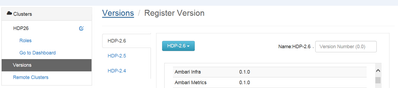
so what we need to do in order to update the ambari , so it will show the HDP availble version - 2.6.4 inspite we not have access to internet ?

we want to use the local repo for HDP upgrade ( but the names are from old HDP version - 2.6 )




Created 03-01-2018 03:04 AM
- Mark as New
- Bookmark
- Subscribe
- Mute
- Subscribe to RSS Feed
- Permalink
- Report Inappropriate Content
When we try to register a new version from ambari UI then on the mentioned page ambari makes the following API call to determine which one is the latest minor release of the selected stack:
# curl -i -u admin:admin -H "X-Requested-By: ambari" -X GET http://amb25101.example.com:8080/api/v1/stacks/HDP/versions/2.6/operating_systems/redhat7/repositori...
That way ambari knows which is the "latest_base_url" for the selected stack:
 {
  "href" : "http://amb25101.example.com:8080/api/v1/stacks/HDP/versions/2.6/operating_systems/redhat7/repositories/HDP-2.6",
  "Repositories" : {
    "base_url" : "http://public-repo-1.hortonworks.com/HDP/centos7/2.x/updates/2.6.3.0",
    "default_base_url" : "http://public-repo-1.hortonworks.com/HDP/centos7/2.x/updates/2.6.0.3",
    "latest_base_url" : "http://public-repo-1.hortonworks.com/HDP/centos7/2.x/updates/2.6.4.0",
    "mirrors_list" : null,
    "os_type" : "redhat7",
    "repo_id" : "HDP-2.6",
    "repo_name" : "HDP",
    "stack_name" : "HDP",
    "stack_version" : "2.6",
    "unique" : false
  }
}
Like in this case it knows: http://public-repo-1.hortonworks.com/HDP/centos7/2.x/updates/2.6.4.0
So if you do not see this info because you do not have the Internet access. So you will need to configure a local HDP repo and make it available in ambari.
You will than need to provide the HDP and HDP-UTILS local repo location in the below text boxes.
.
Created 03-01-2018 03:04 AM
- Mark as New
- Bookmark
- Subscribe
- Mute
- Subscribe to RSS Feed
- Permalink
- Report Inappropriate Content
When we try to register a new version from ambari UI then on the mentioned page ambari makes the following API call to determine which one is the latest minor release of the selected stack:
# curl -i -u admin:admin -H "X-Requested-By: ambari" -X GET http://amb25101.example.com:8080/api/v1/stacks/HDP/versions/2.6/operating_systems/redhat7/repositori...
That way ambari knows which is the "latest_base_url" for the selected stack:
 {
  "href" : "http://amb25101.example.com:8080/api/v1/stacks/HDP/versions/2.6/operating_systems/redhat7/repositories/HDP-2.6",
  "Repositories" : {
    "base_url" : "http://public-repo-1.hortonworks.com/HDP/centos7/2.x/updates/2.6.3.0",
    "default_base_url" : "http://public-repo-1.hortonworks.com/HDP/centos7/2.x/updates/2.6.0.3",
    "latest_base_url" : "http://public-repo-1.hortonworks.com/HDP/centos7/2.x/updates/2.6.4.0",
    "mirrors_list" : null,
    "os_type" : "redhat7",
    "repo_id" : "HDP-2.6",
    "repo_name" : "HDP",
    "stack_name" : "HDP",
    "stack_version" : "2.6",
    "unique" : false
  }
}
Like in this case it knows: http://public-repo-1.hortonworks.com/HDP/centos7/2.x/updates/2.6.4.0
So if you do not see this info because you do not have the Internet access. So you will need to configure a local HDP repo and make it available in ambari.
You will than need to provide the HDP and HDP-UTILS local repo location in the below text boxes.
.


