
Our Community is getting an upgrade! To get everything ready for the relaunch, we’ll be placing the site in read-only mode starting September 21st.
We really appreciate your understanding while we get things set up behind the scenes. Catch up on all the exciting details about the move here.
Need help or have questions? Drop us a line at [email protected]

Archives of Support Questions (Read Only)
- Cloudera Community
- Board Archive
- Archives of Support Questions (Read Only)
- Re: how to prepend constant to attribute in the f...
- Subscribe to RSS Feed
- Mark Question as New
- Mark Question as Read
- Float this Question for Current User
- Bookmark
- Subscribe
- Mute
- Printer Friendly Page
- Subscribe to RSS Feed
- Mark Question as New
- Mark Question as Read
- Float this Question for Current User
- Bookmark
- Subscribe
- Mute
- Printer Friendly Page
how to prepend constant to attribute in the flow file
- Labels:
-
Apache NiFi


Created 10-09-2018 02:38 PM
- Mark as New
- Bookmark
- Subscribe
- Mute
- Subscribe to RSS Feed
- Permalink
- Report Inappropriate Content
Hi
I am trying to prepend constant to the attribute in flow file . I was used below flow
Details :
Input : Flow file contains only below value
{"project" :"ABC-11"}
Output : Flow file should has mentioned value
{"_id.project":"ABC-11"}
here prepending _id to the project attribute and followed below flow
source--> updateattribute->replacetext->put file
in updateattribute attribute defined the project filed as below
project ==> ${prepend(_id)projectid}
The Processor is giving error and refereed the nifi expression language guide , There is no function for prepending constant to attribute
Please suggest some idea/thoughts for resolving the issue. Thanks for time and support


Created on 10-09-2018 10:14 PM - edited 08-17-2019 08:07 PM
- Mark as New
- Bookmark
- Subscribe
- Mute
- Subscribe to RSS Feed
- Permalink
- Report Inappropriate Content
If your flowfile having only one key,value then use ReplaceText processor and configure the processor as shown below
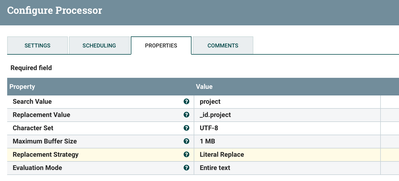
We are searching for project literal value and replacing that with _id.project by using ReplacementStrategy as LiteralReplace.
Input:
{"project" :"ABC-11"}Output:
{"_id.project":"ABC-11"}
Created on 10-09-2018 10:14 PM - edited 08-17-2019 08:07 PM
- Mark as New
- Bookmark
- Subscribe
- Mute
- Subscribe to RSS Feed
- Permalink
- Report Inappropriate Content
If your flowfile having only one key,value then use ReplaceText processor and configure the processor as shown below
We are searching for project literal value and replacing that with _id.project by using ReplacementStrategy as LiteralReplace.
Input:
{"project" :"ABC-11"}Output:
{"_id.project":"ABC-11"}
Created 10-10-2018 12:30 PM
- Mark as New
- Bookmark
- Subscribe
- Mute
- Subscribe to RSS Feed
- Permalink
- Report Inappropriate Content
Thanks for your time and help


