
Our Community is getting an upgrade! To get everything ready for the relaunch, we’ll be placing the site in read-only mode starting September 21st.
We really appreciate your understanding while we get things set up behind the scenes. Catch up on all the exciting details about the move here.
Need help or have questions? Drop us a line at [email protected]

Archives of Support Questions (Read Only)
- Cloudera Community
- Board Archive
- Archives of Support Questions (Read Only)
- how to stop all components on data-node machine ( ...
- Subscribe to RSS Feed
- Mark Question as New
- Mark Question as Read
- Float this Question for Current User
- Bookmark
- Subscribe
- Mute
- Printer Friendly Page
- Subscribe to RSS Feed
- Mark Question as New
- Mark Question as Read
- Float this Question for Current User
- Bookmark
- Subscribe
- Mute
- Printer Friendly Page
how to stop all components on data-node machine ( worker machine ) by rest API
- Labels:
-
Apache Ambari
-
Apache Hadoop


Created on 01-01-2018 05:27 PM - edited 08-18-2019 02:25 AM
- Mark as New
- Bookmark
- Subscribe
- Mute
- Subscribe to RSS Feed
- Permalink
- Report Inappropriate Content
we have in the ambari 3 workers machines ( data node machines )
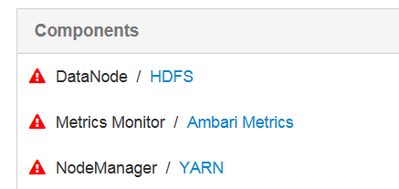
each worker machine has the following components:
DataNode ( HDFS )
Metrics Monitor
NodeManager
how to stop/start all these components only on worker machine!
second
is it possible to stop/start the components only on all workers machines ( instead to stop/start each individual work machine ) ?



Created 01-02-2018 02:01 PM
- Mark as New
- Bookmark
- Subscribe
- Mute
- Subscribe to RSS Feed
- Permalink
- Report Inappropriate Content
I guess you would be using curl, so providing the example in curl. This one is for the PUT call.
[root@ctr-e136-1513029738776-28711-01-000002 ~]# curl -XPUT -u admin:admin --header X-Requested-By:ambari http://172.27.67.14:8080/api/v1/clusters/cl1/hosts/ctr-e136-1513029738776-28711-01-000002.hwx.site/h... -d '
{"RequestInfo":{"context":"Stop All Host Components","operation_level":{"level":"HOST","cluster_name":"cl1","host_names":"ctr-e136-1513029738776-28711-01-000002.hwx.site"},"query":"HostRoles/component_name.in(JOURNALNODE,SPARK_JOBHISTORYSERVER)"},"Body":{"HostRoles":{"state":"STARTED"}}}'
"http://<ambari_server_host>:8080/api/v1/clusters/cl1/hosts/<host_name>/host_components" this is a GET call and this doesn't require any request body.
Created 01-02-2018 10:10 AM
- Mark as New
- Bookmark
- Subscribe
- Mute
- Subscribe to RSS Feed
- Permalink
- Report Inappropriate Content
use below api to stop all the components on a host :
PUT : http://<ambari_server_host>:8080/api/v1/clusters/cl1/hosts/<host_name>/host_components
Body :
{"RequestInfo":{"context":"Stop All Host Components","operation_level":{"level":"HOST","cluster_name":"cl1","host_names":"<host_name>"},"query":"HostRoles/component_name.in(DATANODE,HBASE_REGIONSERVER,JOURNALNODE,METRICS_MONITOR,NFS_GATEWAY,SPARK_JOBHISTORYSERVER)"},"Body":{"HostRoles":{"state":"INSTALLED"}}}use below api to start all the components on a host :
PUT : http://<ambari_server_host>:8080/api/v1/clusters/cl1/hosts/<host_name>/host_components
Body :
{"RequestInfo":{"context":"Start All Host Components","operation_level":{"level":"HOST","cluster_name":"cl1","host_names":"<host_name>"},"query":"HostRoles/component_name.in(DATANODE,HBASE_REGIONSERVER,JOURNALNODE,METRICS_MONITOR,NFS_GATEWAY,SPARK_JOBHISTORYSERVER)"},"Body":{"HostRoles":{"state":"STARTED"}}}Note : Here "HostRoles/component_name.in" should be replaced with components on a specific host. You can obtain this using the api : http://<ambari_server_host>:8080/api/v1/clusters/cl1/hosts/<host_name>?fields=host_components
If you are planning to write a script to automatically start/stop components on a DATANODE host then you can follow below steps :
1) Use GET http://<ambari_server_host>:8080/api/v1/clusters/cl1/services/HDFS/components/DATANODE/?fields=host_... to find all the hosts which have DATANODE installed.
2) Then use the PUT apis to STOP/START(as mentioned above) in a loop to perform the required operation on all the respective hosts.
Please let me know if you have any questions.
Created 01-02-2018 12:17 PM
- Mark as New
- Bookmark
- Subscribe
- Mute
- Subscribe to RSS Feed
- Permalink
- Report Inappropriate Content
thank you for the response , about the syntax "http://<ambari_server_host>:8080/api/v1/clusters/cl1/hosts/<host_name>/host_components" , where is the place for body? , can you show me please the full syntax ?
Created 01-02-2018 02:01 PM
- Mark as New
- Bookmark
- Subscribe
- Mute
- Subscribe to RSS Feed
- Permalink
- Report Inappropriate Content
I guess you would be using curl, so providing the example in curl. This one is for the PUT call.
[root@ctr-e136-1513029738776-28711-01-000002 ~]# curl -XPUT -u admin:admin --header X-Requested-By:ambari http://172.27.67.14:8080/api/v1/clusters/cl1/hosts/ctr-e136-1513029738776-28711-01-000002.hwx.site/h... -d '
{"RequestInfo":{"context":"Stop All Host Components","operation_level":{"level":"HOST","cluster_name":"cl1","host_names":"ctr-e136-1513029738776-28711-01-000002.hwx.site"},"query":"HostRoles/component_name.in(JOURNALNODE,SPARK_JOBHISTORYSERVER)"},"Body":{"HostRoles":{"state":"STARTED"}}}'
"http://<ambari_server_host>:8080/api/v1/clusters/cl1/hosts/<host_name>/host_components" this is a GET call and this doesn't require any request body.


Created 12-20-2018 02:49 PM
- Mark as New
- Bookmark
- Subscribe
- Mute
- Subscribe to RSS Feed
- Permalink
- Report Inappropriate Content
Is it possible to call a script on the host directly to do this shutdown?
When my server is issue a shutdown command I want to called a script directly to shutdown all ambari components on that host.
Thanks
Created 12-20-2018 03:00 PM
- Mark as New
- Bookmark
- Subscribe
- Mute
- Subscribe to RSS Feed
- Permalink
- Report Inappropriate Content
if your ambari server is down then you cant call API in order to stop the services / components
Created 12-20-2018 10:33 PM
- Mark as New
- Bookmark
- Subscribe
- Mute
- Subscribe to RSS Feed
- Permalink
- Report Inappropriate Content
please exept my answer if it fit for you
Created 12-21-2018 10:07 AM
- Mark as New
- Bookmark
- Subscribe
- Mute
- Subscribe to RSS Feed
- Permalink
- Report Inappropriate Content
Thanks for quick reply.
I meant to call a script to shutdown the ambari components after the server is issued a shutdown command, but before it actually shutdowns!
But I found a solution to the issue anyway - I just needed to add this command "ExecStop=" to the systemd service files and all seems to work fine now.
Thanks again for your quick reply..


