
Our Community is getting an upgrade! To get everything ready for the relaunch, we’ll be placing the site in read-only mode starting September 21st.
We really appreciate your understanding while we get things set up behind the scenes. Catch up on all the exciting details about the move here.
Need help or have questions? Drop us a line at [email protected]

Archives of Support Questions (Read Only)
- Cloudera Community
- Board Archive
- Archives of Support Questions (Read Only)
- Re: java version to download for rhel 6
- Subscribe to RSS Feed
- Mark Question as New
- Mark Question as Read
- Float this Question for Current User
- Bookmark
- Subscribe
- Mute
- Printer Friendly Page
- Subscribe to RSS Feed
- Mark Question as New
- Mark Question as Read
- Float this Question for Current User
- Bookmark
- Subscribe
- Mute
- Printer Friendly Page
java version to download for rhel 6


Created 01-25-2016 03:08 AM
- Mark as New
- Bookmark
- Subscribe
- Mute
- Subscribe to RSS Feed
- Permalink
- Report Inappropriate Content
since we dont have internet access and not able to install Java from yum, so we have to download java jdk8 for rhel 6.5 installation. I pick this one -- jdk-8u71-linux-x64.gz and like to confirm weather this is a right one.
if not, please let me know the correct one along with URL, thanks


Created on 01-25-2016 03:30 AM - edited 08-19-2019 04:31 AM
- Mark as New
- Bookmark
- Subscribe
- Mute
- Subscribe to RSS Feed
- Permalink
- Report Inappropriate Content
Hi Robin,
You can download and install anyone of the following
- Oracle JDK 1.8 64-bit (minimum JDK 1.8_60) (default)
- Oracle JDK 1.7 64-bit (minimum JDK 1.7_67)
or
- OpenJDK 8 64-bit (not supported on SLES)
- OpenJDK 7 64-bit (not supported on SLES)
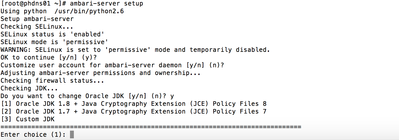
Now, when you install ambari-server then make sure that you choose option 3 when it will ask for java

Created 01-25-2016 03:15 AM
- Mark as New
- Bookmark
- Subscribe
- Mute
- Subscribe to RSS Feed
- Permalink
- Report Inappropriate Content
@Robin Dong please see Here
Created on 01-25-2016 03:30 AM - edited 08-19-2019 04:31 AM
- Mark as New
- Bookmark
- Subscribe
- Mute
- Subscribe to RSS Feed
- Permalink
- Report Inappropriate Content
Hi Robin,
You can download and install anyone of the following
- Oracle JDK 1.8 64-bit (minimum JDK 1.8_60) (default)
- Oracle JDK 1.7 64-bit (minimum JDK 1.7_67)
or
- OpenJDK 8 64-bit (not supported on SLES)
- OpenJDK 7 64-bit (not supported on SLES)
Now, when you install ambari-server then make sure that you choose option 3 when it will ask for java
Created 01-25-2016 11:02 AM
- Mark as New
- Bookmark
- Subscribe
- Mute
- Subscribe to RSS Feed
- Permalink
- Report Inappropriate Content
Yes, it's fine jdk-8u71-linux-x64.gz and make sure you choose option 3 as shown above.
Created 01-25-2016 02:23 PM
- Mark as New
- Bookmark
- Subscribe
- Mute
- Subscribe to RSS Feed
- Permalink
- Report Inappropriate Content
@Robin Dong Hi Robin, Please hit accept on the best answer as part of the best practice to close the thread.

Created 01-25-2016 03:39 AM
- Mark as New
- Bookmark
- Subscribe
- Mute
- Subscribe to RSS Feed
- Permalink
- Report Inappropriate Content
so this one I picked would work, right? jdk-8u71-linux-x64.gz @http://www.oracle.com/technetwork/java/javase/downloads/jdk8-downloads-2133151.html
Appreciated your valuable input, never thought this is a custom JDK.


Created 01-25-2016 07:48 AM
- Mark as New
- Bookmark
- Subscribe
- Mute
- Subscribe to RSS Feed
- Permalink
- Report Inappropriate Content
Hi @Robin Dong ,
you have to choose "[3] Custom JDK" since you installed JDK 'manually', the other options are for let Ambari install JDK.
It doesn't mean that you installed a custom built JDK 😉 ... maybe the wording is a bit confusing here
Created 01-25-2016 01:30 PM
- Mark as New
- Bookmark
- Subscribe
- Mute
- Subscribe to RSS Feed
- Permalink
- Report Inappropriate Content
OH, yest, you are right. I was little confused.


