
Our Community is getting an upgrade! To get everything ready for the relaunch, we’ll be placing the site in read-only mode starting September 21st.
We really appreciate your understanding while we get things set up behind the scenes. Catch up on all the exciting details about the move here.
Need help or have questions? Drop us a line at [email protected]

Archives of Support Questions (Read Only)
- Cloudera Community
- Board Archive
- Archives of Support Questions (Read Only)
- "File /user/root/tmp/test.txt" could only be repli...
- Subscribe to RSS Feed
- Mark Question as New
- Mark Question as Read
- Float this Question for Current User
- Bookmark
- Subscribe
- Mute
- Printer Friendly Page
- Subscribe to RSS Feed
- Mark Question as New
- Mark Question as Read
- Float this Question for Current User
- Bookmark
- Subscribe
- Mute
- Printer Friendly Page
"File /user/root/tmp/test.txt" could only be replicated to 0 nodes instead of minReplication (=1). There are 1 datanode(s) running and 1 node(s) are excluded in this operation.
- Labels:
-
Apache Hadoop
-
Apache NiFi


Created on 02-08-2017 06:34 AM - edited 08-18-2019 04:18 AM
- Mark as New
- Bookmark
- Subscribe
- Mute
- Subscribe to RSS Feed
- Permalink
- Report Inappropriate Content
Hi guys,
First of all, I am new in Hortonworks. I have tried to connect to a remote HDP (actually my hdfs) in VM from NiFi in my local machine. I apply putHDFS processor, but unfortunately I am faced with an error.
org.apache.nifi.processor.exception.ProcessException: IOException thrown from PutHDFS[id=07af2532-015a-1000-acc3-3ed53acfcc7c]: org.apache.hadoop.ipc.RemoteException(java.io.IOException): File /user/root/tmp/test.txt could only be replicated to 0 nodes instead of minReplication (=1).  There are 1 datanode(s) running and 1 node(s) are excluded in this operation.
 at org.apache.hadoop.hdfs.server.blockmanagement.BlockManager.chooseTarget4NewBlock(BlockManager.java:1641)
 at org.apache.hadoop.hdfs.server.namenode.FSNamesystem.getNewBlockTargets(FSNamesystem.java:3198)
 at org.apache.hadoop.hdfs.server.namenode.FSNamesystem.getAdditionalBlock(FSNamesystem.java:3122)
 at org.apache.hadoop.hdfs.server.namenode.NameNodeRpcServer.addBlock(NameNodeRpcServer.java:843)
 at org.apache.hadoop.hdfs.protocolPB.ClientNamenodeProtocolServerSideTranslatorPB.addBlock(ClientNamenodeProtocolServerSideTranslatorPB.java:500)
 at org.apache.hadoop.hdfs.protocol.proto.ClientNamenodeProtocolProtos$ClientNamenodeProtocol$2.callBlockingMethod(ClientNamenodeProtocolProtos.java)
 at org.apache.hadoop.ipc.ProtobufRpcEngine$Server$ProtoBufRpcInvoker.call(ProtobufRpcEngine.java:640)
 at org.apache.hadoop.ipc.RPC$Server.call(RPC.java:982)
 at org.apache.hadoop.ipc.Server$Handler$1.run(Server.java:2313)
 at org.apache.hadoop.ipc.Server$Handler$1.run(Server.java:2309)
 at java.security.AccessController.doPrivileged(Native Method)
 at javax.security.auth.Subject.doAs(Subject.java:422)
 at org.apache.hadoop.security.UserGroupInformation.doAs(UserGroupInformation.java:1724)
 at org.apache.hadoop.ipc.Server$Handler.run(Server.java:2307)
It should be noted :
I set core_site and hdfs_site XMLs on PutHdfs processor;
Only a NameNode instance is running and it's not in safe-mode;
There is a DataNode instances up and running, and there is no node dead;
Namenode and Datanode instances are both running, but I don't know how they can communicate with each other;
I check datanode and namenode logs and i didn't realized anything;
I forwarded 50010 and 8020 ports by using the Virtualbox;
Specified reserved spaces for DataNode instances in dfs.datanode.du.reserved is equal 200000000 and the usage of disk is as follows:
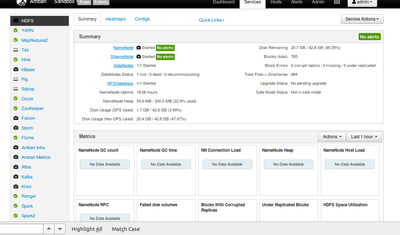
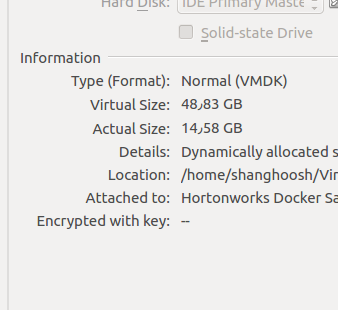
My storage status in the Virtualbox is as follows:
before the error i got another error the same as below:
putHDFS[id=07af2532-015a-1000-acc3-3ed53acfcc7c] Failed to write to HDFS due to java.lang.IllegalArgumentException: Compression codec com.hadoop.compression.lzo.LzoCodec not found.: java.lang.IllegalArgumentException: Compression codec com.hadoop.compression.lzo.LzoCodec not found
and for solving it, I removed a property (io.compression.codecs) from core_site.xml. Maybe it has caused the error.
Thanks.


Created 02-08-2017 12:00 PM
- Mark as New
- Bookmark
- Subscribe
- Mute
- Subscribe to RSS Feed
- Permalink
- Report Inappropriate Content
Try to add the rest of the hdfs ports to port forwarding
https://ambari.apache.org/1.2.3/installing-hadoop-using-ambari/content/reference_chap2_1.html and if you are on HDP 2.5 sandbox follow this tutorial to port forward https://community.hortonworks.com/articles/65914/how-to-add-ports-to-the-hdp-25-virtualbox-sandbox.h...
Created 02-08-2017 12:00 PM
- Mark as New
- Bookmark
- Subscribe
- Mute
- Subscribe to RSS Feed
- Permalink
- Report Inappropriate Content
Try to add the rest of the hdfs ports to port forwarding
https://ambari.apache.org/1.2.3/installing-hadoop-using-ambari/content/reference_chap2_1.html and if you are on HDP 2.5 sandbox follow this tutorial to port forward https://community.hortonworks.com/articles/65914/how-to-add-ports-to-the-hdp-25-virtualbox-sandbox.h...
Created on 02-08-2017 12:50 PM - edited 08-18-2019 04:18 AM
- Mark as New
- Bookmark
- Subscribe
- Mute
- Subscribe to RSS Feed
- Permalink
- Report Inappropriate Content
Thank You Dear Artem
I followed the tutorial, but when I apply the last command "docker ps", I saw something else
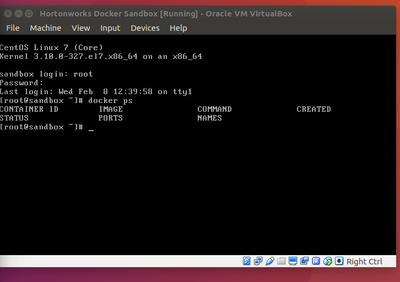
and I couldn't to connect to VM in Nifi any more. I faced with this error:
PutHDFS[id=015a1000-2532-17af-9400-6501c5ca7018] Failed to write to HDFS due to java.io.IOException: Failed on local exception: java.io.IOException: Connection reset by peer; Host Details : local host is: "shanghoosh-All-Series/127.0.1.1"; destination host is: "sandbox.hortonworks.com":8020; : java.io.IOException: Failed on local exception: java.io.IOException: Connection reset by peer; Host Details : local host is: "shanghoosh-All-Series/127.0.1.1"; destination host is: "sandbox.hortonworks.com":8020;
Created 02-10-2017 02:53 AM
- Mark as New
- Bookmark
- Subscribe
- Mute
- Subscribe to RSS Feed
- Permalink
- Report Inappropriate Content
Install Nifi in the same container as sandbox
Created 02-12-2017 05:53 AM
- Mark as New
- Bookmark
- Subscribe
- Mute
- Subscribe to RSS Feed
- Permalink
- Report Inappropriate Content
Dear Artem
I tried again and now, I have a remote HDFS.
Thanks a million


Created 01-13-2021 08:21 AM
- Mark as New
- Bookmark
- Subscribe
- Mute
- Subscribe to RSS Feed
- Permalink
- Report Inappropriate Content
I use the HDP 2.6.5 and i can not connect to the sandbox vm. Is there a change in Version 2.6.5?
thx
Marcel
Created 01-13-2021 10:37 PM
- Mark as New
- Bookmark
- Subscribe
- Mute
- Subscribe to RSS Feed
- Permalink
- Report Inappropriate Content
I find the solution in HDP 2.6.5 the ssh prort for the sandbox vm is the standard port 22.
Created 02-12-2017 08:55 AM
- Mark as New
- Bookmark
- Subscribe
- Mute
- Subscribe to RSS Feed
- Permalink
- Report Inappropriate Content
Notice: some information will be lost when you do what we did.
for example I had a lucidworks but now I should install it again.


