
Our Community is getting an upgrade! To get everything ready for the relaunch, we’ll be placing the site in read-only mode starting September 21st.
We really appreciate your understanding while we get things set up behind the scenes. Catch up on all the exciting details about the move here.
Need help or have questions? Drop us a line at [email protected]

Archives of Support Questions (Read Only)
- Cloudera Community
- Board Archive
- Archives of Support Questions (Read Only)
- Re: "urlopen timed out" error occurs while distrib...
- Subscribe to RSS Feed
- Mark Question as New
- Mark Question as Read
- Float this Question for Current User
- Bookmark
- Subscribe
- Mute
- Printer Friendly Page
- Subscribe to RSS Feed
- Mark Question as New
- Mark Question as Read
- Float this Question for Current User
- Bookmark
- Subscribe
- Mute
- Printer Friendly Page
"urlopen timed out" error occurs while distributing parcels when installation CM and CDH locally


Created on 09-29-2015 08:40 PM - edited 09-16-2022 02:42 AM
- Mark as New
- Bookmark
- Subscribe
- Mute
- Subscribe to RSS Feed
- Permalink
- Report Inappropriate Content
I am trying to install CDH5.3.1 offline in Oracle Enterprise Linux6u5. I have downloaded the parcels from archive.cloudera.com as following:
CDH-5.4.0-1.cdh5.4.0.p0.27-el6.parcel
CDH-5.4.0-1.cdh5.4.0.p0.27-el6.parcel.sha1 (and I rename it as CDH-5.4.0-1.cdh5.4.0.p0.27-el6.parcel.sha)
manifest.json
then I changed it owner to be cloudera-scm:cloudera-scm.
After I logged in to the Cloudera Manager (version 5.4.0, which I installed by using tarball ) console, the server found the CDH parcels and showed
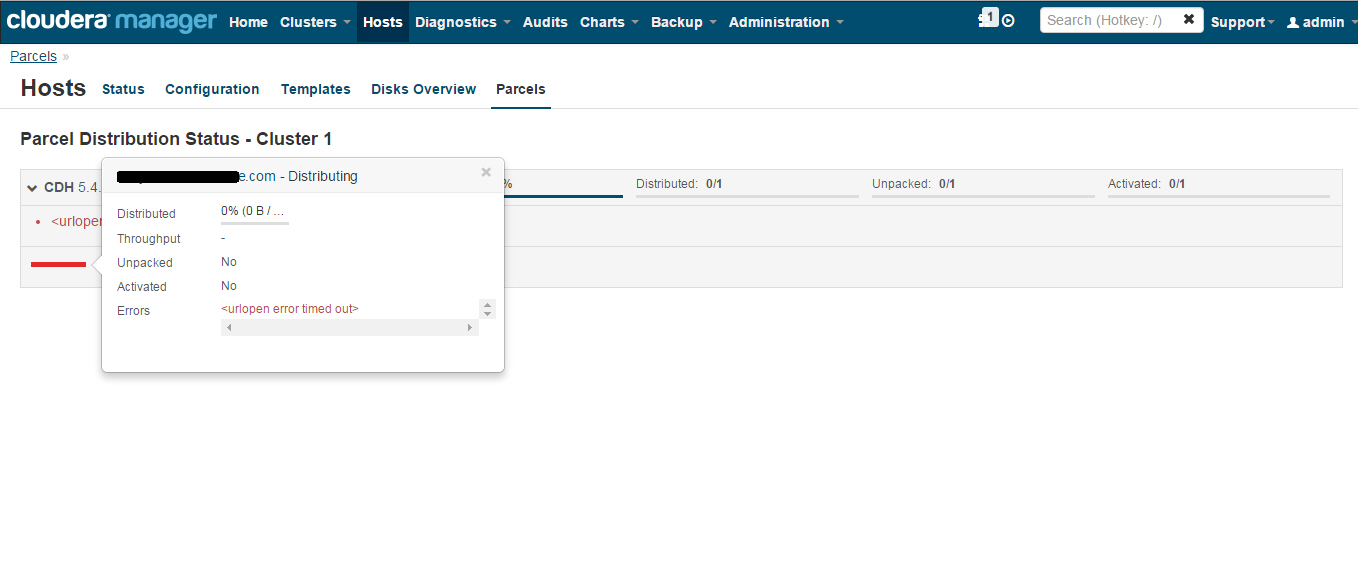
the download status as 100%, but when it started to distribute, error occurred as " <urlopen timed out>"
Here is the log of agent:
[28/Sep/2015 15:15:28 +0000] 5713 Thread-13 downloader INFO Starting download of: http://myhostname:7180/cmf/parcel/download/CDH-5.4.0-1.cdh5.4.0.p0.27-el6.parcel
[28/Sep/2015 15:15:28 +0000] 5713 Thread-13 downloader INFO /opt/cloudera/parcel-cache/CDH-5.4.0-1.cdh5.4.0.p0.27-el6.parcel.part exists, add Range header: bytes=0-
[28/Sep/2015 15:15:49 +0000] 5713 CP Server Thread-4 _cplogging INFO 10.182.xxx.xxx - - [28/Sep/2015:15:15:49] "GET /heartbeat HTTP/1.1" 200 2 "" "NING/1.0"
[28/Sep/2015 15:15:49 +0000] 5713 MainThread downloader INFO Aborting download request for http://myhostname:7180/cmf/parcel/download/CDH-5.4.0-1.cdh5.4.0.p0.27-el6.parcel
[28/Sep/2015 15:15:58 +0000] 5713 Thread-13 downloader ERROR Unexpected exception during download
Traceback (most recent call last):
File "/opt/cloudera-manager/cm-5.4.0/lib64/cmf/agent/src/cmf/downloader.py", line 275, in _download
response = self.opener.fetch_url(request)
File "/opt/cloudera-manager/cm-5.4.0/lib64/cmf/agent/src/cmf/downloader.py", line 73, in fetch_url
return urllib2.urlopen(request)
File "/usr/lib64/python2.6/urllib2.py", line 126, in urlopen
return _opener.open(url, data, timeout)
File "/usr/lib64/python2.6/urllib2.py", line 391, in open
response = self._open(req, data)
File "/usr/lib64/python2.6/urllib2.py", line 409, in _open
'_open', req)
File "/usr/lib64/python2.6/urllib2.py", line 369, in _call_chain
result = func(*args)
File "/usr/lib64/python2.6/urllib2.py", line 1190, in http_open
return self.do_open(httplib.HTTPConnection, req)
File "/usr/lib64/python2.6/urllib2.py", line 1165, in do_open
raise URLError(err)
URLError: <urlopen error timed out>
[28/Sep/2015 15:15:58 +0000] 5713 Thread-13 parcel_cache INFO Distribution aborted during download, skipping unpack.
here is the disk and memory info:
[root@hostname init.d]# df -h /opt/cloudera/
Filesystem Size Used Avail Use% Mounted on
/dev/mapper/vg01-lv_root 71G 12G 56G 18% /
[root@hostname parcel-repo]# free
total used free shared buffers cached
Mem: 11782728 7458676 4324052 0 188300 4491224
-/+ buffers/cache: 2779152 9003576
Swap: 8388604 0 8388604
so, what's the problem. I searched internet but did not got a solution.
thank you.
Created 10-09-2015 02:00 AM
- Mark as New
- Bookmark
- Subscribe
- Mute
- Subscribe to RSS Feed
- Permalink
- Report Inappropriate Content
Hi Harsh,
I have solved this issue.
I think the problem is related with permissions. And solution is the agent should be started by sudo even by user root. like:
# sudo ./cloudera-scm-agent start
Then the distributing go smoothly.
Thank you for your tips of running 'curl'.



Created 10-01-2015 03:45 AM
- Mark as New
- Bookmark
- Subscribe
- Mute
- Subscribe to RSS Feed
- Permalink
- Report Inappropriate Content
Is this a single host installation? Do you have a firewall running that may prevent local transfers (over the external network interface)? You could try disabling the firewall temporarily.
Created 10-07-2015 09:33 PM
- Mark as New
- Bookmark
- Subscribe
- Mute
- Subscribe to RSS Feed
- Permalink
- Report Inappropriate Content
Hi,
The file can be download (bin file content shows while run curl ). Actually, the firewall has already been disabled.
Created 10-07-2015 09:37 PM
- Mark as New
- Bookmark
- Subscribe
- Mute
- Subscribe to RSS Feed
- Permalink
- Report Inappropriate Content
Yes, it's a single host installation.
Created 10-08-2015 11:16 PM
- Mark as New
- Bookmark
- Subscribe
- Mute
- Subscribe to RSS Feed
- Permalink
- Report Inappropriate Content
Hi Harsh,
I found some issues while running 'curl -v http://myhostname:7180/cmf/parcel/download/CDH-5.4.0-1.cdh5.4.0.p0.27-el6.parcel'.
1. When I run this command by 'root' user in the same host with cloudera-manager host(myhostname), it's hanged there, nothing downloaded. But when I add sudo before curl ([root@myhostname~]#sudo curl -v http://myhostname:7180/cmf/parcel/download/CDH-5.4.0-1.cdh5.4.0.p0.27-el6.parcel), the file is downloaded.
2. When I run this command by 'oracle' user(I configured sudo permission to this user and passwordless ssh access, I also using this user to install cdh) in the same host, it's hanged there; and with sudo also works.
3. When I run this command by 'root' user in another host, sudo is not required. The file can be downloaded.
4. When I run this command by 'oracle' user in another host(this 'oracle' is configured to be able to passwordless ssh access to the other 'oracle' user on cloudera-manager host), sudo is required. The file can only be downloaded with sudo.
I configured proxy in the above two hosts. So when I running 'curl', it first connected to proxy server successfully.
So, what's the problem could be ? Please help.
Thank you.
Created 10-08-2015 07:32 PM
- Mark as New
- Bookmark
- Subscribe
- Mute
- Subscribe to RSS Feed
- Permalink
- Report Inappropriate Content
more information, <urlopen error timed out> while distributing
Created 10-09-2015 02:00 AM
- Mark as New
- Bookmark
- Subscribe
- Mute
- Subscribe to RSS Feed
- Permalink
- Report Inappropriate Content
Hi Harsh,
I have solved this issue.
I think the problem is related with permissions. And solution is the agent should be started by sudo even by user root. like:
# sudo ./cloudera-scm-agent start
Then the distributing go smoothly.
Thank you for your tips of running 'curl'.


