
Our Community is getting an upgrade! To get everything ready for the relaunch, we’ll be placing the site in read-only mode starting September 21st.
We really appreciate your understanding while we get things set up behind the scenes. Catch up on all the exciting details about the move here.
Need help or have questions? Drop us a line at [email protected]

Archives of Support Questions (Read Only)
- Cloudera Community
- Board Archive
- Archives of Support Questions (Read Only)
- ranger Admin UI password change
- Subscribe to RSS Feed
- Mark Question as New
- Mark Question as Read
- Float this Question for Current User
- Bookmark
- Subscribe
- Mute
- Printer Friendly Page
- Subscribe to RSS Feed
- Mark Question as New
- Mark Question as Read
- Float this Question for Current User
- Bookmark
- Subscribe
- Mute
- Printer Friendly Page
ranger Admin UI password change


Created on 07-12-2017 01:28 PM - edited 08-18-2019 02:23 AM
- Mark as New
- Bookmark
- Subscribe
- Mute
- Subscribe to RSS Feed
- Permalink
- Report Inappropriate Content
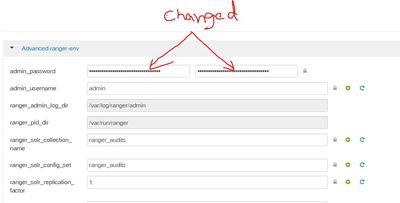
I changed this password but this is not the password Ranger Admin UI is using , I still can login using "admin" as password.
so where is the Ranger Admin UI password stored ?
and what password is this that I changed ?


Created on 07-12-2017 03:24 PM - edited 08-18-2019 02:23 AM
- Mark as New
- Bookmark
- Subscribe
- Mute
- Subscribe to RSS Feed
- Permalink
- Report Inappropriate Content
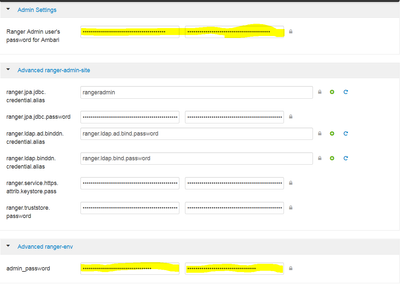
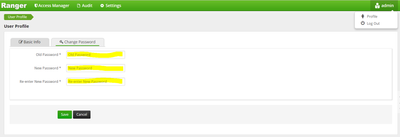
For changing the Ranger Admin password, we need to change the password in 3 different locations.
1. In Ambari you need to change the password at highlighted places:
2. Login to ranger using admin/admin, click on the profile at right-top, then click on change password. Below screenshot helps you to navigate
Note: Password should be same across all the places and it should be minimum 8 characters.
Hope this helps you.


Created 07-12-2017 03:04 PM
- Mark as New
- Bookmark
- Subscribe
- Mute
- Subscribe to RSS Feed
- Permalink
- Report Inappropriate Content
This config is used by Ambari (for ambari alerts for Ranger). Actual password change should be done in Ranger UI and updated password should be provided in this config for alerts to work.
Starting in HDP 2.5, kerberized clusters will not use this config and will use keytab.
Created on 07-12-2017 03:24 PM - edited 08-18-2019 02:23 AM
- Mark as New
- Bookmark
- Subscribe
- Mute
- Subscribe to RSS Feed
- Permalink
- Report Inappropriate Content
For changing the Ranger Admin password, we need to change the password in 3 different locations.
1. In Ambari you need to change the password at highlighted places:
2. Login to ranger using admin/admin, click on the profile at right-top, then click on change password. Below screenshot helps you to navigate
Note: Password should be same across all the places and it should be minimum 8 characters.
Hope this helps you.


