
Our Community is getting an upgrade! To get everything ready for the relaunch, we’ll be placing the site in read-only mode starting September 21st.
We really appreciate your understanding while we get things set up behind the scenes. Catch up on all the exciting details about the move here.
Need help or have questions? Drop us a line at [email protected]

Archives of Support Questions (Read Only)
- Cloudera Community
- Board Archive
- Archives of Support Questions (Read Only)
- Re: ranger installation failed while DB connection...
- Subscribe to RSS Feed
- Mark Question as New
- Mark Question as Read
- Float this Question for Current User
- Bookmark
- Subscribe
- Mute
- Printer Friendly Page
- Subscribe to RSS Feed
- Mark Question as New
- Mark Question as Read
- Float this Question for Current User
- Bookmark
- Subscribe
- Mute
- Printer Friendly Page
ranger installation failed while DB connection checking
- Labels:
-
Apache Ranger


Created 02-09-2017 10:33 AM
- Mark as New
- Bookmark
- Subscribe
- Mute
- Subscribe to RSS Feed
- Permalink
- Report Inappropriate Content
image1.png image2.png ranger-logs.txt
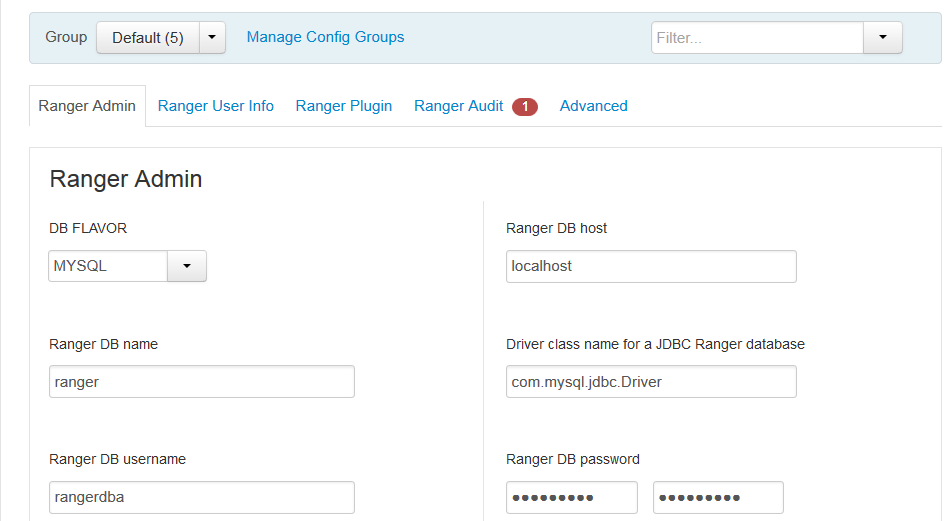
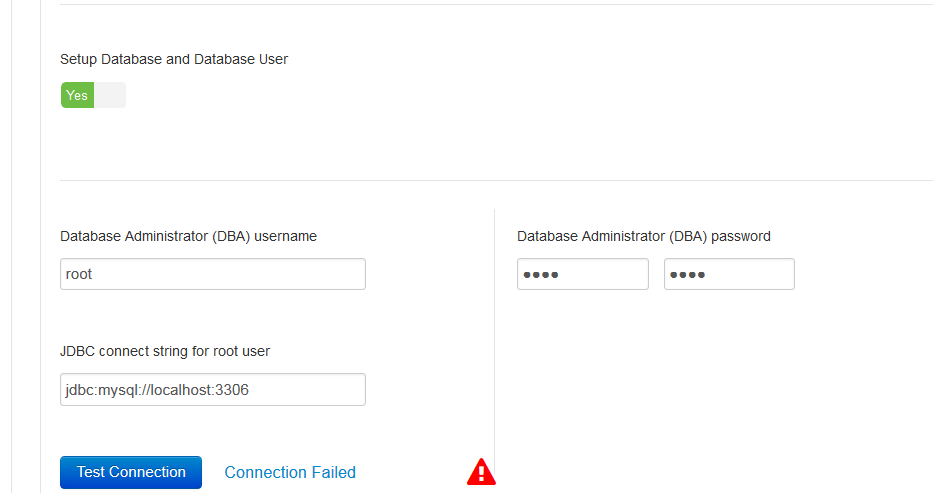
While doing the installation of ranger from ambari UI , pre-requisites are checked successfully and while checking the MySQL db connection , we are facing error of service unavailable.
Kindly find the attached files & logs.
please do the needful if possible. @Kuldeep Kulkarni



Created 02-09-2017 10:53 AM
- Mark as New
- Bookmark
- Subscribe
- Mute
- Subscribe to RSS Feed
- Permalink
- Report Inappropriate Content
Can you please verify connectivity between Ranger admin and Ambari server host?
Telnet from Ranger Admin host to Ambari Server on 8080?
503 error code - looks like Ambari Server is too busy to respond or there is network issue between Ranger Admin and Ambari Server.
Can you manually copy DBConnectionVerification.jar from ambari-server to ambari-agent on ranger admin host and restart ambari-agent followed by retry DB connection.
On Ambari-server DBConnectionVerification.jar should present at below location
/var/lib/ambari-server/resources/DBConnectionVerification.jar
On Ambari-agent, copy DBConnectionVerification.jar at below location
/usr/lib/ambari-agent/DBConnectionVerification.jar
/var/lib/ambari-agent/tmp/DBConnectionVerification.jar
/var/lib/ambari-agent/cache/DBConnectionVerification.jar
You can also try to bounce Ambari Server and see if it helps.
Please keep us posted.
Thanks @Sagar Shimpi
Created 02-09-2017 10:53 AM
- Mark as New
- Bookmark
- Subscribe
- Mute
- Subscribe to RSS Feed
- Permalink
- Report Inappropriate Content
Can you please verify connectivity between Ranger admin and Ambari server host?
Telnet from Ranger Admin host to Ambari Server on 8080?
503 error code - looks like Ambari Server is too busy to respond or there is network issue between Ranger Admin and Ambari Server.
Can you manually copy DBConnectionVerification.jar from ambari-server to ambari-agent on ranger admin host and restart ambari-agent followed by retry DB connection.
On Ambari-server DBConnectionVerification.jar should present at below location
/var/lib/ambari-server/resources/DBConnectionVerification.jar
On Ambari-agent, copy DBConnectionVerification.jar at below location
/usr/lib/ambari-agent/DBConnectionVerification.jar
/var/lib/ambari-agent/tmp/DBConnectionVerification.jar
/var/lib/ambari-agent/cache/DBConnectionVerification.jar
You can also try to bounce Ambari Server and see if it helps.
Please keep us posted.
Thanks @Sagar Shimpi
Created 02-09-2017 11:19 AM
- Mark as New
- Bookmark
- Subscribe
- Mute
- Subscribe to RSS Feed
- Permalink
- Report Inappropriate Content
@hardik desai - Please check updated answer above ^^


Created 02-09-2017 12:10 PM
- Mark as New
- Bookmark
- Subscribe
- Mute
- Subscribe to RSS Feed
- Permalink
- Report Inappropriate Content
@Kuldeep KulkarniKuldeep
Seems to be a connection pooling issue, Restarted multiple times ambari-agent on the slaves and event the ambari-server and it worked.
I think there needs to be a sequence first ambari-server and then ambari-agent.
Really thanks for pointing it out.
Regards
Created 02-09-2017 11:12 AM
- Mark as New
- Bookmark
- Subscribe
- Mute
- Subscribe to RSS Feed
- Permalink
- Report Inappropriate Content
Thanks for the info; we have tried doing the same but the issue still persist.
root@server:~# cksum /var/lib/ambari-server/resources/DBConnectionVerification.jar
2699944268 1931 /var/lib/ambari-server/resources/DBConnectionVerification.jar
root@slave1:~# cksum /usr/lib/ambari-agent/DBConnectionVerification.jar
2699944268 1931 /usr/lib/ambari-agent/DBConnectionVerification.jar
Best Regards,
Created 02-09-2017 11:42 AM
- Mark as New
- Bookmark
- Subscribe
- Mute
- Subscribe to RSS Feed
- Permalink
- Report Inappropriate Content
We did the things mentioned, but still the error is the same.
Also bounced the ambari-server as well as ambari-agent but things seems to be same.
Regards
Created 02-09-2017 12:09 PM
- Mark as New
- Bookmark
- Subscribe
- Mute
- Subscribe to RSS Feed
- Permalink
- Report Inappropriate Content
Take backup of below file --> edit it on ranger admin host --> restart ambari-agent and try again
#Backup
cp /var/lib/ambari-agent/cache/custom_actions/scripts/check_host.py /var/lib/ambari-agent/cache/custom_actions/scripts/check_host.py.bak
#Edit
vi /var/lib/ambari-agent/cache/custom_actions/scripts/check_host.py
#Comment below code
# download DBConnectionVerification.jar from ambari-server resources
   try:
     download_file(check_db_connection_url, check_db_connection_path)
   except Exception, e:
     message = "Error downloading DBConnectionVerification.jar from Ambari Server resources. Check network access to " \
               "Ambari Server.\n" + str(e)
     print message
     db_connection_check_structured_output = {"exit_code" : 1, "message": message}
     return db_connection_check_structured_output
#Save and restart ambari agent
Let me know the results.
This is hacky approach and I would not recommend it for Production clusters. We need to investigate what's happening. If you have support subscription, please open a support case with us 🙂


