
Our Community is getting an upgrade! To get everything ready for the relaunch, we’ll be placing the site in read-only mode starting September 21st.
We really appreciate your understanding while we get things set up behind the scenes. Catch up on all the exciting details about the move here.
Need help or have questions? Drop us a line at [email protected]

Archives of Support Questions (Read Only)
- Cloudera Community
- Board Archive
- Archives of Support Questions (Read Only)
- Re: replacetext processor: replacing '$$$$' with '...
- Subscribe to RSS Feed
- Mark Question as New
- Mark Question as Read
- Float this Question for Current User
- Bookmark
- Subscribe
- Mute
- Printer Friendly Page
- Subscribe to RSS Feed
- Mark Question as New
- Mark Question as Read
- Float this Question for Current User
- Bookmark
- Subscribe
- Mute
- Printer Friendly Page
replacetext processor: replacing '$$$$' with '\$' while replacing content
- Labels:
-
Apache NiFi


Created 01-24-2018 06:35 PM
- Mark as New
- Bookmark
- Subscribe
- Mute
- Subscribe to RSS Feed
- Permalink
- Report Inappropriate Content
I am trying to replace the content in the flowfile using replaceText processor.
If the attribute is "myattr" and I replace the content of the flowfile using replaceText processor with ${myattr}. I am seeing the below results
if myattr is "$$this is test$$", then the content of flowfile is replaced as "\$this is test\$"
if myttr is "\$$$this is test$$", then the content of flowfile is replaced as "\$\$this is test\$"
May I know how can I overcome the issue of '\'


Created on 01-24-2018 11:42 PM - edited 08-17-2019 10:07 PM
- Mark as New
- Bookmark
- Subscribe
- Mute
- Subscribe to RSS Feed
- Permalink
- Report Inappropriate Content
if you are using
Replacement Strategy
Regex Replace
In ReplaceText processor, it will add \ before $ sign because $ is special character(end of line) character in Regular expression.
If you use
Replacement Strategy
Always Replace
this Strategy won't add any \ to before $ sign.
I'm not sure if you are going to achieve your desired result with Always Replace strategy.
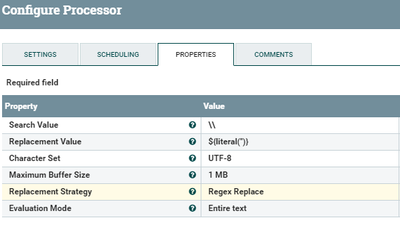
What you can do to overcome \ issue is after your first Replace Text Processor(that adds \ before $) add another Replace text processor with below configs.
Search Value
\ //search for \(backslash) literal
Replacement Value
${literal('')} //replace \ with empty(or)
Instead of keeping above value(${literal('')}) you can click on check box that is shown below
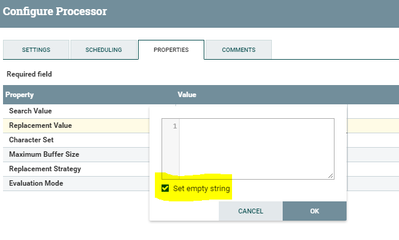
Both methods above will result same empty string as Replacement Value.
Maximum Buffer Size
1 MB
Replacement Strategy
Regex Replace
Evaluation Mode
Entire text
Configs:-
Example:-
Input:-
\$\$\$\$\$\$\$\$hi\$\$\$\$\$\$\$\$
Output:-
$$$$$$$$hi$$$$$$$$
By using two Replace Text processors in series we are going to replace \ that is added in first replace text processor.
Created on 01-24-2018 11:42 PM - edited 08-17-2019 10:07 PM
- Mark as New
- Bookmark
- Subscribe
- Mute
- Subscribe to RSS Feed
- Permalink
- Report Inappropriate Content
if you are using
Replacement Strategy
Regex Replace
In ReplaceText processor, it will add \ before $ sign because $ is special character(end of line) character in Regular expression.
If you use
Replacement Strategy
Always Replace
this Strategy won't add any \ to before $ sign.
I'm not sure if you are going to achieve your desired result with Always Replace strategy.
What you can do to overcome \ issue is after your first Replace Text Processor(that adds \ before $) add another Replace text processor with below configs.
Search Value
\ //search for \(backslash) literal
Replacement Value
${literal('')} //replace \ with empty(or)
Instead of keeping above value(${literal('')}) you can click on check box that is shown below
Both methods above will result same empty string as Replacement Value.
Maximum Buffer Size
1 MB
Replacement Strategy
Regex Replace
Evaluation Mode
Entire text
Configs:-
Example:-
Input:-
\$\$\$\$\$\$\$\$hi\$\$\$\$\$\$\$\$
Output:-
$$$$$$$$hi$$$$$$$$
By using two Replace Text processors in series we are going to replace \ that is added in first replace text processor.
Created 01-25-2018 09:10 AM
- Mark as New
- Bookmark
- Subscribe
- Mute
- Subscribe to RSS Feed
- Permalink
- Report Inappropriate Content
It works, Thanks alot @Shu


