
Our Community is getting an upgrade! To get everything ready for the relaunch, we’ll be placing the site in read-only mode starting September 21st.
We really appreciate your understanding while we get things set up behind the scenes. Catch up on all the exciting details about the move here.
Need help or have questions? Drop us a line at [email protected]

Archives of Support Questions (Read Only)
- Cloudera Community
- Board Archive
- Archives of Support Questions (Read Only)
- Re: replacing blank lines in a file using a effice...
- Subscribe to RSS Feed
- Mark Question as New
- Mark Question as Read
- Float this Question for Current User
- Bookmark
- Subscribe
- Mute
- Printer Friendly Page
- Subscribe to RSS Feed
- Mark Question as New
- Mark Question as Read
- Float this Question for Current User
- Bookmark
- Subscribe
- Mute
- Printer Friendly Page
replacing blank lines in a file using a efficeint approach
- Labels:
-
Apache NiFi


Created on 01-03-2018 07:02 PM - edited 08-18-2019 02:18 AM
- Mark as New
- Bookmark
- Subscribe
- Mute
- Subscribe to RSS Feed
- Permalink
- Report Inappropriate Content
Hi All,
Thanks a lot this awesome community. I using replace text processor and I used the apporaches such as desribed in these 2 links below
https://community.hortonworks.com/questions/147405/replacing-new-lines-weird-behavior-observed.html
https://community.hortonworks.com/questions/147226/replacetextprocessor-remove-blank-lines.html
this consumes a lot of heap space and need something efficient, @Matt Clarke suggested to use shown in picture.
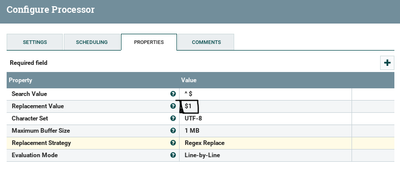
Now I am using
Evaluation mode as Line by line
Search regex as ^ (new line shift+enter) $
What should be my replacement value?
since there are no groups formed there?
Any help or suggestions?
Thanks a lot


Created on 01-03-2018 08:57 PM - edited 08-18-2019 02:18 AM
- Mark as New
- Bookmark
- Subscribe
- Mute
- Subscribe to RSS Feed
- Permalink
- Report Inappropriate Content
I think just add capture all after $ as shown below screenshot will work.
Search Value
^
$(.*)
Replacement Value
$1
Replacement Strategy
Regex Replace
Evaluation Mode
Line-by-Line
Replace Text Configs:-

Created on 01-03-2018 08:57 PM - edited 08-18-2019 02:18 AM
- Mark as New
- Bookmark
- Subscribe
- Mute
- Subscribe to RSS Feed
- Permalink
- Report Inappropriate Content
I think just add capture all after $ as shown below screenshot will work.
Search Value
^
$(.*)
Replacement Value
$1
Replacement Strategy
Regex Replace
Evaluation Mode
Line-by-Line
Replace Text Configs:-
Created on 01-03-2018 09:41 PM - edited 08-18-2019 02:18 AM
- Mark as New
- Bookmark
- Subscribe
- Mute
- Subscribe to RSS Feed
- Permalink
- Report Inappropriate Content
@Shu Thanks for the response. However it still did not removed the blank lines. Attached is the image,

and after applying replacetext processor it still looked the same
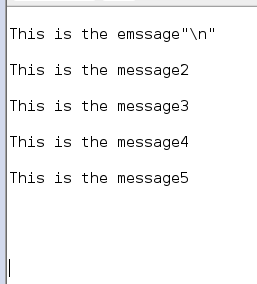
Any idea or help?
Thanks
Dheeru
Created on 01-04-2018 04:19 AM - edited 08-18-2019 02:18 AM
- Mark as New
- Bookmark
- Subscribe
- Mute
- Subscribe to RSS Feed
- Permalink
- Report Inappropriate Content
Can you once make sure the search value property having no spaces in it.
Search Value
^//no space
$(.*)//no space
Configs:-

Compare your Replace Text processor configs with above screenshot configs and don't keep any spaces after ^ and $(.*) in search value property and Rerun the processor.
If you are still having issues please attach your input file contents...!!
Created 01-04-2018 04:28 AM
- Mark as New
- Bookmark
- Subscribe
- Mute
- Subscribe to RSS Feed
- Permalink
- Report Inappropriate Content
@Shu it worked Thanks a lot appreciate your help!!!. Apologies for the silly mistake, there was a space on the first line
Thanks again


