
Our Community is getting an upgrade! To get everything ready for the relaunch, we’ll be placing the site in read-only mode starting September 21st.
We really appreciate your understanding while we get things set up behind the scenes. Catch up on all the exciting details about the move here.
Need help or have questions? Drop us a line at [email protected]

Archives of Support Questions (Read Only)
- Cloudera Community
- Board Archive
- Archives of Support Questions (Read Only)
- template upload issue
- Subscribe to RSS Feed
- Mark Question as New
- Mark Question as Read
- Float this Question for Current User
- Bookmark
- Subscribe
- Mute
- Printer Friendly Page
- Subscribe to RSS Feed
- Mark Question as New
- Mark Question as Read
- Float this Question for Current User
- Bookmark
- Subscribe
- Mute
- Printer Friendly Page
template upload issue
- Labels:
-
Apache NiFi


Created 05-02-2017 09:52 AM
- Mark as New
- Bookmark
- Subscribe
- Mute
- Subscribe to RSS Feed
- Permalink
- Report Inappropriate Content
I have upload the template in root processor group then when i click on the template is listed there. but when i delete from Nifi UI then tried to upload the same file getting 200 OK response but not listed in the template option , please help


Created 05-05-2017 07:48 PM
- Mark as New
- Bookmark
- Subscribe
- Mute
- Subscribe to RSS Feed
- Permalink
- Report Inappropriate Content
Using the NiFi REST-API, i was able to upload, delete, and upload again the same template using the following commands
To upload:
curl -X POST -v -F template=@"/<path to template>/template.xml" http://<host>:<port>/nifi-api/process-groups/<UUID of process group>/templates/upload
The UUID of my template was in the response to the above command.
To delete:
curl -X DELETE -v http://<host>:<port>/nifi-api/templates/<UUID of template>
I then repeated the above to commands successfully several times.
Thanks,
Matt
Created 05-02-2017 02:28 PM
- Mark as New
- Bookmark
- Subscribe
- Mute
- Subscribe to RSS Feed
- Permalink
- Report Inappropriate Content
What version of NiFi are you running?
Is this a standalone NiFi or a NiFi cluster?
Is you NiFi secured?
Thanks,
Matt
Created 05-03-2017 06:13 AM
- Mark as New
- Bookmark
- Subscribe
- Mute
- Subscribe to RSS Feed
- Permalink
- Report Inappropriate Content
Thanks for your reply.
1. nifi-1.1.2, 2. Nifi Standalone 3. No
Created on 05-03-2017 06:37 PM - edited 08-17-2019 07:54 PM
- Mark as New
- Bookmark
- Subscribe
- Mute
- Subscribe to RSS Feed
- Permalink
- Report Inappropriate Content
I have been unable to reproduce what you are seeing. Just to make sure I am doing the same steps, I have detailed what i have done below: - I setup a Apache NiFi 1.1.2 standalone unsecure instance.
- With root process group selected, I uploaded a template:
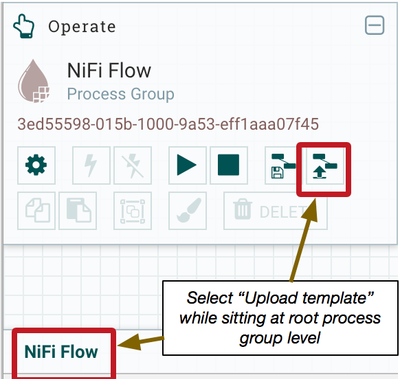
- I then performed the following actions to upload my template.
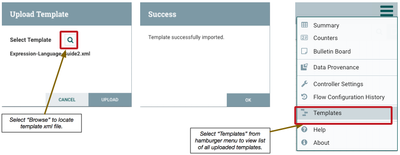
- Then i deleted the template I uploaded from my NiFi
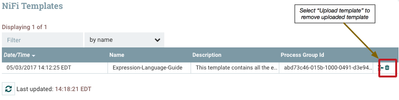
- After I deleted the template, I followed the same procedure above to upload the exact same template again.
This process worked for me every time. I uploaded and deleted the same template repeatedly without issue.
Am I doing the same thing you have been doing?
Thank you,
Matt
Created 05-05-2017 06:25 AM
- Mark as New
- Bookmark
- Subscribe
- Mute
- Subscribe to RSS Feed
- Permalink
- Report Inappropriate Content
Thanks for your reply. I am using the Nifi-API for the same.
Content-Type: multipart/form-data METHOD : POST http://84.39.32.32:8080/process-groups/36e4ed20-015a-1000-0882-9092542ffd03/templates/upload choose file.
Created 05-05-2017 07:48 PM
- Mark as New
- Bookmark
- Subscribe
- Mute
- Subscribe to RSS Feed
- Permalink
- Report Inappropriate Content
Using the NiFi REST-API, i was able to upload, delete, and upload again the same template using the following commands
To upload:
curl -X POST -v -F template=@"/<path to template>/template.xml" http://<host>:<port>/nifi-api/process-groups/<UUID of process group>/templates/upload
The UUID of my template was in the response to the above command.
To delete:
curl -X DELETE -v http://<host>:<port>/nifi-api/templates/<UUID of template>
I then repeated the above to commands successfully several times.
Thanks,
Matt
Created 05-08-2017 03:15 PM
- Mark as New
- Bookmark
- Subscribe
- Mute
- Subscribe to RSS Feed
- Permalink
- Report Inappropriate Content
Where either of the above answers able to resolve your template issue? If you found either helpful, please accept the answer.
Thank you,
Matt


