
Our Community is getting an upgrade! To get everything ready for the relaunch, we’ll be placing the site in read-only mode starting September 21st.
We really appreciate your understanding while we get things set up behind the scenes. Catch up on all the exciting details about the move here.
Need help or have questions? Drop us a line at [email protected]

Archives of Support Questions (Read Only)
- Cloudera Community
- Board Archive
- Archives of Support Questions (Read Only)
- unable to read hiveserver2 configs from zookeeper ...
- Subscribe to RSS Feed
- Mark Question as New
- Mark Question as Read
- Float this Question for Current User
- Bookmark
- Subscribe
- Mute
- Printer Friendly Page
- Subscribe to RSS Feed
- Mark Question as New
- Mark Question as Read
- Float this Question for Current User
- Bookmark
- Subscribe
- Mute
- Printer Friendly Page
unable to read hiveserver2 configs from zookeeper (state=,code=0)
- Labels:
-
Apache Hive


Created 07-26-2018 05:22 PM
- Mark as New
- Bookmark
- Subscribe
- Mute
- Subscribe to RSS Feed
- Permalink
- Report Inappropriate Content
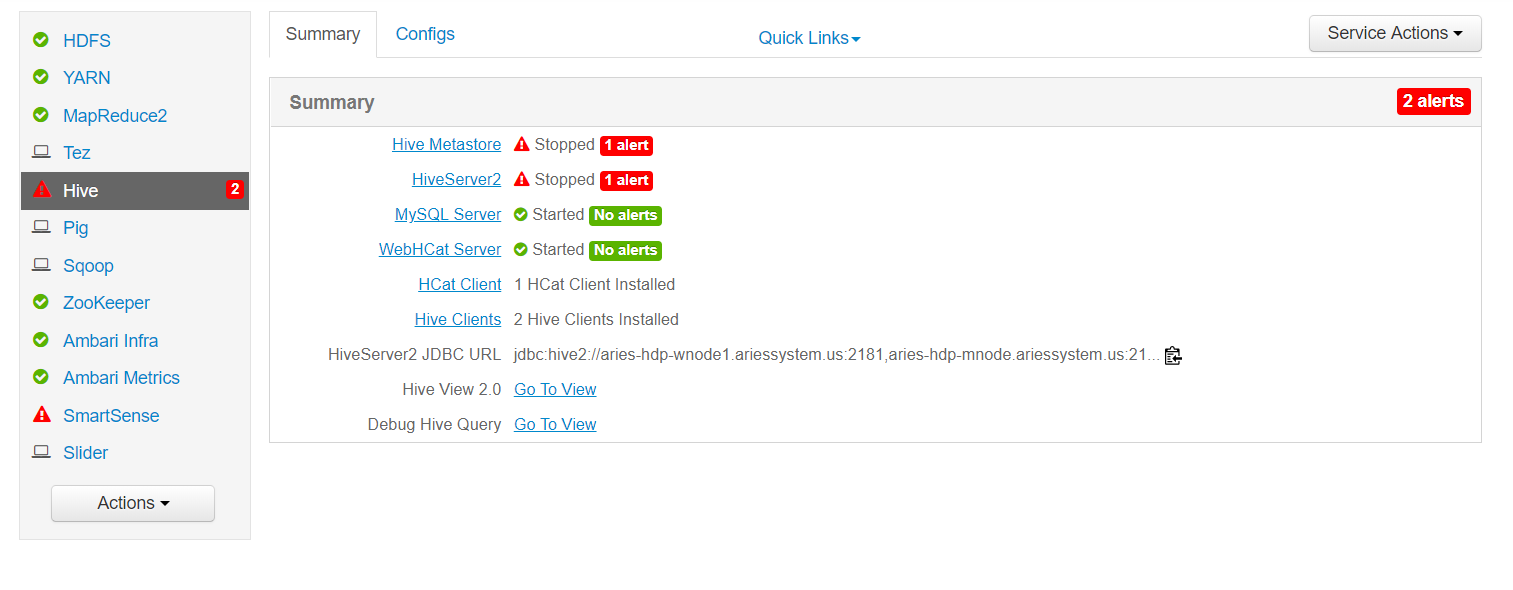
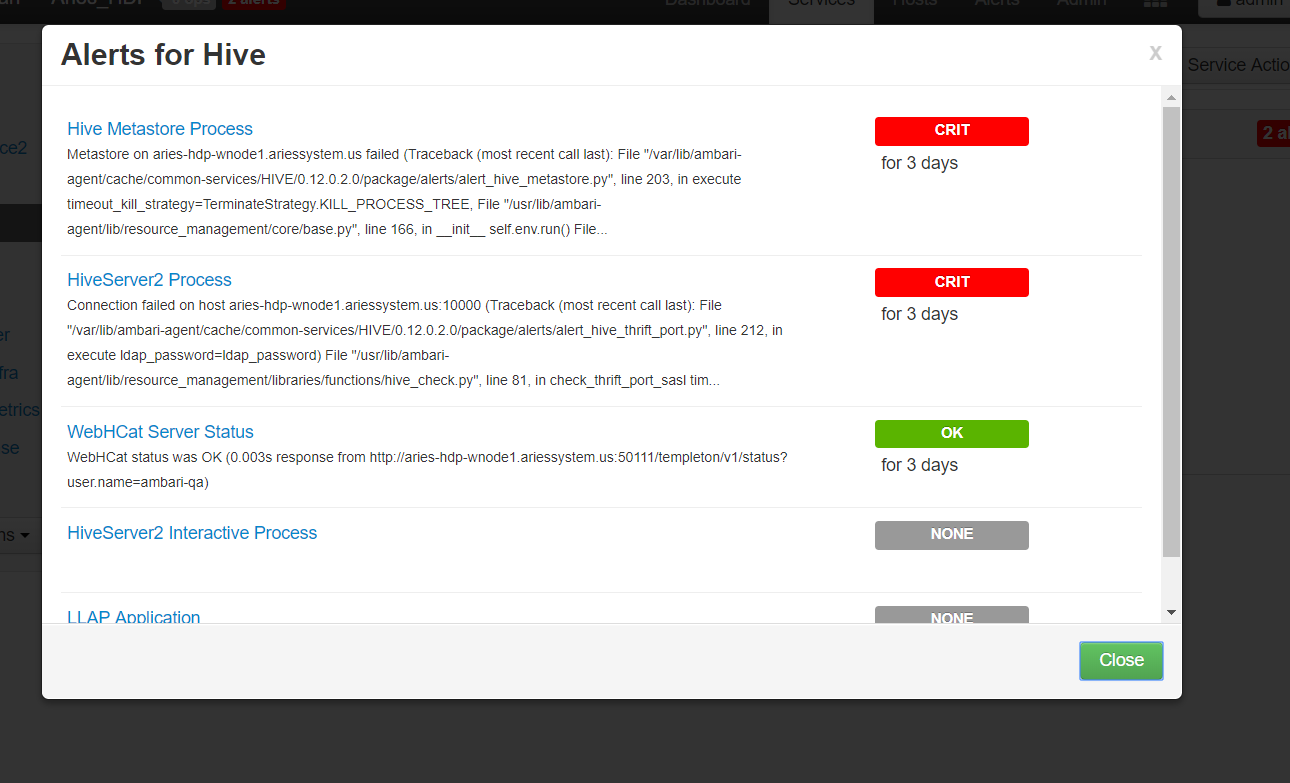
Hi all, I have installed ambari and every service was running good, but im getting 2 alerts on hive. i tried to resolve but i'm unable to do that. can anyone help me out?
- i'm able to login to mysql and beeline also.
==================
Hive error
==========================================================================================
root@ARIES-HDP-WNODE1:/etc# beeline -u "jdbc:hive2://aries-hdp-wnode1.ariessystem.us:2181,aries-hdp-mnode.ariessystem.us:2181/;serviceDiscoveryMode=zooKeeper;zooKeeperNamespace=hiveserver2" Connecting to jdbc:hive2://aries-hdp-wnode1.ariessystem.us:2181,aries-hdp-mnode.ariessystem.us:2181/;serviceDiscoveryMode=zooKeeper;zooKeeperNamespace=hiveserver2 Error: org.apache.hive.jdbc.ZooKeeperHiveClientException: Unable to read HiveServer2 configs from ZooKeeper (state=,code=0) Beeline version 1.2.1000.2.6.5.0-292 by Apache Hive 0: jdbc:hive2://aries-hdp-wnode1.ariessystem. (closed)>
==============================================================================================
Here i attach the hive server log and alert pictures from ambarihive-metastore-log.txt


Created 07-31-2018 05:04 AM
- Mark as New
- Bookmark
- Subscribe
- Mute
- Subscribe to RSS Feed
- Permalink
- Report Inappropriate Content
Hello @Deepak SANAGAPALLI!
Could you check your mysql connector?
#[root@node1 ~]# ambari-server setup --jdbc-db=mysql --jdbc-driver=/usr/share/java/mysql-connector-java.jar #I made my setup with this jdbc-driver
#Finding my jar
[root@node1 ~]# find / -name "mysql-connector-java.jar" -type f
/tmp/mysql-connector-java.jar
/usr/share/java/mysql-connector-java.jar
/var/lib/ambari-server/resources/mysql-connector-java.jar
[root@node1 ~]# ls -ltrah /var/lib/ambari-server/resources/mysql-connector-java.jar
-rw-r--r-- 1 root root 864K Jul 26 23:48 /var/lib/ambari-server/resources/mysql-connector-java.jar
[root@node1 ~]# ls -ltrah /usr/share/java/mysql-connector-java.jar
-rw-r--r-- 1 root root 864K Jul 26 22:52 /usr/share/java/mysql-connector-java.jar
Hope this helps!
Created 07-31-2018 07:00 PM
- Mark as New
- Bookmark
- Subscribe
- Mute
- Subscribe to RSS Feed
- Permalink
- Report Inappropriate Content
In this case, you'll have to use the following options:
apt-get install -y mysql-connector-java_8.0.12-1ubuntu18.04_all.deb
#or if you're using a minor version of Ubuntu
apt-get install -y mysql-connector-java_8.0.12-1ubuntu16.04_all.deb
If the issue persists, you can try to download it manually
https://dev.mysql.com/downloads/connector/j/
Hope this helps!
Created 07-31-2018 08:11 PM
- Mark as New
- Bookmark
- Subscribe
- Mute
- Subscribe to RSS Feed
- Permalink
- Report Inappropriate Content
Hi @Vinicius Higa Murakami , i'm currently using Ubuntu 14.04 i don't see that option in MySQL.com when I'm trying to download manually and when i ran the command by changing the version to
apt-get install -y mysql-connector-java_8.0.12-1ubuntu14.04_all.deb, I'm getting the following error.mysql-error2.png can you please help me out.
Created 07-31-2018 08:57 PM
- Mark as New
- Bookmark
- Subscribe
- Mute
- Subscribe to RSS Feed
- Permalink
- Report Inappropriate Content
Hi @Deepak SANAGAPALLI.
Try to install using this command:
apt-get install libmysql-javaHope this helps!
Created 07-31-2018 09:04 PM
- Mark as New
- Bookmark
- Subscribe
- Mute
- Subscribe to RSS Feed
- Permalink
- Report Inappropriate Content
Hi @Vinicius Higa Murakami , i ran that command and it got installed. can you please tell me what steps to be performed next.sqllib-java.png
Created 07-31-2018 09:07 PM
- Mark as New
- Bookmark
- Subscribe
- Mute
- Subscribe to RSS Feed
- Permalink
- Report Inappropriate Content
@Deepak SANAGAPALLI, now you should see the mysql-connector-java.jar under the libmysql-java.
You can try to find it with the following command:
find / -name "mysql-connector*" -type f -exec ls -ltrah {} \;If you are able to see it, then just follow the instruction inside that documentation link.





Created 08-04-2020 07:30 AM
- Mark as New
- Bookmark
- Subscribe
- Mute
- Subscribe to RSS Feed
- Permalink
- Report Inappropriate Content
Could you please let us know which documentation you are talking about?
Created 07-31-2018 09:21 PM
- Mark as New
- Bookmark
- Subscribe
- Mute
- Subscribe to RSS Feed
- Permalink
- Report Inappropriate Content
Thanks a lot @Vinicius Higa Murakami @Geoffrey Shelton Okot issue resolved. i appreciate for helping me.
Created 07-31-2018 09:23 PM
- Mark as New
- Bookmark
- Subscribe
- Mute
- Subscribe to RSS Feed
- Permalink
- Report Inappropriate Content
Hi @Deepak SANAGAPALLI!
Glad to hear that! Keep it up with your HiveServer and let us know if you find any other issues 🙂
Thanks

- « Previous
-
- 1
- 2
- Next »

