Created on 06-10-202303:04 AM - edited on 06-12-202311:46 PM by VidyaSargur
Summary
After you experience a disk failure on a worker node then replace the disk, you’ll need to ensure that the disk is suitably rebalanced within the Kudu Service at the local level.
Investigation & Resolution
Purging a Tablet Server
There isn’t currently a method to rebalance the replicas on a single Tablet Server disk array. This means that we need to empty the node and reintroduce it so that it can be used again from scratch. We begin by quiescing the Tablet Server.
Quiesce the Tablet Server
Quiesce essentially means to stop the Tablet Server from hosting any leaders in order to:
Make other replicas on live Tablet Servers become the leaders
Prevent this Tablet Server from becoming a leader for any other reason
Allow this Tablet Server to be read from (the replicas that are still present)
Check Quiesce Status
sudo -u kudu kudu tserver quiesce status <Worker-Node-FQDN>
Quiescing | Tablet Leaders | Active Scanners
-----------+----------------+-----------------
true | 0 | 0
Quiesce Start
sudo -u kudu kudu tserver quiesce start <Worker-Node-FQDN>
Put the Tablet Server into Maintenance Mode
Maintenance Mode stops the Tablet Server from being used completely. The maintenance mode commands require you to retrieve the UUID of the Tablet Server first. We can get this information from a tserver list command:
sudo -u kudu kudu tserver list <Master-Node1-FQDN>,<Master-Node2-FQDN>,<Master-Note 3-FQDN>
An example that then targets the server you want to work on
sudo -u kudu kudu tserver list <Master-Node1-FQDN>,<Master-Node2-FQDN>,<Master-Node3-FQDN> | grep <Worker-Node-FQDN>
sudo -u kudu kudu tserver state enter_maintenance <Master-Node1-FQDN>,<Master-Node2-FQDN>,<Master-Note 3-FQDN> 5e103ac84707495e843a4553ac622f20
Exit the Tablet Server from Maintenance Mode
sudo -u kudu kudu tserver state exit_maintenance <Master-Node1-FQDN>,<Master-Node2-FQDN>,<Master-Note 3-FQDN> 5e103ac84707495e843a4553ac622f20
Run ksck to check the status of Kudu Service / TS to be purged
This will confirm the status of both Quiesce and Maintenance Mode for every Tablet Server in the cluster, (in our example - <Worker-Node-FQDN>😞
sudo -u kudu kudu cluster ksck <Master-Node1-FQDN>,<Master-Node2-FQDN>,<Master-Node3-FQDN> 2>&1 | tee ksck.out
The above command outputs the ksck to both the terminal and a file called ‘ksck.out’. This allows us to review the information from both perspectives and also create a record of the output in the file. But taking our example of purging <Worker-Node-FQDN> into account, the following information is key:
Tablet Server Summary
This is a list of all Tablet Servers in the cluster. We’ve focused on just <Worker-Node-FQDN> and the surrounding TS’s for illustrative purposes. Notice the text in RED - <Worker-Node-FQDN> is quiescing and has no leaders running on it.
Tablet Server Summary
UUID | Address | Status | Location | Quiescing | Tablet Leaders | Active Scanners
The following command instructs kudu to ignore the <Worker-Node-FQDN> node AND move replicas away from it:
sudo -u kudu /tmp/kudu cluster rebalance <Master-Node1-FQDN>,<Master-Node2-FQDN>,<Master-Note 3-FQDN> -ignored_tservers=5e103ac84707495e843a4553ac622f20 -move_replicas_from_ignored_tservers
Again, importantly, the Tablet Server has to have been successfully quiesced and put into maintenance mode to avoid any issues with the Kudu service.
A simple break in VPN or shell terminal will kill the rebalance command. This won't affect Kudu, but it will stop the process. In order to work around this and retain information during the process, use the following command to output the rebalance status into the active terminal session as well as a file:
sudo -u kudu /tmp/kudu cluster rebalance <Master-Node1-FQDN>,<Master-Node2-FQDN>,<Master-Node3-FQDN> -ignored_tservers=5e103ac84707495e843a4553ac622f20 -move_replicas_from_ignored_tservers 2>&1 | tee <Worker-Node-FQDN>-rebalance.out &
Re-introduce the Tablet Server
After the Kudu Tablet Server has been purged, it’s time to reintroduce it into the Kudu service so that it can be used again.
Exit the Tablet Server from Maintenance Mode
sudo -u kudu kudu tserver state exit_maintenance <Master-Node1-FQDN>,<Master-Node2-FQDN>,<Master-Note 3-FQDN> 5e103ac84707495e843a4553ac622f20
Unquiesce the Tablet Server
sudo -u kudu kudu tserver quiesce stop <Worker-Node-FQDN>
Rebalance the Kudu Service
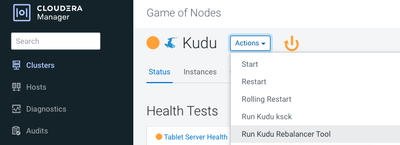
We now have a Kudu Tablet Server that has been quiesced and purged. It’s time to rebalance the Kudu service and share the Tablets back onto the recently purged Kudu Tablet Server.
Go to CM - Kudu - Actions - Run Kudu Rebalancer Tool: