Our Community is getting an upgrade! To get everything ready for the relaunch, we’ll be placing the site in read-only mode starting September 21st.
We really appreciate your understanding while we get things set up behind the scenes. Catch up on all the exciting details about the move here.
Need help or have questions? Drop us a line at [email protected]

Community Articles

Find and share helpful community-sourced technical articles.
Announcements
Share your experience with Cloudera on G2 and get a $25 Amazon Gift card.
Hi, I'm CLEO! Something exciting is coming to the Community. Stay Tuned!

avatar

Installing the Alarm Fatigue Demo via Cloudbreak:

There are multiple ways to deploy the Alarm Fatigue Demo via Cloudbreak. Below are four options:

1) Deploy via the Cloudbreak UI

a) Login to https://cbdtest.field.hortonworks.com

b) Select your credentials – if you credentials don’t exist, create them under “Manage Credentials”

c) Once your credentials are selected, click “Create Cluster”

d) Make-up a cluster name and choose the Availability Zone (SE) and then click “Setup Network and Security"

e) “fieldcloud-openstack-network” should be selected and click “Choose Blueprint”

f) Select the Blueprint called “alarm_fatigue_v2”

Host Group 1 (Select Ambari Server, alarm-fatigue-demo and pre-install-java8)

Host Group 2 (select pre-install-java8)

Host Group 3 (select pre-install-java8)

g) Click on “Review and Launch”

e) Click on “Create and start cluster” (After clicking, the deployment via Cloudbreak will likely take 30-50 minutes, go get a coffee)

2) Deploy via Bash Script (specifying configuration file)

Create file .deploy.config with the following

Version=0.5

CloudBreakServer= https://cbdtest.field.hortonworks.com

CloudBreakIdentityServer= http://cbdtest.field.hortonworks.com:8089

[email protected]

CloudBreakPassword=yourpassword

CloudBreakCredentials=

CloudBreakClusterName=alarmfatigue-auto

CloudBreakTemplate=openstack-m3-xlarge

CloudBreakRegion=RegionOne

CloudBreakSecurityGroup=openstack-connected-platform-demo-all-services-port-v3

CloudBreakNetwork=fieldcloud-openstack-network

CloudBreakAvailabilityZone=SE

Change the highlighted

Then execute the following:

wget -O - https://raw.githubusercontent.com/ryancicak/northcentral_hackathon/master/CloudBreakArtifacts/cloudb...| bash

3) Deploy via Bash Script inputting configurations (while prompted)

Just execute

wget -O -https://raw.githubusercontent.com/ryancicak/northcentral_hackathon/master/CloudBreakArtifacts/cloudb...| bash

and fill out the information as prompted

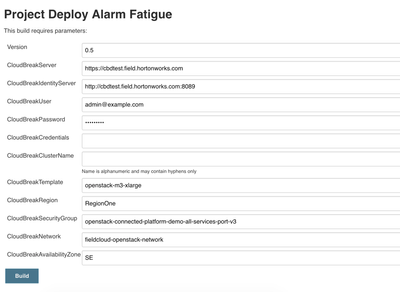
4) Deploy via Jenkins

39957-jenkins.png


All four options will deploy install, configure and run all necessary services including "Alarm Fatigue Demo Control"

1,236 Views
Version history
Last update:
‎04-21-2026 05:19 AM
Updated by: