Our Community is getting an upgrade! To get everything ready for the relaunch, we’ll be placing the site in read-only mode starting September 21st. We really appreciate your understanding while we get things set up behind the scenes. Catch up on all the exciting details about the move here. Need help or have questions? Drop us a line at [email protected]
Download code base from GitHub location. Clone it under c:\work\Apache\atlas on Window and ~/Apache/atlas on Mac.
Change directory to the location above and initiate a build (using mvn clean install package).
Deploy Directory Setup
Create a directory say Deploy (say c:\work on Windows or ~/work on Mac) with a structure below it:
conf
Copy atlas-application.properties, users-credentials.properties, policy-store.txt atlas-log4j.xml and atlas-env.sh here.
Use contents of the attached ZIP.
data
During runtime, the backend database will create its files here. This may be a location to check.
data/solr
Copy contents C:\work\atlas\repository\src\test\resources\solr to c:\deploy\data\ for Windows (from ~/Apache/atlas/repository/src/test/resources to ~/Deploy/data on Mac).
libext
Copy BerkeleyDB JAR here, say je-5.0.73.jar
logs
Logs will be created here.
models
Copy contents from c:\work\atlas\addons\models (or ~/Apache/atlas/addons/models for Mac.)
webapp (optional)
Deploy the contents of atlas.war here if you are developing on client-side (UI).
bin (optional)
Empty for now.
When done, your directory layout should look like this:
WinUtils (for Windows only)
Install WinUtils (link below).
Copy WinUtils.exe from C:\Program Files (x86)\WinUtil\WinUtil.exe to C:\Users\ashut\.m2\repository\org\apache\hadoop\bin\WinUtils.exe
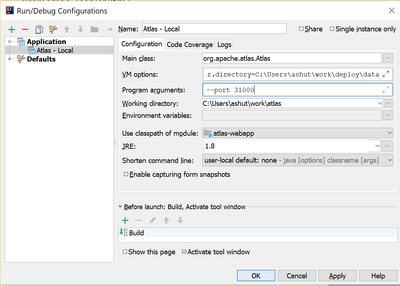
IntelliJ: 'Atlas - Local' Configuration
From IntelliJ's Run/Edit Configurations menu option, create a new configuration, call it 'Atlas - Local'.
Details are:
Type: Application
Main class: org.apache.atlas.Atlas
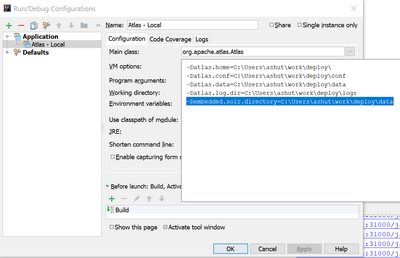
VM options: These should reflect location of your directory created in the step above. Add the following: