Our Community is getting an upgrade! To get everything ready for the relaunch, we’ll be placing the site in read-only mode starting September 21st.
We really appreciate your understanding while we get things set up behind the scenes. Catch up on all the exciting details about the move here.
Need help or have questions? Drop us a line at [email protected]
Created on 10-13-2016 08:02 AM
.
.
.
http://docs.hortonworks.com/HDPDocuments/Ambari-2.1.2.1/bk_Installing_HDP_AMB/content/_download_the_...
.
Install ambari-agent package on all the nodes in the cluster and modify hostname to ambari server host(fqdn) in /etc/ambari-agent/conf/ambari-agent.ini
.
Please follow below steps to create Blueprints
.
Note – This file will have information related to all the hosts which are part of your HDP cluster.
{
"blueprint" : "prod",
"default_password" : "hadoop",
"host_groups" :[
{
"name" : "prodnode1",
"hosts" : [
{
"fqdn" : "prodnode1.openstacklocal"
}
]
},
{
"name" : "prodnode2",
"hosts" : [
{
"fqdn" : "prodnode2.openstacklocal"
}
]
},
{
"name" : "prodnode3",
"hosts" : [
{
"fqdn" : "prodnode3.openstacklocal"
}
]
}
]
}.
{
"configurations" : [
{ "core-site": {
"properties" : {
"fs.defaultFS" : "hdfs://prod",
"ha.zookeeper.quorum" : "%HOSTGROUP::prodnode1%:2181,%HOSTGROUP::prodnode2%:2181,%HOSTGROUP::prodnode3%:2181"
}}
},
{ "hdfs-site": {
"properties" : {
"dfs.client.failover.proxy.provider.prod" : "org.apache.hadoop.hdfs.server.namenode.ha.ConfiguredFailoverProxyProvider",
"dfs.ha.automatic-failover.enabled" : "true",
"dfs.ha.fencing.methods" : "shell(/bin/true)",
"dfs.ha.namenodes.prod" : "nn1,nn2",
"dfs.namenode.http-address" : "%HOSTGROUP::prodnode1%:50070",
"dfs.namenode.http-address.prod.nn1" : "%HOSTGROUP::prodnode1%:50070",
"dfs.namenode.http-address.prod.nn2" : "%HOSTGROUP::prodnode3%:50070",
"dfs.namenode.https-address" : "%HOSTGROUP::prodnode1%:50470",
"dfs.namenode.https-address.prod.nn1" : "%HOSTGROUP::prodnode1%:50470",
"dfs.namenode.https-address.prod.nn2" : "%HOSTGROUP::prodnode3%:50470",
"dfs.namenode.rpc-address.prod.nn1" : "%HOSTGROUP::prodnode1%:8020",
"dfs.namenode.rpc-address.prod.nn2" : "%HOSTGROUP::prodnode3%:8020",
"dfs.namenode.shared.edits.dir" : "qjournal://%HOSTGROUP::prodnode1%:8485;%HOSTGROUP::prodnode2%:8485;%HOSTGROUP::prodnode3%:8485/prod",
"dfs.nameservices" : "prod"
}}
}],
"host_groups" : [
{
"name" : "prodnode1",
"components" : [
{
"name" : "NAMENODE"
},
{
"name" : "JOURNALNODE"
},
{
"name" : "ZKFC"
},
{
"name" : "NODEMANAGER"
},
{
"name" : "DATANODE"
},
{
"name" : "ZOOKEEPER_CLIENT"
},
{
"name" : "HDFS_CLIENT"
},
{
"name" : "YARN_CLIENT"
},
{
"name" : "FALCON_CLIENT"
},
{
"name" : "OOZIE_CLIENT"
},
{
"name" : "HIVE_CLIENT"
},
{
"name" : "MAPREDUCE2_CLIENT"
},
{
"name" : "ZOOKEEPER_SERVER"
}
],
"cardinality" : 1
},
{
"name" : "prodnode2",
"components" : [
{
"name" : "JOURNALNODE"
},
{
"name" : "MYSQL_SERVER"
},
{
"name" : "HIVE_SERVER"
},
{
"name" : "HIVE_METASTORE"
},
{
"name" : "WEBHCAT_SERVER"
},
{
"name" : "NODEMANAGER"
},
{
"name" : "DATANODE"
},
{
"name" : "ZOOKEEPER_CLIENT"
},
{
"name" : "ZOOKEEPER_SERVER"
},
{
"name" : "HDFS_CLIENT"
},
{
"name" : "YARN_CLIENT"
},
{
"name" : "FALCON_SERVER"
},
{
"name" : "OOZIE_SERVER"
},
{
"name" : "FALCON_CLIENT"
},
{
"name" : "OOZIE_CLIENT"
},
{
"name" : "HIVE_CLIENT"
},
{
"name" : "MAPREDUCE2_CLIENT"
}
],
"cardinality" : 1
},
{
"name" : "prodnode3",
"components" : [
{
"name" : "RESOURCEMANAGER"
},
{
"name" : "JOURNALNODE"
},
{
"name" : "ZKFC"
},
{
"name" : "NAMENODE"
},
{
"name" : "APP_TIMELINE_SERVER"
},
{
"name" : "HISTORYSERVER"
},
{
"name" : "NODEMANAGER"
},
{
"name" : "DATANODE"
},
{
"name" : "ZOOKEEPER_CLIENT"
},
{
"name" : "ZOOKEEPER_SERVER"
},
{
"name" : "HDFS_CLIENT"
},
{
"name" : "YARN_CLIENT"
},
{
"name" : "HIVE_CLIENT"
},
{
"name" : "MAPREDUCE2_CLIENT"
}
],
"cardinality" : 1
}
],
"Blueprints" : {
"blueprint_name" : "prod",
"stack_name" : "HDP",
"stack_version" : "2.4"
}
}Note - I have kept Namenodes on prodnode1 and prodnode3, you can change it according to your requirement. I have added few more services like Hive, Falcon, Oozie etc. You can remove them or add few more according to your requirement.
.
.
{
"Repositories":{
"base_url":"http://<ip-address-of-repo-server>/hdp/centos6/HDP-2.4.2.0",
"verify_base_url":true
}
}.
{
"Repositories" : {
"base_url" : "http://<ip-address-of-repo-server>/hdp/centos6/HDP-UTILS-1.1.0.20",
"verify_base_url" : true
}
}curl -H "X-Requested-By: ambari"-X POST -u admin:admin http://<ambari-server-hostname>:8080/api/v1/blueprints/multinode-hdp -d @cluster_config.json
.
Execute below curl calls to setup internal repositories.
curl -H "X-Requested-By: ambari"-X PUT -u admin:admin http://<ambari-server-hostname>:8080/api/v1/stacks/HDP/versions/2.4/operating_systems/redhat6/reposi... -d @repo.json
curl -H "X-Requested-By: ambari"-X PUT -u admin:admin http://<ambari-server-hostname>:8080/api/v1/stacks/HDP/versions/2.4/operating_systems/redhat6/reposi... -d @hdputils-repo.json
.
curl -H "X-Requested-By: ambari"-X POST -u admin:admin http://<ambari-server-hostname>:8080/api/v1/clusters/multinode-hdp -d @hostmap.json
.
.
Created on 03-26-2017 11:23 PM
Hi Kuldeep,
I have a question. What is the minimum number of journal nodes that are required for a cluster which is in namenode HA mode? From what I understand what the role of journal node is, only one or two should also be enough (even though in your example you have 3 journal nodes and even when I created a manual namenode HA cluster of 3 nodes, each node had a journal node totally again to 3 journal nodes) or is it that each node must have a journal node for example if I have 10 node cluster where I want to have NN HA enabled, will I require 10 journal nodes to be installed (one on each node)?
Created on 03-29-2017 11:51 PM
The JournalNodes are for shared edits. They are responsible for keep in the Active and Standby NameNodes in sync in terms of filesystem edits. You do not need a JournalNode for each of your data nodes. The normal approach is to use 3 JournalNodes to give the greatest level of high availability. It's the same idea behind 3x replication of data.
Created on 01-18-2018 09:33 PM - edited 08-17-2019 08:52 AM
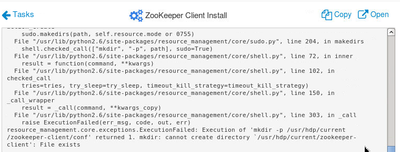
with HDP-2.6, I'm facing an issue with the zookeeper-server and client install with the above config. I tried removing and re-installing but that didn't work either.
mkdir: cannot create directory `/usr/hdp/current/zookeeper-client': File exists