


Change Data Capture (CDC) with Apache NiFi (Part 2 of 3)
Objective
This tutorial is the second article of a three part series. We will walk-through a Apache NiFi CDC flow which uses MySQL bin logs to create a copy of a table and keep the copy in sync with row-level changes to the source. The last article in the series will delve into the finer details of the flow configuration, suggest best practices and highlight potential trouble spots.
Environment
This tutorial was tested using the following environment and components:
- Mac OS X 10.11.6
- MySQL 5.7.13
- Apache NiFi 1.3.0
NiFI CDC Flow Walk Through
Prerequisites
- The first article in this tutorial series has been completed and the finalized CDC flow is on your NiFi canvas.
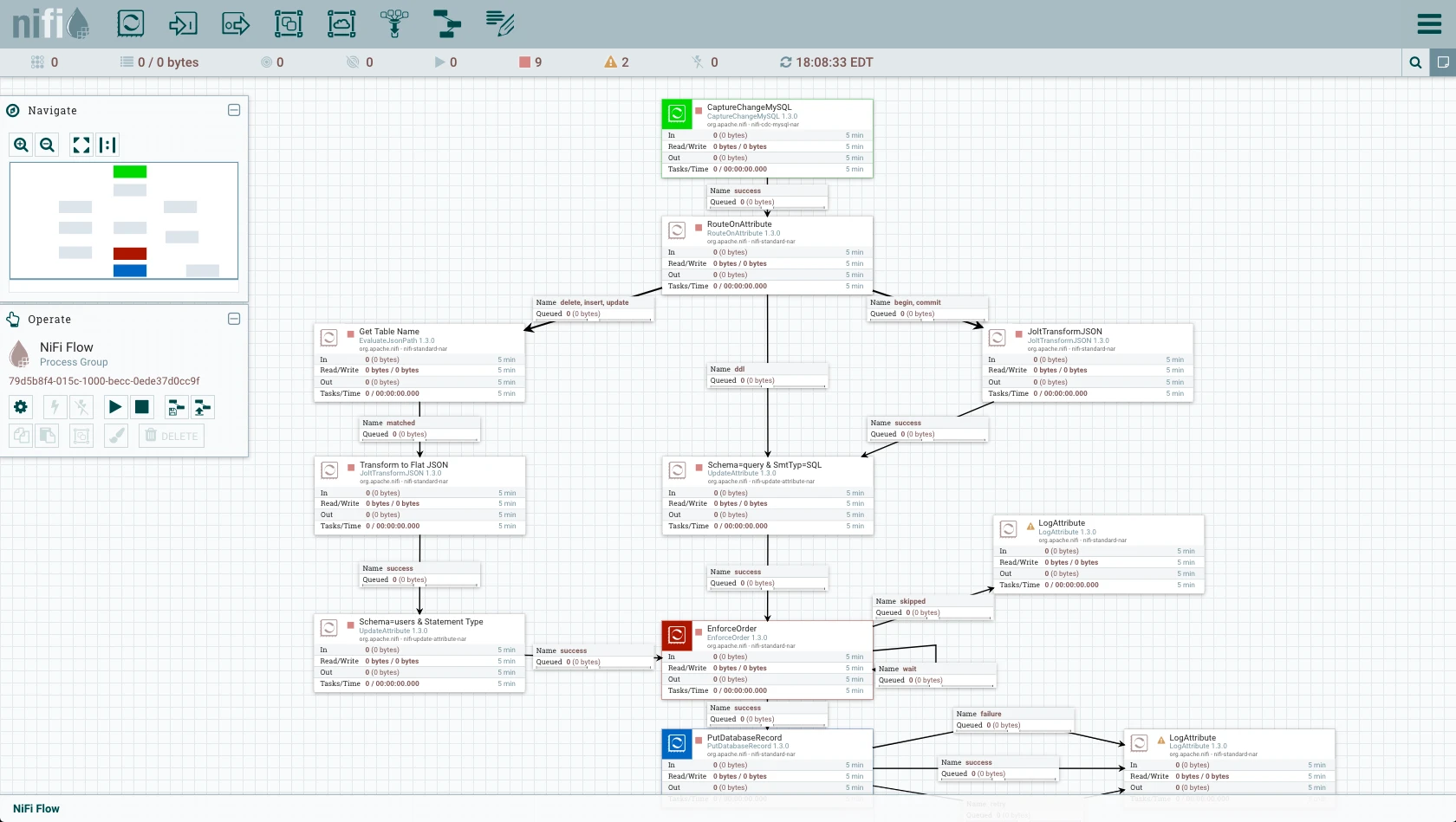
- Your MySQL instance (with binary logging enabled) is running. A 'users' table exists in your "source" database. Your "copy" database is empty.
- All controller services are enabled.
Flow Overview
Here is a quick overview of the CDC flow:
1. CaptureChangeMySQL reads the bin logs to generate FlowFiles (JSON)
2. FlowFiles are routed based on event type:
- Begin/Commit events: JSON manipulated by JoltTransformJSON
- DDL events: schema (QUERY) and statement type (SQL) attributes are added
- Delete/Insert/Update events: table name, schema (USERS) and statement type attributes are added, JSON manipulated
3. EnforceOrder ensures all change events are processed in the correct order
4. PutDatabaseRecord uses a RecordReader to input multiple records from the incoming flow files. These records are translated to SQL statements and executed as a single batch.
Flow Details
Looking at the flow in detail:
CaptureChangeMySQL Processor
Select the first processor in the flow, CaptureChangeMySQL. Right-click to see the context menu and select "Configuration" to view the Configure Processor window. Select the "Properties" tab.
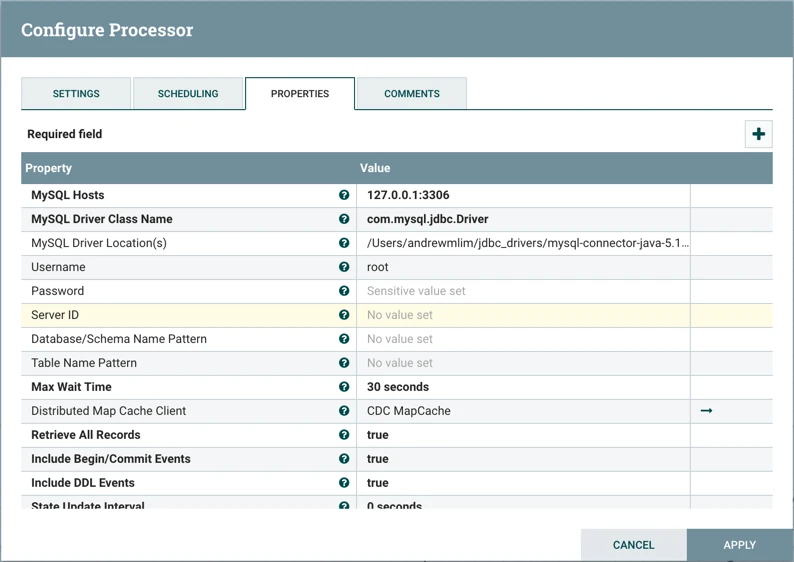
MySQL Hosts, MySQL Driver Class Name, MySQL Driver Location(s), Username, and Password are configured to point to the "source" MySQL database.
"Server ID" is not specified, which defaults the value to 65535. It should not match the server_id in the my.cnf file that we configured in the first article of this tutorial series.
"Distributed Map Cache Client" is set to the DistributedMapCache controller service "CDC MapCache" to store state information and keep it up to date.
"Include Begin/Commit" Events and "Include DDL Events" are set to "true" for completeness, to demonstrate how the CaptureChangeMySql processor can handle events in the bin log in addition to Delete/Insert/Update events. The DDL events are also needed to ultimately generate the SQL for the `users` table creation in the "copy" database.
Close the Configuration Window. With the processor still highlighted, right-click to see the context menu and select "Start" to run this single processor. 13 FlowFiles should be generated.
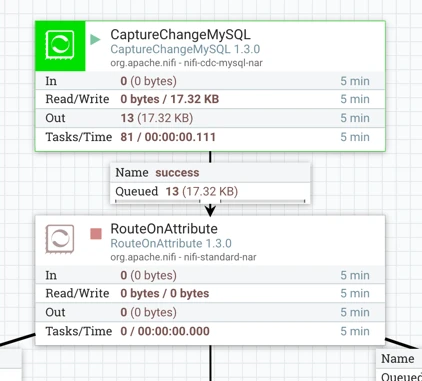
The 13 flowfiles are for the 13 events in the bin log: 1 DDL event for the creation of the 'users' table, 1 begin event, 10 insert events for the rows added to the table, and 1 commit event. The contents of these flowfiles can be seen if you right-click on the connection where the 13 flowfiles are queued and select "List queue". Select the View Details button ("i" icon) next to any row to see the details and attributes:
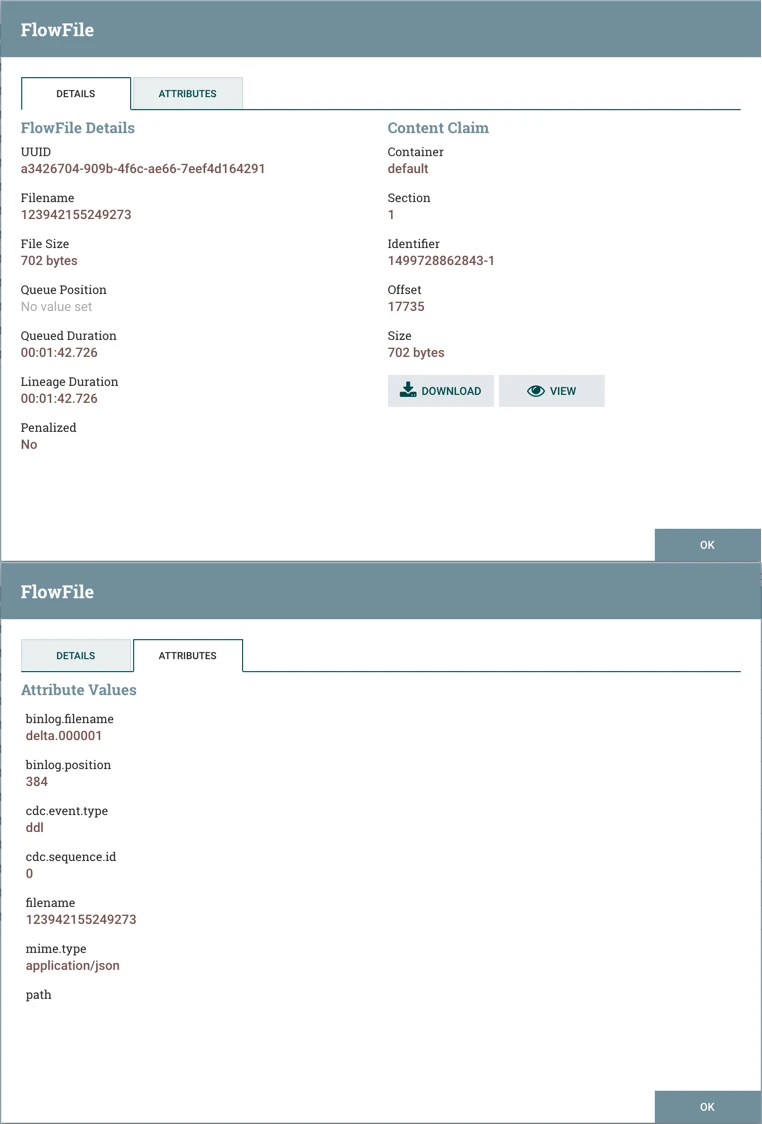
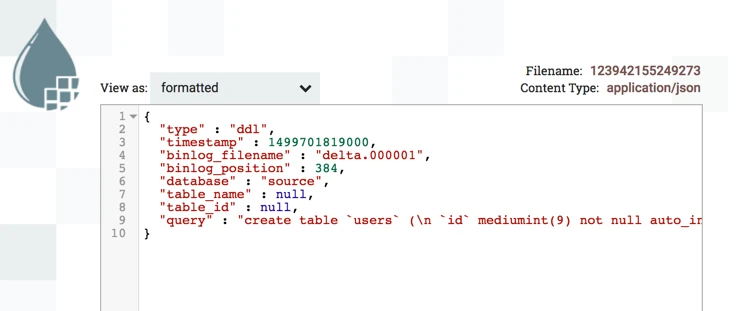
Selecting the "VIEW" button on the Details tab displays the contents of the flowfile. Here are the contents of the DDL event flowfile:
RouteOnAttribute Processor
The next processor in the flow is RouteOnAttribute. Looking at the properties:
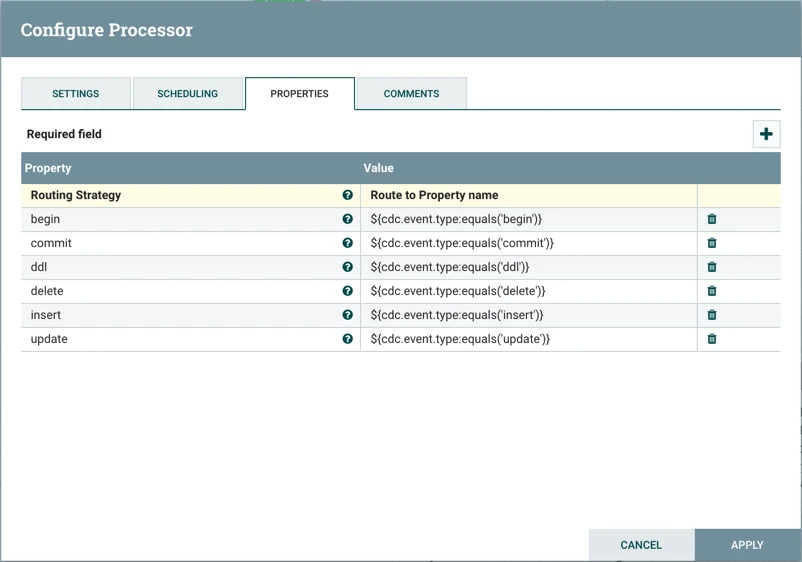
this processor routes the flowfiles depending on the event type. Run this processor and we see the expected results of 10 insert event flowfiles sent to the "delete, insert, update" connection, 1 ddl event flowfile sent to the "ddl" connection and 2 total flowfiles (1 begin event, 1 commit event) sent to the "begin, commit" connection.
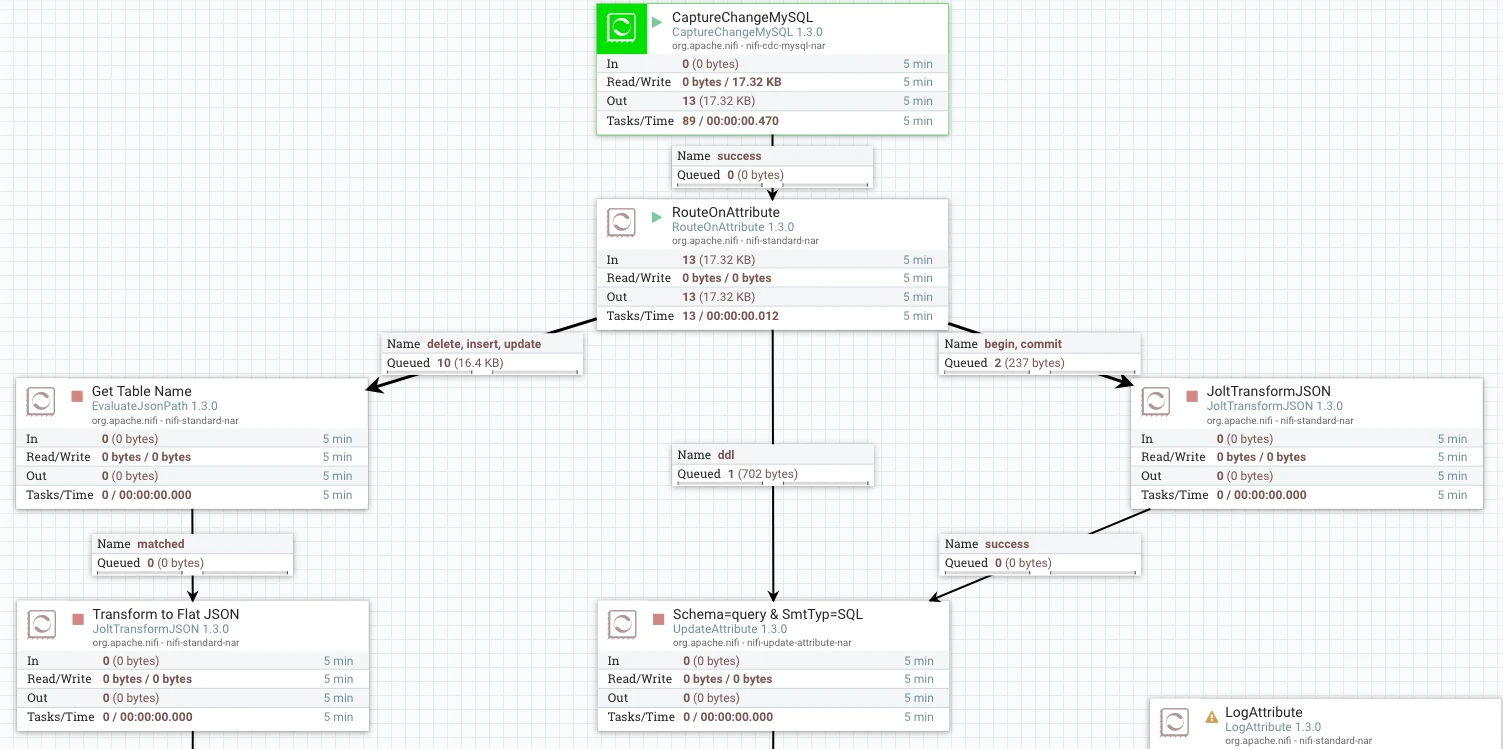
At this point, the flow has multiple branches. Let's look at the BEGIN/COMMIT and DDL paths of the flow first.
Begin/Commit Path
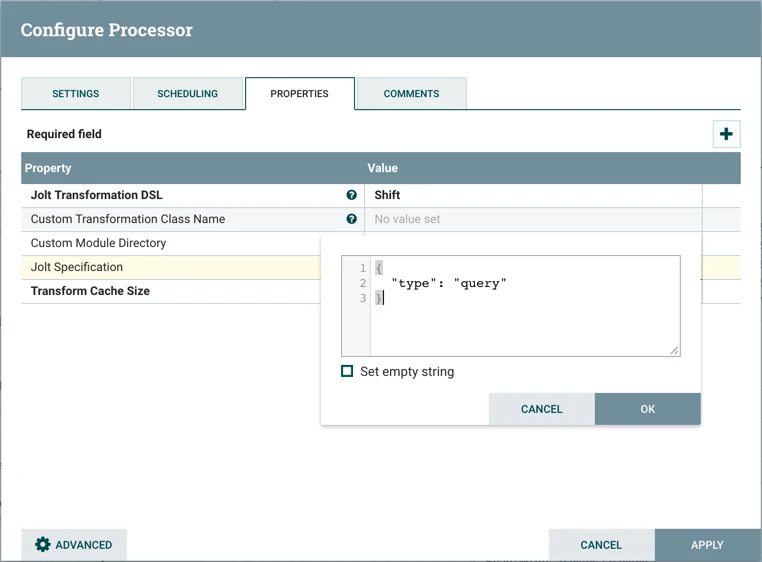
The begin/commit flowfiles are sent to a JoltTransformJSON processor which uses a Shift Jolt transformation DSL to put the begin/commit events in the "query" field of the JSON:
Here is an example of the JSON from the incoming begin event flowfile:
{ "type" : "begin", "timestamp" : 1499702324000, "binlog_filename" : "delta.000001", "binlog_position" : 1070, "database" : "source" }
Then after running the processor:
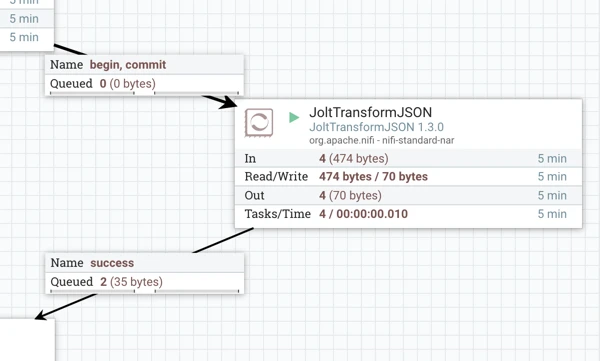
here is the flattened result:
{"query":"begin"}
DDL Path
For the DDL path, the contents of the DDL flowfile already has a "query" field, so no JSON transformation is needed:
{ "type" : "ddl", "timestamp" : 1499701819000, "binlog_filename" : "delta.000001", "binlog_position" : 384, "database" : "source", "table_name" : null, "table_id" : null, "query" : "create table `users` (\n `id` mediumint(9) not null auto_increment primary key,\n `title` text,\n `first` text,\n `last` text,\n `street` text,\n `city` text,\n `state` text,\n `zip` text,\n `gender` text,\n `email` text,\n `username` text,\n `password` text,\n `phone` text,\n `cell` text,\n `ssn` text,\n `date_of_birth` timestamp null default null,\n `reg_date` timestamp null default null,\n `large` text,\n `medium` text,\n `thumbnail` text,\n `version` text,\n `nationality` text\n) engine=innodb auto_increment=1 default charset=latin1" }
Schema=query & StmtType=SQL (UpdateAttribute Processor)
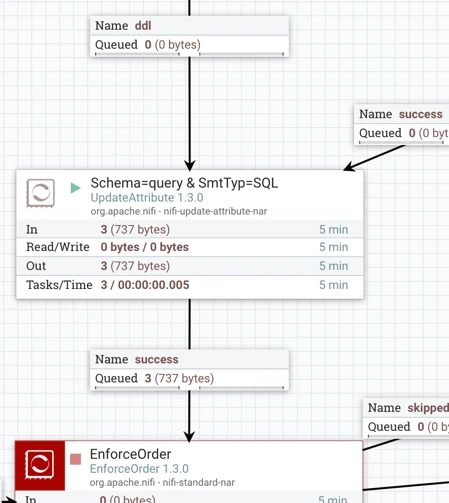
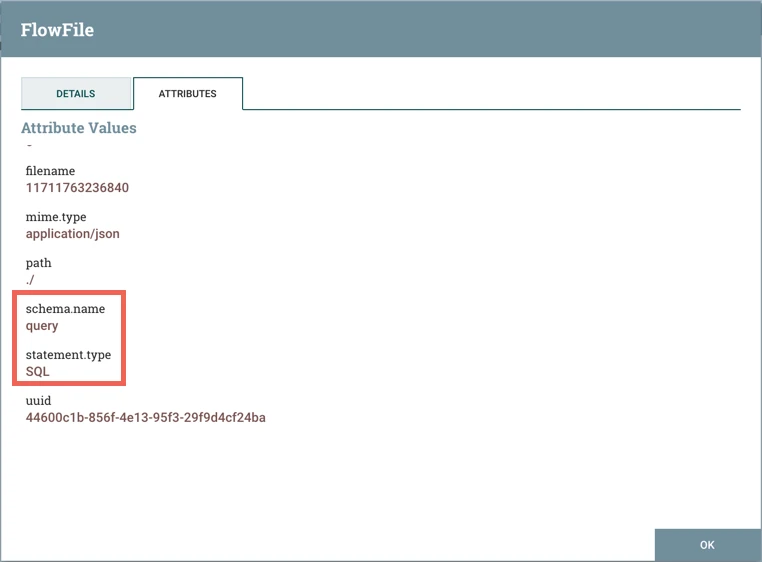
The begin/commit and ddl flowfiles are now both sent to a UpdateAttribute processor which adds the schema name and statement type attributes with the values of "query" and "SQL" respectively.
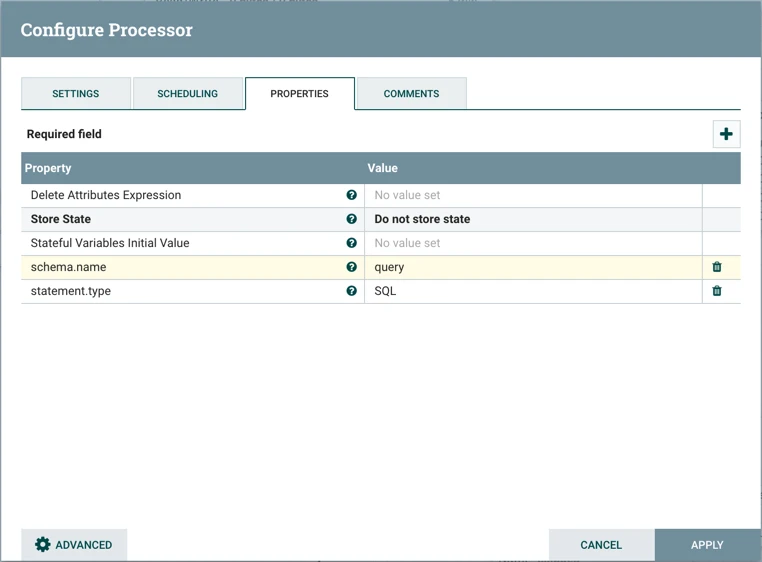
After starting the processor:
Here is an example of these attributes added to the flowfile:
Delete, Insert, Update Path
Now let's look at the DELETE/INSERT/UPDATE path of the flow.
Get Table Name (EvaluateJsonPath Processor)
This processor adds the attribute tableName to each of the flowfiles:
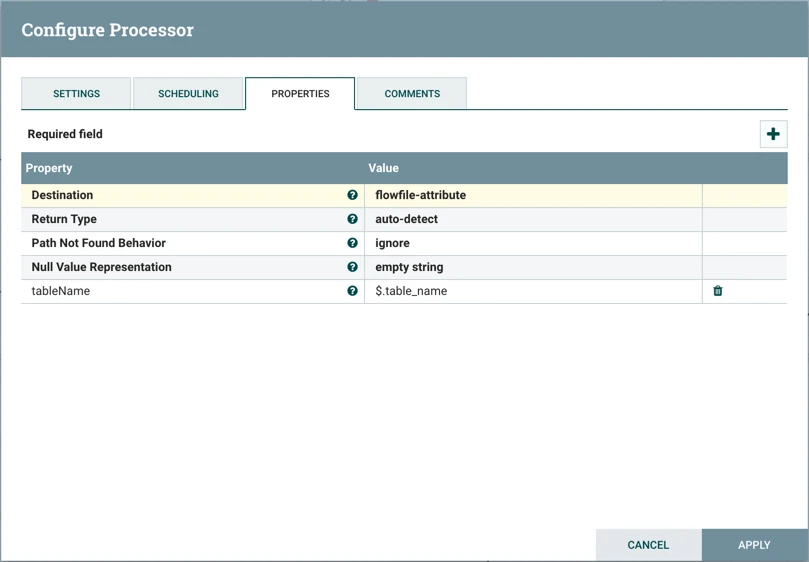
with a value of "users" from the flowfile contents via expression language.
After starting the processor:
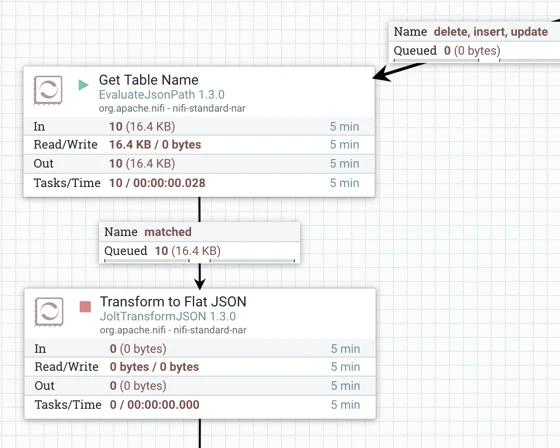
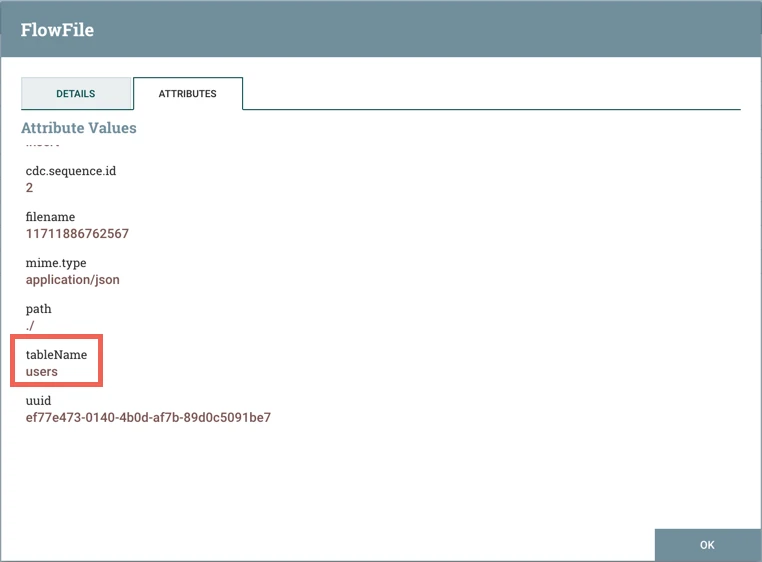
here is an example of the new tableName attribute and value added to one of the flowfiles:
Transform to Flat JSON (JoltTransformJSON Processor)
The next processor, JoltTransformJSON, simplifies and formats the JSON in the flowfiles in order for these insert SQL statements to be applied to the `users` table in the copy db (applied by the PutDBRecord processor later in the flow). Looking at the configuration for this processor:
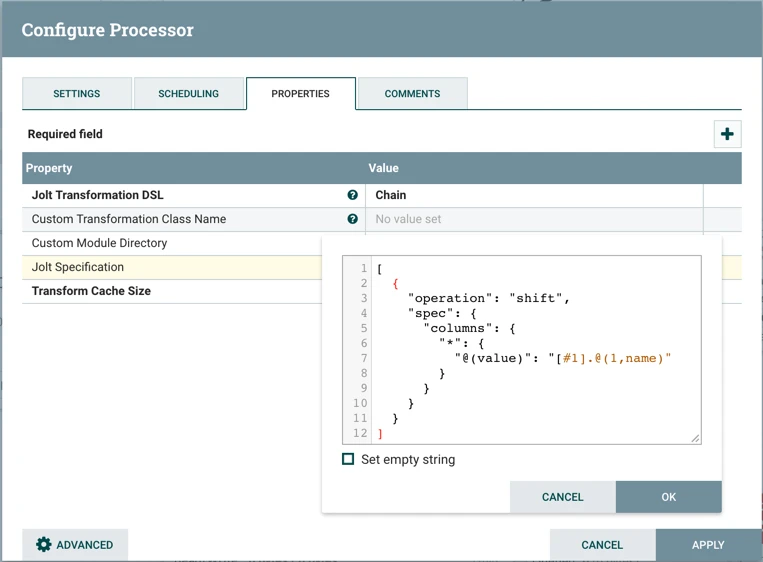
As shown, a Chain Jolt transformation DSL is used in conjunction with a Jolt "shift" specification to perform the flattening.
Here is an example of the JSON from an incoming flowfile:
{ "type" : "insert", "timestamp" : 1499702324000, "binlog_filename" : "delta.000001", "binlog_position" : 1246, "database" : "source", "table_name" : "users", "table_id" : 108, "columns" : [ { "id" : 1, "name" : "id", "column_type" : 4, "value" : 1 }, { "id" : 2, "name" : "title", "column_type" : -1, "value" : "miss" }, { "id" : 3, "name" : "first", "column_type" : -1, "value" : "marlene" }, { "id" : 4, "name" : "last", "column_type" : -1, "value" : "shaw" }, { "id" : 5, "name" : "street", "column_type" : -1, "value" : "3450 w belt line rd" }, { "id" : 6, "name" : "city", "column_type" : -1, "value" : "abilene" }, { "id" : 7, "name" : "state", "column_type" : -1, "value" : "florida" }, { "id" : 8, "name" : "zip", "column_type" : -1, "value" : "31995" }, { "id" : 9, "name" : "gender", "column_type" : -1, "value" : "F" }, { "id" : 10, "name" : "email", "column_type" : -1, "value" : "marlene.shaw75@example.com" }, { "id" : 11, "name" : "username", "column_type" : -1, "value" : "goldenpanda70" }, { "id" : 12, "name" : "password", "column_type" : -1, "value" : "naughty" }, { "id" : 13, "name" : "phone", "column_type" : -1, "value" : "(176)-908-6931" }, { "id" : 14, "name" : "cell", "column_type" : -1, "value" : "(711)-565-2194" }, { "id" : 15, "name" : "ssn", "column_type" : -1, "value" : "800-71-1872" }, { "id" : 16, "name" : "date_of_birth", "column_type" : 93, "value" : "1991-10-07 00:22:53.0" }, { "id" : 17, "name" : "reg_date", "column_type" : 93, "value" : "2004-01-29 16:19:10.0" }, { "id" : 18, "name" : "large", "column_type" : -1, "value" : "http://api.randomuser.me/portraits/women/67.jpg" }, { "id" : 19, "name" : "medium", "column_type" : -1, "value" : "http://api.randomuser.me/portraits/med/women/67.jpg" }, { "id" : 20, "name" : "thumbnail", "column_type" : -1, "value" : "http://api.randomuser.me/portraits/thumb/women/67.jpg" }, { "id" : 21, "name" : "version", "column_type" : -1, "value" : "0.6" }, { "id" : 22, "name" : "nationality", "column_type" : -1, "value" : "US" } ] }
Then after running the processor:
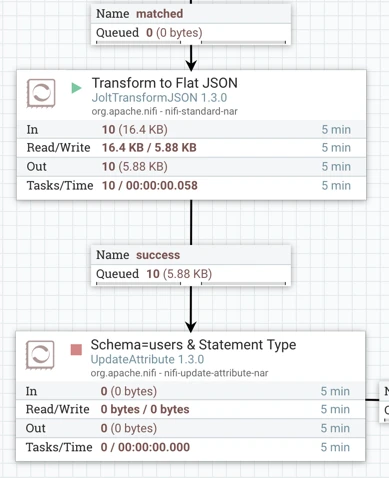
here is the flattened result:
[ { "id" : 1, "title" : "miss", "first" : "marlene", "last" : "shaw", "street" : "3450 w belt line rd", "city" : "abilene", "state" : "florida", "zip" : "31995", "gender" : "F", "email" : "marlene.shaw75@example.com", "username" : "goldenpanda70", "password" : "naughty", "phone" : "(176)-908-6931", "cell" : "(711)-565-2194", "ssn" : "800-71-1872", "date_of_birth" : "1991-10-07 00:22:53.0", "reg_date" : "2004-01-29 16:19:10.0", "large" : "http://api.randomuser.me/portraits/women/67.jpg", "medium" : "http://api.randomuser.me/portraits/med/women/67.jpg", "thumbnail" : "http://api.randomuser.me/portraits/thumb/women/67.jpg", "version" : "0.6", "nationality" : "US" } ]
Schema=users & Statement Type (UpdateAttribute Processor)
The next step in the flow is an UpdateAttribute processor which adds the schema name and statement type attributes to the flowfiles.
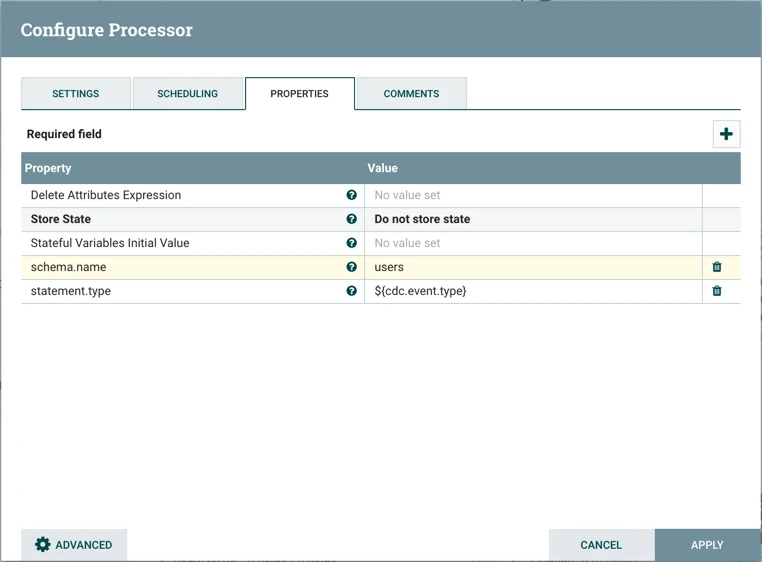
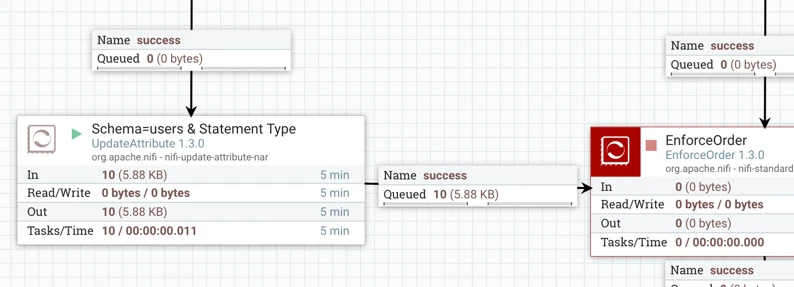
After starting the processor:
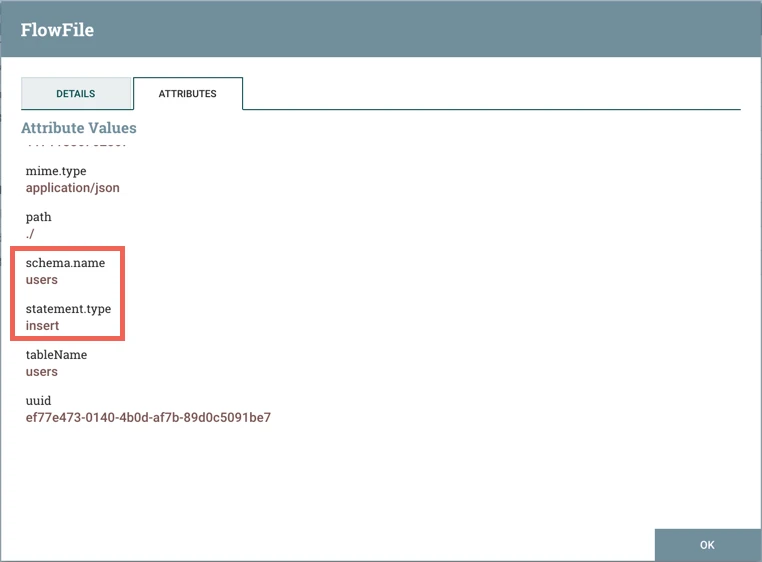
Here is an example of these attributes added to one of the insert flowfiles:
EnforceOrder Processor
The two flow paths converge at an EnforceOrder processor:
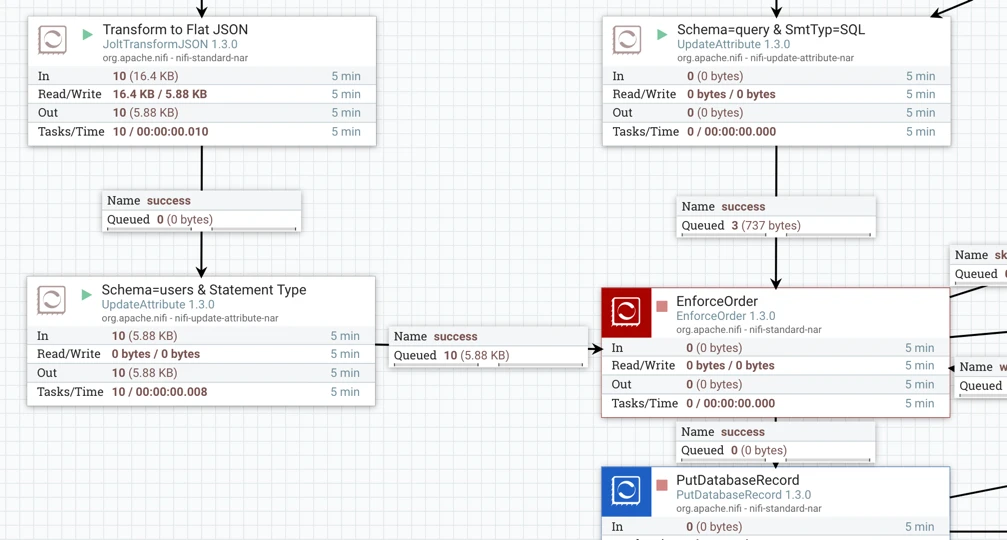
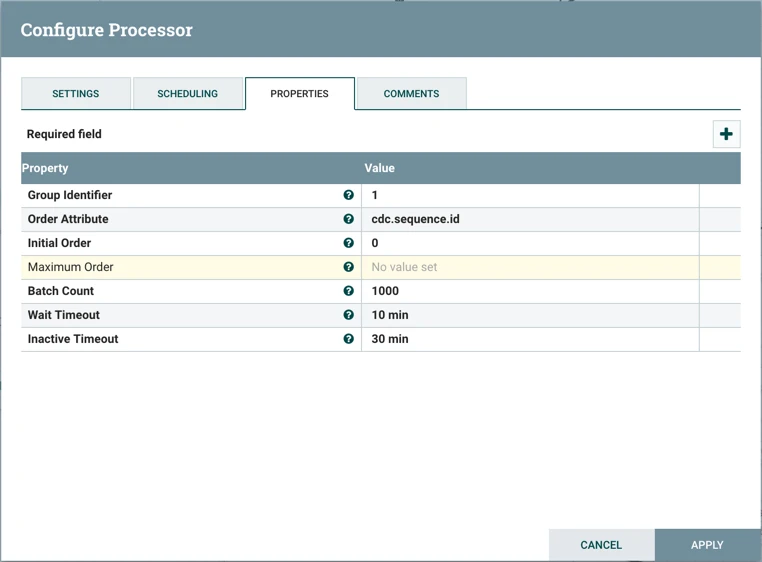
This processor guarantees order delivery of the CDC events based on sequence id, which were generated by the CaptureChangeMySQL processor at the beginning of the flow (cdc.sequence.id attribute).
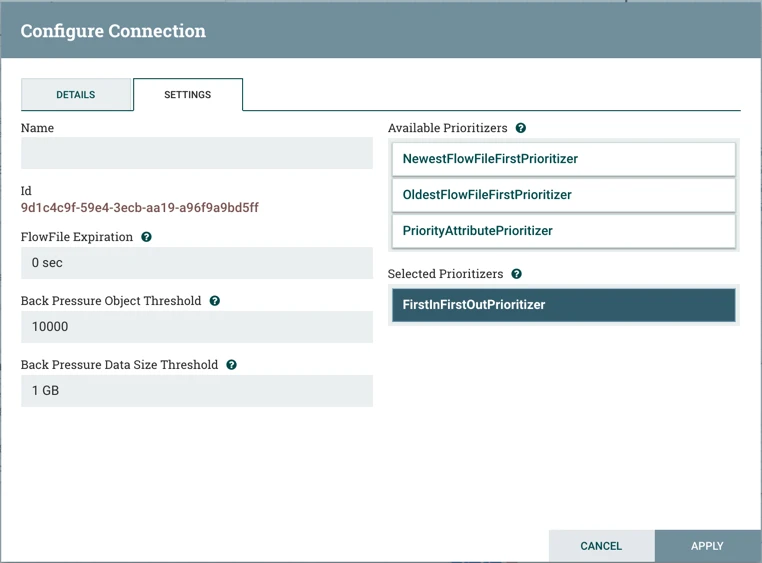
The connection that follows EnforceOrder, is configured to prioritize flowfiles by "first in, first out":
Running the processor results in the following:
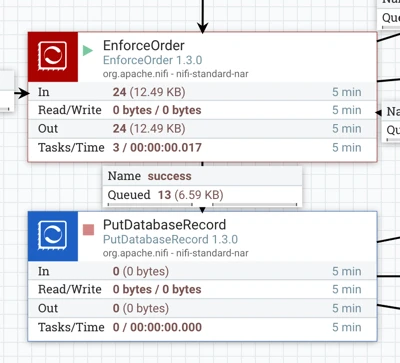
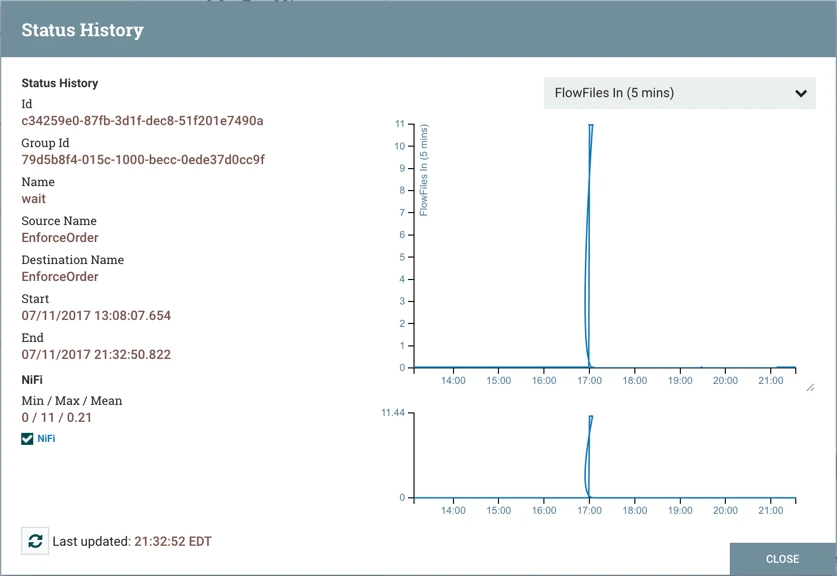
Note: While the number of files that are queued after the processor is 13 as expected, 24 total flowfiles were processed In/Out. This is because some flowfiles went through the "wait" connection. This is confirmed if you right-click on the wait connection and select "Status History":
PutDatabaseRecord Processor
With the order of the CDC events ensured, the next and final processor is PutDatabaseRecord. Looking at it's configuration:
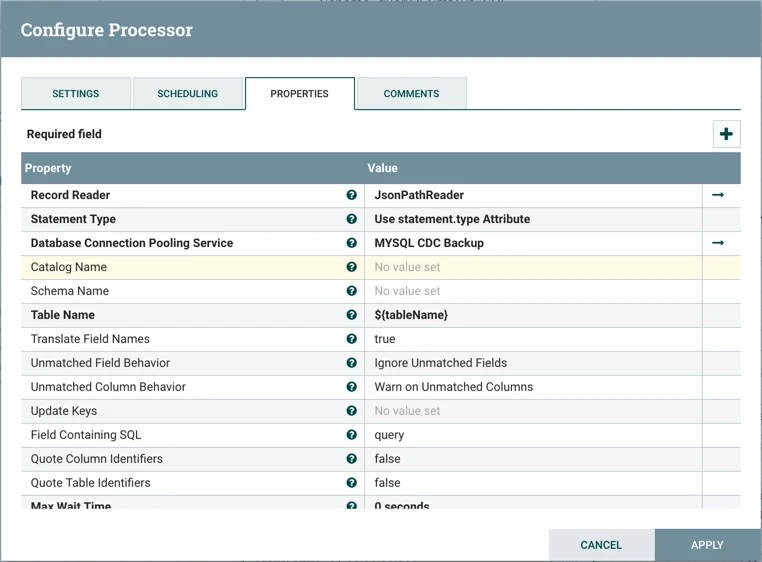
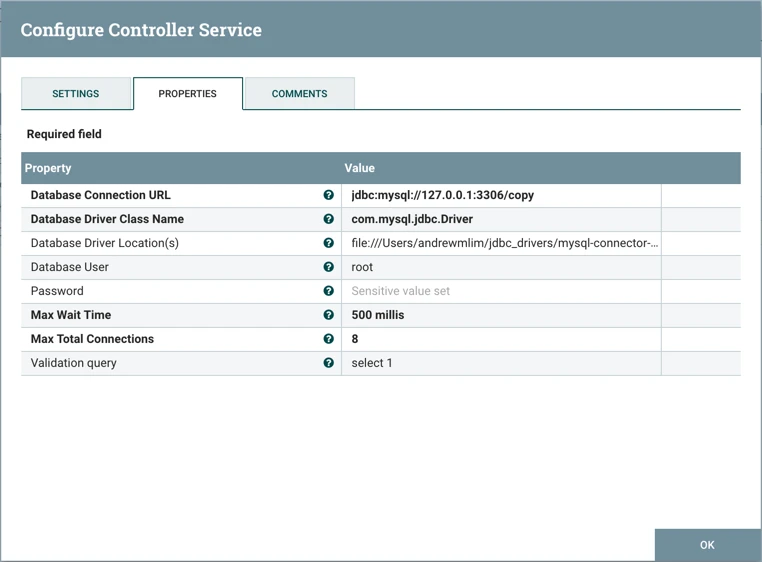
the Record Reader property points to the "JsonPathReader" controller service, which parses the incoming data and determines the data's schema (more on this later). Statement Type property specifies the type of SQL statement to generate. In this flow it is set to "Use statement.type Attribute", which is necessary for the flow to handle more than individual INSERT, UPDATE, DELETE types. In conjunction with the Field Containing SQL property set to "query", the processor: 1) looks at the statement.type attribute from each Delete/Insert/Update flowfile to apply the appropriate delete/insert/update SQL and 2) assumes the value of the "query" field is valid SQL and applies it as-is for the Begin/Commit/DDL flow files. Table Name property is set to the "tableName" attribute via Expression Language, which is "user" for the flowfiles. Database Connection Pooling Service is set to the MYSQL CDC Backup controller service. This DBCPConnectionPool controller service points to the target “copy” database:
JsonPathReader Record Reader
As mentioned earlier, the Record Reader used in the processor is the "JsonPathReader" controller service. JsonPathReader dynamically reads JSON files that have any schema. The reader specifies the schema expected in an attribute, which in this flow is schema.name.
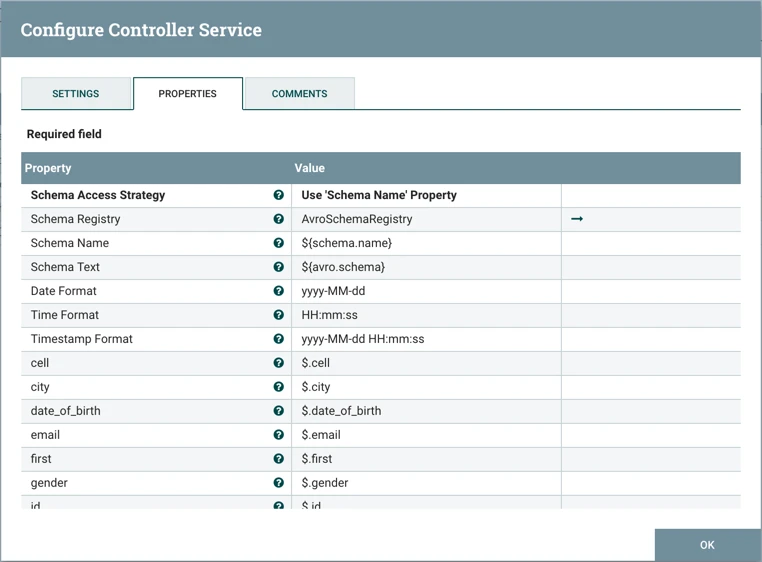
Schema Registry property is set to the AvroSchemaRegistry controller service. AvroSchemaRegistry which defines the "query" and "users" schemas.
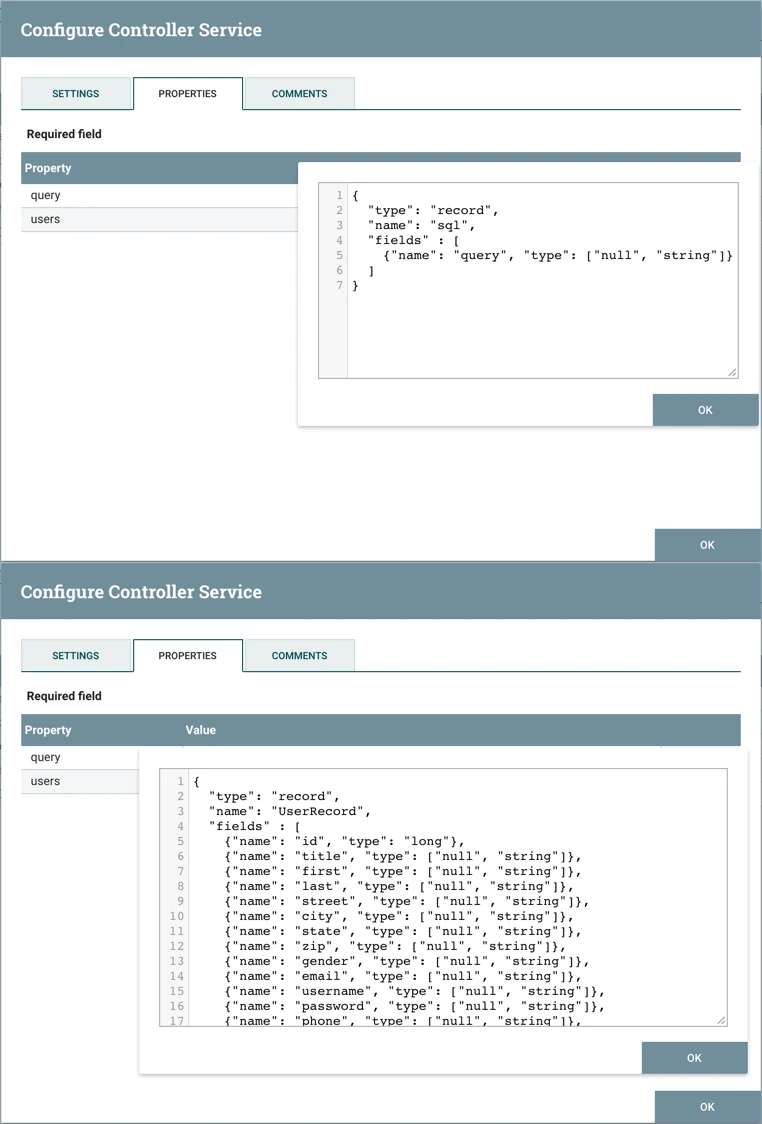
Note: For more information on Record Readers/Writers, see
Starting the PutDatabaseRecord processor should process 13 flowfiles going to Success.
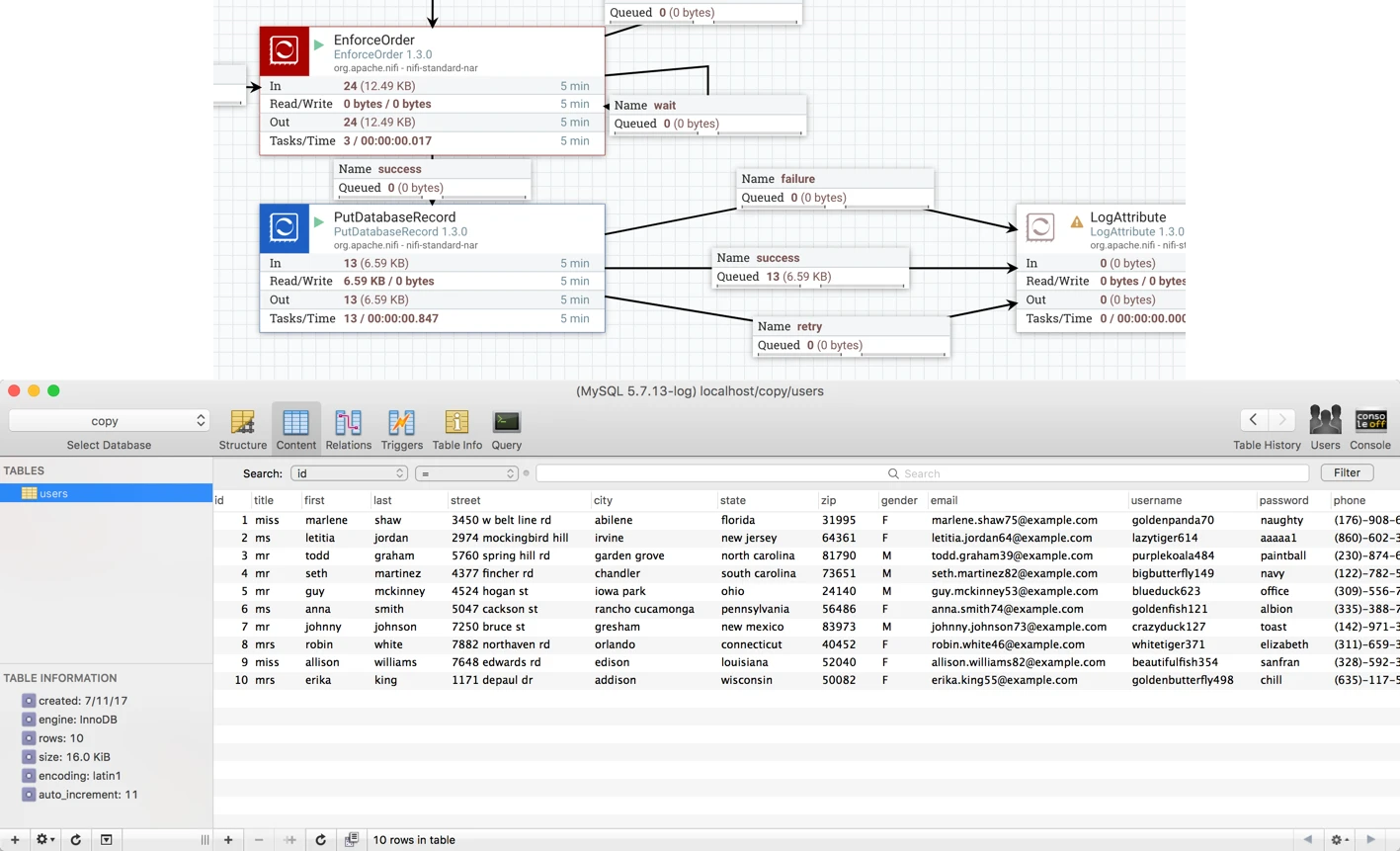
As a result, a `user` table now exists in the "copy" database which is equivalent to the original `user` table in the "source" database.
Table Synchronization
With all of the processors in the flow running (except for the LogAttribute ones), any row-level changes to the original `users` table in the source database will be applied in real-time to the `users` table in the copy database.
Delete, add or modify some rows and you will see these change events processed by the flow to keep the tables in sync.
Review
This tutorial walked you through a sample NiFi CDC flow, examining each component in the flow in detail including the critical processors CaptureChangeMySQL, EnforceOrder and PutDatabaseRecord. Running the flow, created a `user` table in the copy database that is identical to the original `user` table in the source database. With these processors in the flow running, any changes in the original `user` table are also applied to the replicated `user` table. Continue to the third article in this tutorial series to delve into more details of the flow configuration and learn about best practices and potential trouble spots.

