Our Community is getting an upgrade! To get everything ready for the relaunch, we’ll be placing the site in read-only mode starting September 21st.
We really appreciate your understanding while we get things set up behind the scenes. Catch up on all the exciting details about the move here.
Need help or have questions? Drop us a line at [email protected]

Community Articles

Find and share helpful community-sourced technical articles.
Announcements
Share your experience with Cloudera on G2 and get a $25 Amazon Gift card.
Hi, I'm CLEO! Something exciting is coming to the Community. Stay Tuned!

Labels (1)
avatar
Master Mentor

https://github.com/apache/ambari/blob/trunk/ambari-server/src/main/resources/host_scripts/alert_disk...

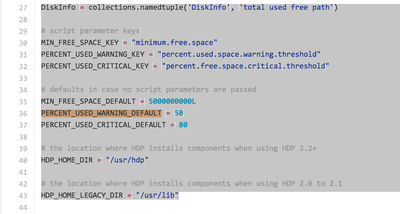
596-screen-shot-2015-11-26-at-71311-am.png

vi /var/lib/ambari-server/resources/host_scripts/alert_disk_space.py

# defaults in case no script parameters are passed

MIN_FREE_SPACE_DEFAULT = 5000000000L #5GB

PERCENT_USED_WARNING_DEFAULT = 50

PERCENT_USED_CRITICAL_DEFAULT = 80

You can change the above parameter to avoid alerting at 80% threshold reached in case it needs to be aletered to 85 or 90

6,088 Views
Comments
avatar

@Neeraj Sabharwal

As per Ambari REST API docs https://github.com/apache/ambari/blob/trunk/ambari-server/docs/api/v1/alert-definitions.md

the definitions can be updated

Is it possible to use REST API to update these thresholds ?

If not, then once the cluster has been deployed should these properties be updated in /var/lib/ambari-server/resources/host_scripts/alert_disk_space.py and then ambari server restarted to push this update to all the agents ?

I couldn't find a way to update these thresholds in Ambari UI

avatar

In addition don't forget to re-start Amabri-server after making above mentioned changes.

Version history
Last update:
‎08-17-2019 01:47 PM
Updated by:
Contributors