Our Community is getting an upgrade! To get everything ready for the relaunch, we’ll be placing the site in read-only mode starting September 21st.
We really appreciate your understanding while we get things set up behind the scenes. Catch up on all the exciting details about the move here.
Need help or have questions? Drop us a line at [email protected]
Created on 06-22-2016 01:31 PM - edited 08-17-2019 11:53 AM
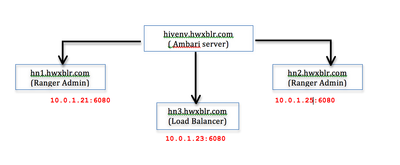
[ hivenv ] >> Cluster name
hivenv-ambari-server.hwxblr.com >> 10.0.1.26 >> Ambari Server
hn1.hwxblr.com >> 10.0.1.21 >> Existing Ranger Admin
hn3.hwxblr.com >> 10.0.1.23 >> Load Balancer
hn2.hwxblr.com >> 10.0.1.25 >> Additional Ranger Admin
# hadoop version Hadoop 2.7.1.2.3.2.0-2950 Subversion [email protected]:hortonworks/hadoop.git -r5cc60e0003e33aa98205f18bccaeaf36cb193cc Compiled by jenkins on 2015-09-30T18:08Z Compiled with protoc 2.5.0 From source with checksum 69a3bf8c667267c2c252a54fbbf23d This command was run using /usr/hdp/2.3.2.0-2950/hadoop/lib/hadoop-common-2.7.1.2.3.2.0-2950.jar # uname -a Linux hn1.hwxblr.com 3.10.0-327.13.1.el7.x86_64 #1 SMP Thu Mar 31 16:04:38 UTC 2016 x86_64 x86_64 x86_64 GNU/Linux # cat /etc/redhat-release CentOS release 6.7 (Final)
Step 1: Before Installing HAProxy on the server we need to install epel repository on our system depending on our operating system version using following command.
CentOS/RHEL 5 , 32 bit: # rpm -Uvh http://dl.fedoraproject.org/pub/epel/5/i386/epel-release-5-4.noarch.rpm CentOS/RHEL 5 , 64 bit: # rpm -Uvh http://dl.fedoraproject.org/pub/epel/5/x86_64/epel-release-5-4.noarch.rpm CentOS/RHEL 6 , 32 bit: # rpm -Uvh http://dl.fedoraproject.org/pub/epel/6/i386/epel-release-6-8.noarch.rpm CentOS/RHEL 6 , 64 bit: # rpm -Uvh http://dl.fedoraproject.org/pub/epel/6/x86_64/epel-release-6-8.noarch.rpm
Step 2: Install HAProxy using Yum.
[root@hn3 ~]# yum install haproxy
Step 3: Now we will configure HAProxy.
[root@hn3 ~]# vi /etc/haproxy/haproxy.cfg
Please refer for brief documentation before editing this file : https://access.redhat.com/documentation/en-US/Red_Hat_Enterprise_Linux/7/html/Load_Balancer_Administ...
[root@hn3 ~]# cat haproxy.cfg #--------------------------------------------------------------------- # Example configuration for a possible web application. See the # full configuration options online. # # http://haproxy.1wt.eu/download/1.4/doc/configuration.txt # #--------------------------------------------------------------------- #--------------------------------------------------------------------- # Global settings #--------------------------------------------------------------------- global # to have these messages end up in /var/log/haproxy.log you will # need to: # # 1) configure syslog to accept network log events. This is done # by adding the '-r' option to the SYSLOGD_OPTIONS in # /etc/sysconfig/syslog # # 2) configure local2 events to go to the /var/log/haproxy.log # file. A line like the following can be added to # /etc/sysconfig/syslog # # local2.* /var/log/haproxy.log # log 127.0.0.1 local2 chroot /var/lib/haproxy pidfile /var/run/haproxy.pid maxconn 4000 user haproxy group haproxy daemon # turn on stats unix socket stats socket /var/lib/haproxy/stats #--------------------------------------------------------------------- # common defaults that all the 'listen' and 'backend' sections will # use if not designated in their block #--------------------------------------------------------------------- defaults mode http log global option httplog option dontlognull option http-server-close option forwardfor except 127.0.0.0/8 option redispatch retries 3 timeout http-request 10s timeout queue 1m timeout connect 10s timeout client 1m timeout server 1m timeout http-keep-alive 10s timeout check 10s maxconn 30000 #--------------------------------------------------------------------- # round robin balancing between Ranger HA #--------------------------------------------------------------------- frontend haproxy bind 10.0.1.28:6080 reqadd X-Forwarded-Proto:\ http default_backend ranger_ha backend ranger_ha 10.0.1.28:6080 balance roundrobin mode http stats enable stats hide-version stats uri /stats stats realm Haproxy\ Statistics stats auth haproxy:redhat option httpchk option httpclose option forwardfor cookie LB insert server hn1.hwxblr.com 10.0.1.27:6080 cookie A check server hn2.hwxblr.com 10.0.1.29:6080 check [root@hn3 ~]#
Step 5: Start the HAProxy service
[root@hn3 ~]# service haproxy start
Step 6: To make the HAProxy service persist through reboots
[root@hn3 ~]# chkconfig haproxy on
Ambari >> Ranger >> Configs >>Ranger Settings >> External URL (policymgr_external_url ) : http://hn3.hwxblr.com:6080