Once logged in, you should see your login name on the top right corner of the AWS page
Click on the drop-down arrow beside your login name and select "My Security Credentials"
This should take you to a page titled "Your Security Credentials"
From this page, collapse the option that says "Access Keys(Access Key ID and Secret Access Key)"
You have to click on "create a new access key" because of Amazon limitation described here
This lets you download the key/secret in this format (this is not case sensitive)
AWSAccessKeyId=XXXXXXXXXXXXXXXXXXXXX
AWSSecretKey=XXXXXxxxxxXXXXXxxxxxXXXXX/xxxxx
Value for "fs.s3a.access.key" will be the value for "AWSAccessKeyId"
Value for "fs.s3a.secret.key" will be the value for "AWSSecretKey"
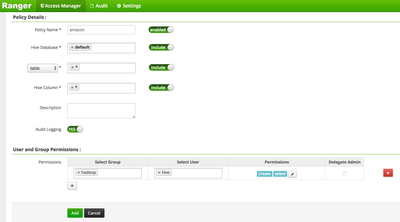
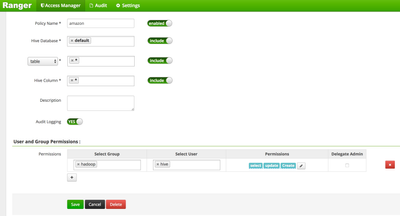
Login to ranger admin interface and create a policy for hive/desired user to allow the desired permissions
Now login to hive with the kerberos credentials, as required via beeline and create table ensuring that the location is on s3a
[hive@xlnode-standalone ~]$ beeline -u "jdbc:hive2://xlnode-standalone.hwx.com:2181/;serviceDiscoveryMode=zooKeeper;zooKeeperNamespace=hiveserver2"
WARNING: Use "yarn jar" to launch YARN applications.
Connecting to jdbc:hive2://xlnode-standalone.hwx.com:2181/;serviceDiscoveryMode=zooKeeper;zooKeeperNamespace=hiveserver2
Connected to: Apache Hive (version 1.2.1000.2.4.3.0-227)
Driver: Hive JDBC (version 1.2.1000.2.4.3.0-227)
Transaction isolation: TRANSACTION_REPEATABLE_READ
Beeline version 1.2.1000.2.4.3.0-227 by Apache Hive
0: jdbc:hive2://xlnode-standalone.hwx.com:218> create table mys3test (col1 int, col2 string) row format delimited fields terminated by ',' stored as textfile location 's3a://myhivebucket/test';
No rows affected (12.04 seconds)
0: jdbc:hive2://xlnode-standalone.hwx.com:218>
Now try and insert some rows
0: jdbc:hive2://xlnode-standalone.hwx.com:218> insert into mys3test values (1,'test'),(2,'test');
Error: Error while compiling statement: FAILED: HiveAccessControlException Permission denied: user [hive] does not have [UPDATE] privilege on [default/mys3test] (state=42000,code=40000)
0: jdbc:hive2://xlnode-standalone.hwx.com:218>
The above error is intentional, since we do not have "UPDATE" privilege assigned via ranger, we cannot insert the values yet, allow the permission and INSERT again
Validate INSERT/UPDATE and SELECT
0: jdbc:hive2://xlnode-standalone.hwx.com:218> insert into mys3test values (1,'test'),(2,'test');
INFO : Tez session hasn't been created yet. Opening session
INFO : Dag name: insert into mys3test ...1,'test'),(2,'test')(Stage-1)
INFO :
INFO : Status: Running (Executing on YARN cluster with App id application_1492107639289_0002)
INFO : Map 1: -/-
INFO : Map 1: 0/1
INFO : Map 1: 0(+1)/1
INFO : Map 1: 0/1
INFO : Map 1: 1/1
INFO : Loading data to table default.mys3test from s3a://myhivebucket/test/.hive-staging_hive_2017-04-13_19-27-13_226_6105571528298793138-1/-ext-10000
INFO : Table default.mys3test stats: [numFiles=1, numRows=2, totalSize=14, rawDataSize=12]
No rows affected (53.854 seconds)
0: jdbc:hive2://xlnode-standalone.hwx.com:218> select * from mys3test;
+----------------+----------------+--+
| mys3test.col1 | mys3test.col2 |
+----------------+----------------+--+
| 1 | test |
| 2 | test |
+----------------+----------------+--+
2 rows selected (3.554 seconds)
0: jdbc:hive2://xlnode-standalone.hwx.com:218>