Created on 02-09-201911:30 PM - edited 08-17-201904:49 AM
Abstract
This article objective is to explain how one can
Enrich Ranger Request Context with additional data which can be very useful
during policy evaluation.
Problem Statement
As you all know Ranger Tag
based policies are very powerful in implementing data governance using ABAC model, one can define data attributes at Tag level within
Atlas and use them during
policy condition creation using JavaScript style execution engine, by default you
can only access certain context level data like user, group, action, IP address and tag
attribute values etc within this javascript logic, but these are not sufficient
to define complex authorization policies you see in the enterprise,
authorization polices may require additional data like project/usecase user is
assigned to, external data which influences policy evaluation etc. How are you
going to resolve these kind of situations?
Solution
This is where Ranger Dynamic Context hook comes handy, Ranger framework
allow you to hook your own custom context enricher which can augment the access
request with external data so that you can use them during policy creation,
it’s a very powerful feature if you use it properly.
In this article I will explain how we can enrich
the Hive access request with additional project/usecase related data for a given
user from external file and use it while defining tag based policy.
Step 1) Implementing Custom Enricher.
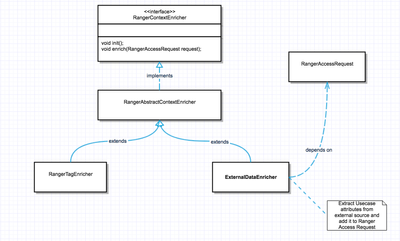
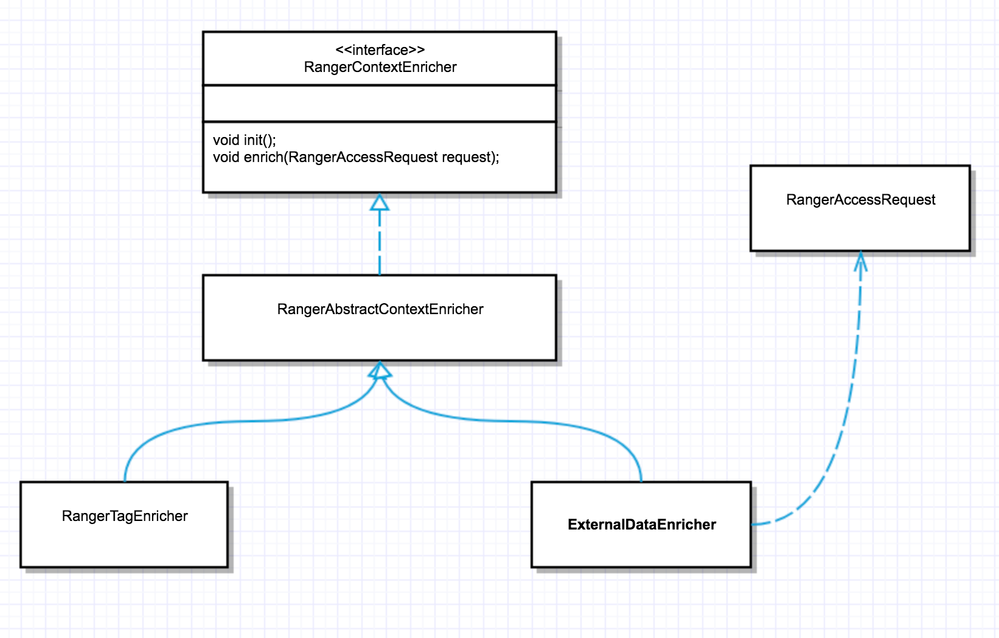
RangerContextEnricher is an interface we need to implement to provide custom implementation, for example
here ExternalDataEnricher is a custom implementation which extracts the external data from a file for a given
user and stick into RangerAccessRequest. Once created build the jar and copy into hive lib
under /usr/hdp/3.1.0.0-78/hive/lib/ranger-hive-plugin-impl and/usr/hdp/3.1.0.0-78/ranger-hive-plugin/lib/ranger-hive-plugin-impl ( depending on your environment versions )
Sample Code attached ExternalDataEnricher.java
Step 2) Updating Ranger Hive Service Definition.
In order for ranger to enrich
the request context , we need to update the Ranger Hive Service definition with
following new context enricher. Here “Client_Name” is the usecase/project data attribute
we will extract from /etc/ranger/data/userProject.txt for a given user in the
form of username + “-“ + “Client_Name”.
We will register above
Context Enricher with Hive service using the Ranger API. We will first retrieve
the service definition via the following GET request, where the authentication
credentials and Ranger host URI are updated as appropriate.
Restart both Hive and Ranger
services once the above steps are done, make sure to have /etc/ranger/data/userProject.txt
with username-Client_Name=something for
users you need this additional data.
Step 3) Using the newly added context data in policy condition.
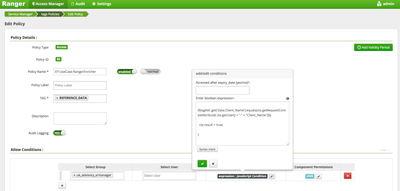
Access the newly added project/usecase data in tag based policy “JavaScript”
condition logic, use ctx.getRequestContextAttribute()
method to extract data based on ctx.getUser() value. Here I am comparing tag attribute "Data.Client_Name" with user's project/usecase value from external text file and if matches allowing the access.